
Website optimization helps present an offer sooner, keep the interface responsive and remove obstacles on the path to an inquiry. For a business, it is a way to improve the performance of existing traffic. Assess the outcome through real page speed, ease of key actions and qualified inquiries.
At DDRW, we improved the homepage from 71 to 95 points in mobile PageSpeed Insights lab measurements. Below, we examine what these figures mean for a visitor, how to check the benefit to a company and why one green score is not enough.
What changes for the visitor
Someone opens a page on a phone to find a price, view a project, choose a product or contact a company. There are several kinds of waiting along that path. First they wait for content, then for menus and buttons to respond, and after submitting a form, for clear confirmation.
A well-optimized page shows useful text without first downloading all its interactive code. Images occupy reserved space, keeping headings and buttons in position. Opening a menu, choosing a size and filling in a form should not block the interface for long.
This is especially noticeable on an ordinary smartphone and an unstable mobile network. A developer's powerful computer can mask unnecessary megabytes and computation. For a visitor, these can become a blank screen, a delay after a tap or an accidental click on a button that moved.
Optimization must therefore preserve the entire user journey: content, navigation, product options, inquiry submission and error handling. Removing a form makes the page faster but stops it serving the business task.
How speed relates to inquiries and advertising spend
A fast page reduces technical obstacles between arrival and action. This creates conditions for improved conversion, but the outcome also depends on the offer, price, trust, form usability and audience quality.
For example, a Rakuten 24 case study published on web.dev compared an optimized page with the original in an A/B experiment. Conversion increased by 33.13%. That is the outcome of a particular store and experiment; the percentage cannot be applied to another website without measurement. Rakuten 24 case study.
For your own company, calculating the funnel is more useful. Consider a hypothetical example: advertising costs RUB 100,000 and brings 10,000 visits. A 1% inquiry conversion rate produces 100 inquiries at RUB 1,000 each. If conversion reaches 1.3% with the same budget and a comparable audience, it produces 130 inquiries at approximately RUB 769 each. This is an arithmetic example, not a forecast of the effect of speed improvements.
Check inquiry quality too. More form submissions help little if spam, duplicates or unsuitable requests increase. Confirmed inquiries, sales and customer acquisition cost matter when assessing the result. Compare periods while accounting for advertising changes, seasonality and the offer; a controlled experiment is useful when traffic is sufficient.
What optimization contributes to search visibility
Google recommends improving Core Web Vitals as part of user experience quality. These metrics concern loading, responsiveness and page stability, and Google's search systems consider them within their page experience evaluation. Google Search Central documentation.
Good speed metrics do not secure a particular search position. Search visibility still needs useful content, a clear structure, crawlable pages, correct URLs and relevance to the user's query. A Lighthouse SEO score of 100 also does not mean the website has passed a full search audit or will necessarily rank first.
For a service website, the practical task is this: a visitor finds the right page, quickly reads an answer to their question, sees evidence of experience and understands the next step. Technical optimization helps that path work; the content and offer provide a reason to inquire.
Why loading order matters
A page has resources with different levels of urgency. The first screen's text, styles and required fonts help the visitor understand the offer. Photographs far down the page, a heavy editor and a complex decorative scene may be needed later.
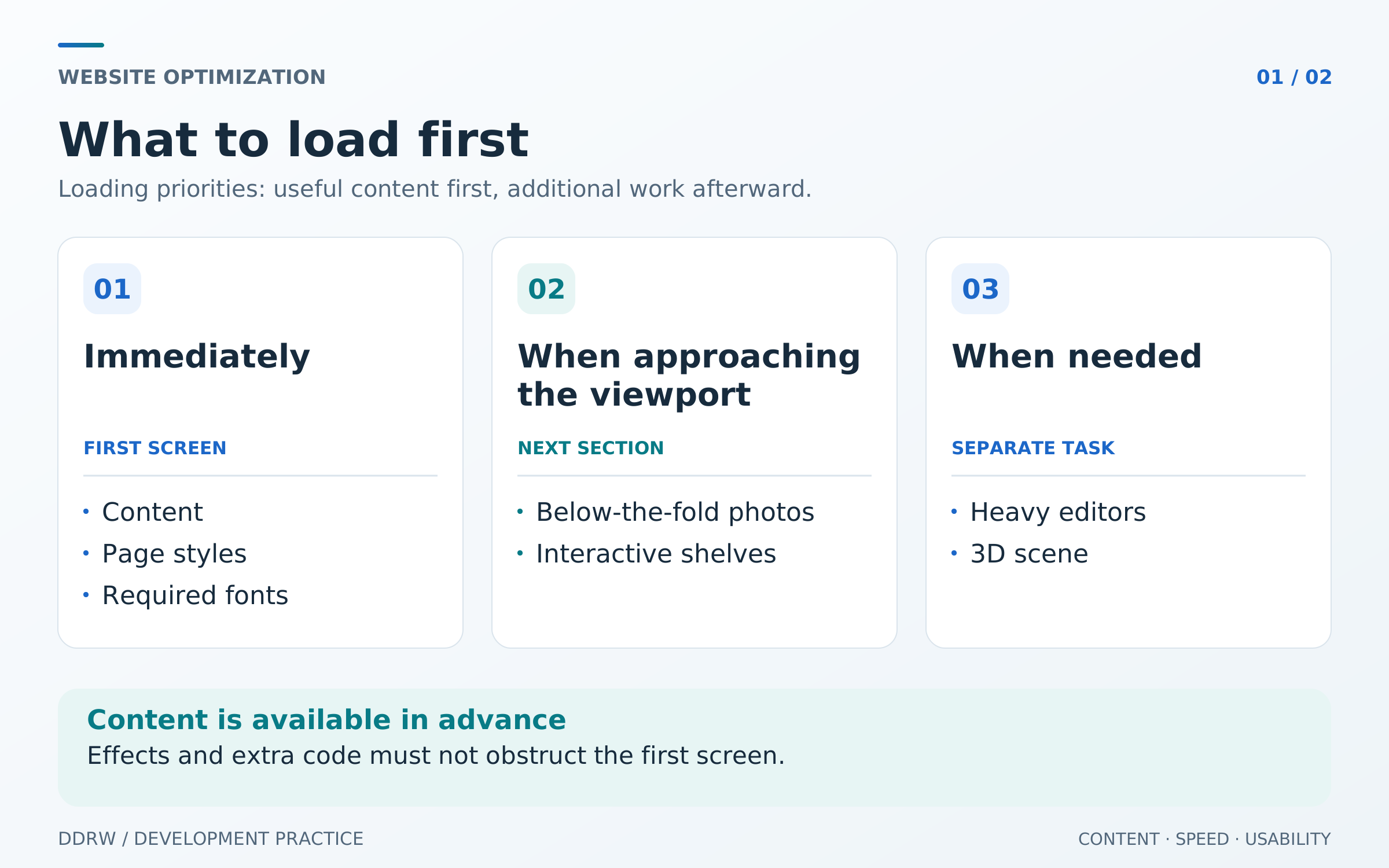
This diagram illustrates prioritization. The exact boundaries depend on the page: a product's main photo is needed immediately, while a lower gallery image can load as it approaches the viewport. All text and ordinary links should remain available in advance.
Technical work usually includes several areas:
- Appropriately sized images. A phone does not need an original several thousand pixels wide for a small card. It needs screen-appropriate variants, reasonable compression and preserved proportions.
- Code where it is used. Someone reading an article should not immediately load a heavy admin editor. Store features and other large modules can be loaded where needed.
- Ready content from the server. SSR sends page HTML before the client application starts. Interactivity then needs to attach without fetching the same data again or rebuilding the screen already shown.
- Less unnecessary computation. Repeatedly copying large data, traversing decorative elements and running invisible effects can burden the browser even with a fast server.
- Targeted caching. Repeated public reads can be accelerated with a correctly invalidated cache. Personal data, carts and responses with user cookies need a separate policy.
Reducing transferred data and repeated server work can reduce resource consumption. Infrastructure cost changes depend on pricing, traffic and actual bottlenecks. Buying a more powerful server before this review is often premature: the delay may be in the browser.
DDRW's example: from 71 to 95 points
For the DDRW homepage, we compared two published mobile PageSpeed Insights reports. The original measurement was taken on October 25, 2026, and the final one on October 26. Both reports use Lighthouse 13.5.0, a Moto G Power profile and slow 4G throttling.
| Metric | Original report | Final report |
|---|---|---|
Performance | 71 points | 95 points |
FCP — first content appearance | 1.5 s | 1.5 s |
LCP — largest visible element appearance | 6.9 s | 2.1 s |
TBT — total blocking time | 153 ms | 142 ms |
CLS — unexpected shifts | 0 | 0 |
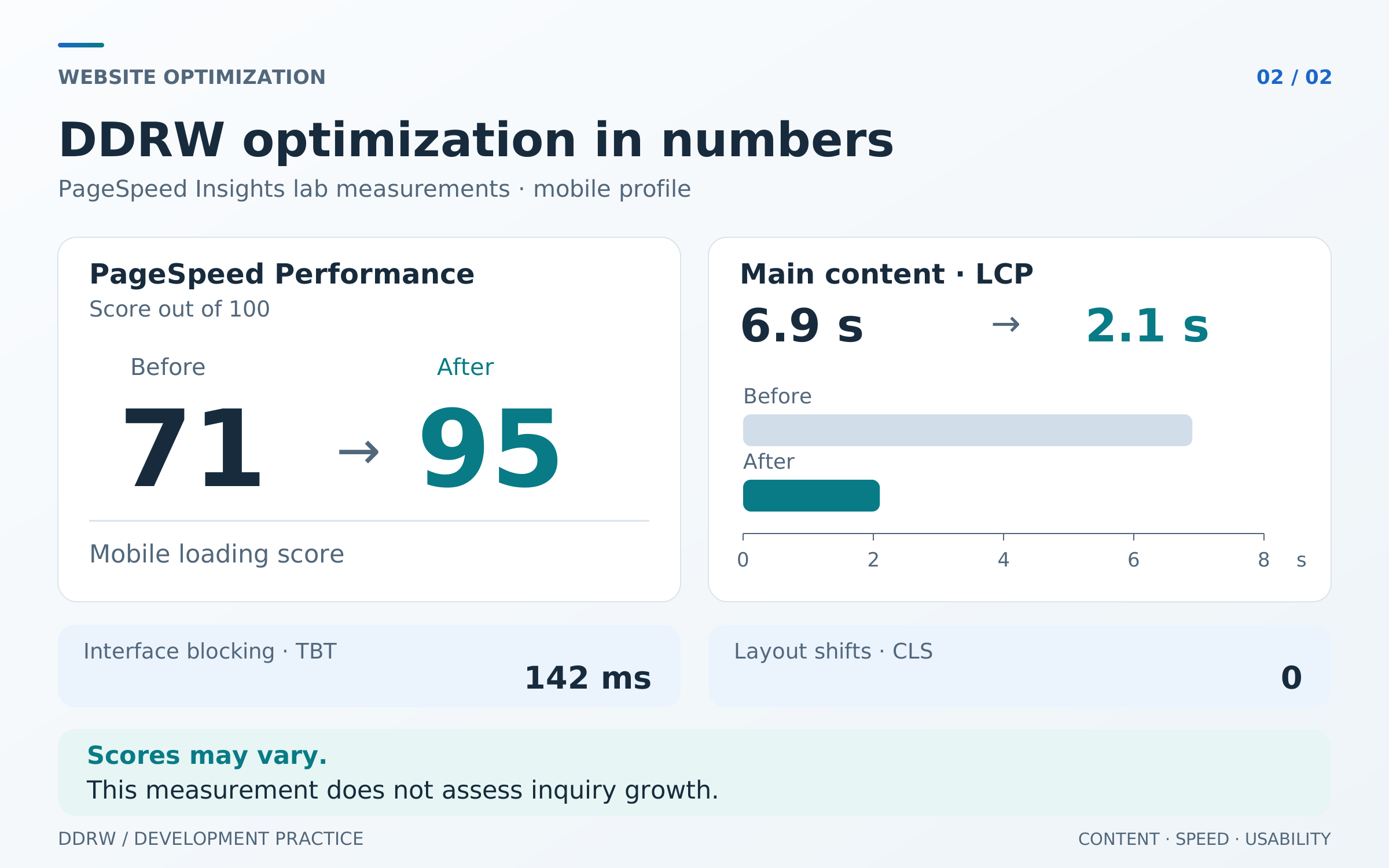
Reports for verification: original report and final report.
The main result here is the earlier appearance of the largest visible element. Initial content was already appearing fairly quickly; filling the rest of the screen was delayed. In this pair of measurements, LCP decreased by about 70%, while blocking decreased moderately. These changes cannot be combined into a promise that “the entire website became 70% faster.”
We changed resource loading order, separated the page's first display from loading the interactive application, reduced work on decorative markup and removed unnecessary data copying. Admin editors and the store already load as separate groups. The design, content and user features were preserved.
These are results from two lab runs, not an average across all visitors. The score can vary with measurement conditions. The reports also do not measure growth in DDRW inquiries or sales; that conclusion requires business analytics data.
Which metrics to check beyond PageSpeed
Core Web Vitals describe real user experience: LCP measures the appearance of the largest visible element, INP measures responsiveness to interactions and CLS measures layout stability. Recommended good values are LCP at most 2.5 seconds, INP at most 200 milliseconds and CLS at most 0.1. Assess them at the 75th percentile of visits, considering mobile and desktop separately. Web Vitals overview.
TBT in a lab report helps find long startup tasks but does not replace INP from real visits. A page may open quickly and then respond slowly to a filter or product selection. Checking only the homepage will not reveal that.
The working page set should include the homepage, a service, an article, a product card, the cart and an inquiry form. Each journey needs both speed and successful completion. Browser errors, API availability, server response time and unsuccessful form submission rates are useful too.
How to accept optimization work
Before starting, save the original reports and agree on the pages and actions important to the business. Repeat measurements under comparable conditions afterwards. Several runs and their median are more useful than one favorable screenshot.
Verification should answer specific questions:
- Does useful content appear sooner on a phone?
- Do menus, filters, product options and forms respond without noticeable waiting?
- Are the design, keyboard accessibility and main journeys preserved?
- Do analytics views and goals arrive without duplication, and do inquiries reach the team?
- Have errors, missing images or interface jumps appeared?
- Are there before-and-after measurements identifying pages and conditions?
The result then needs maintenance: new photographs, widgets and sections gradually increase load. Resource-size limits and repeated checks after significant changes help preserve speed.
If the website already receives traffic, start by examining the visitor's key journey. The business website development page describes our work, and DDRW contacts let you share the website address and task. The review will show what actually obstructs visitors and which changes should come first.
