
First collect the existing website's URLs
Begin with an inventory while the old website is still available. Export URLs from the CMS and sitemap, then add important pages from analytics and working documents. Check links in advertising materials, emails and QR codes. They may lead to a long-forgotten section no longer present in the main menu.
For each URL, record the page's purpose, content owner and migration decision. It helps to preserve the heading and a short note about what visitors expect to find. A URL list without descriptions is difficult to assess: similar addresses can lead to different services, while different ones can lead to the same content. At this stage, you do not need to automatically migrate everything accumulated. You need to understand what exists and why it is used.

AI-generated illustration. Preserve the working version and a rollback plan before migration. URL checks are separate from backups.
Separate a design update from a URL change
A new design does not itself require renaming every page. If an address is clear and matches the content, we recommend keeping it. This reduces the number of transitions that need reconfiguration and checking. Moving to a different CMS also does not mean visitors must receive an entirely new link structure.
Change a URL when there is a substantive reason: a section is merged, a product moves to a different catalog model or the old name is misleading. Define a specific new address for each such page. A working table can have four columns: old URL, decision, new URL and person responsible for checking. An empty destination should represent an unresolved question, not an accidentally lost page.
Match pages by meaning
Suppose design services used to be spread across three small pages and are now described in one detailed section. Merging them may be reasonable if the new page answers the previous questions. But redirecting all old materials to the homepage does not help someone find the relevant description. They followed a specific link and expect to continue their task.
Google's guidance on URL changes recommends mapping old and new addresses and configuring redirects; bulk redirects to an irrelevant homepage are not recommended. For a completely removed article without a suitable replacement, discuss an honest missing-page response. Do not create the appearance of a successful migration where the content has actually disappeared.
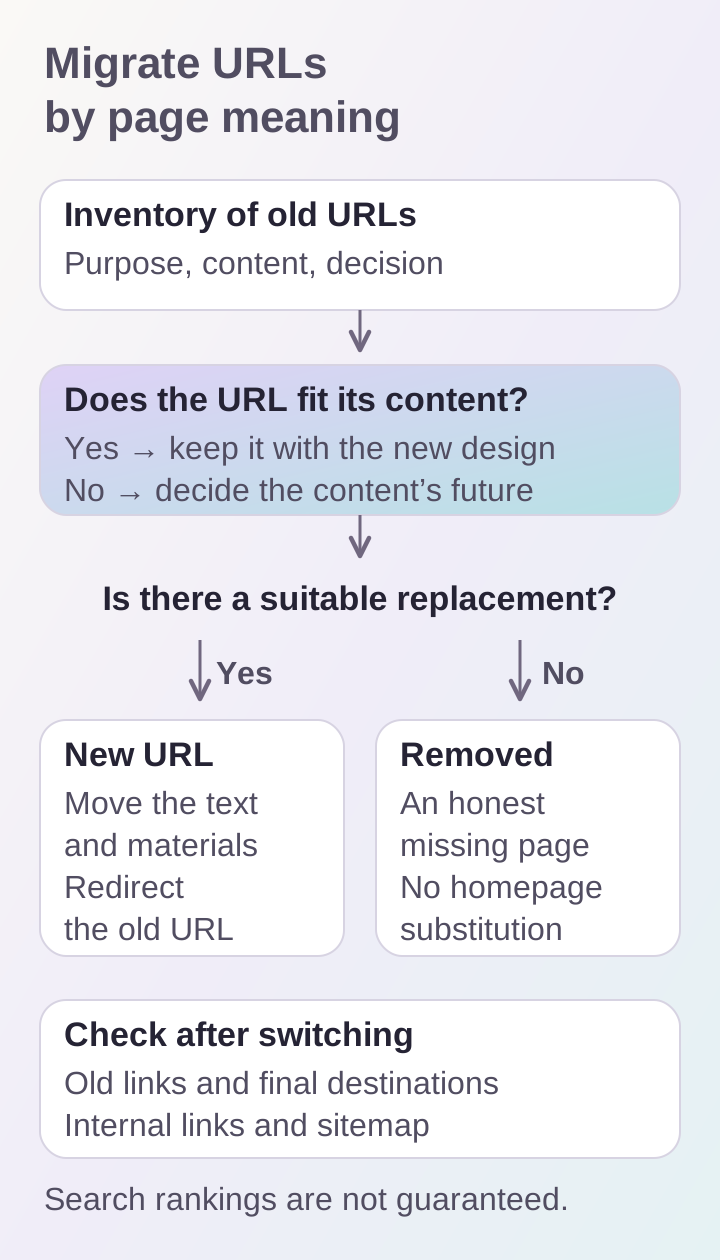
A migration map connects an old address to appropriate content. A homepage redirect without a meaningful replacement does not solve the visitor's task.
Prepare the new pages before switching
A mapping table does not replace content migration. The new URL needs finished copy, images, documents and related links. Verify that the specifications and terms people visit the page for have been preserved. If an article was rewritten, its owner should approve the new meaning, not just its visual design.
We recommend checking several page types: a service, project, article, product card and download if they exist. Then extend the check automatically across the full URL list. Manual review shows the quality of the outcome; a full crawl helps find omissions. Both are useful: viewing only the homepage does not confirm the entire migration is ready, and a status-code table does not confirm textual accuracy.
Check redirects and internal links
Open an old link and make sure it leads directly to the correct new content. Do not stop at the first step: the destination page must open too. Ask the developer to check for loops and unnecessary redirect chains. Pay particular attention to trailing slashes and actual links containing advertising parameters.
Within the new website, we recommend linking directly to new pages. Menus, cards, breadcrumbs and documents should not rely on the old structure without a reason. Verify the sitemap and canonical URLs separately. A deleted page should not remain promoted in collections. These checks apply across the website, including links editors manually placed in article text.
Agree on the content migration cutoff
While the team builds the new version, the old site may receive articles, prices and inquiries. Decide which changes will be migrated again before the switch and who owns that work. For editorial content, agree on a short publishing freeze or keep an update log. Operational data needs a separate technical plan: it cannot be treated as ordinary page files.
Preserve the ability to return to the previous version and define signs of a failed launch in advance. Widespread page errors or broken inquiry handling, for example, require a clear decision rather than a discussion from scratch. This is a recommendation for organizing migration; the exact process depends on the architecture and acceptable downtime.
Verify the outcome after launch
After switching, repeat checks of important old URLs on the live domain. Review forms, documents and links from external materials. Then monitor page errors and visitor inquiries. Every issue found needs an owner and a specific correction deadline.
A short review list:
- old URLs and important external links are collected;
- every URL has a migration decision;
- new pages are populated and checked;
- redirects lead to relevant content;
- internal links and the sitemap are updated;
- migration of the latest changes is agreed;
- key checks have been repeated after launch.
A correct migration does not guarantee preserved rankings: search engines need to process the changes, and results also depend on content. Plan a redesign alongside SEO preparation, sharing the current address and important sections through the contact form in advance.
