
A ready page remained behind the preloader
On October 10, 2026, we changed the sequence in which DDRW pages become visible. The text and primary link are now available without waiting for the interactive part of the application. In our lab run, the homepage was open for reading by 2.29 seconds instead of 5.16. This is an observation about content availability, not proof that all resources load faster.
We found the problem while checking the mobile journey. The server was already sending HTML with service descriptions and links, and the browser was loading the styles, but a preloader remained over the page. Dismissing it depended on WASM — the application’s executable module — being ready. Visitors kept looking at a splash screen even though the useful part of the page already existed.
That dependency is inconvenient for a business: people need to understand the offer and find a way to get in touch. A decorative scene and complex event handlers can load separately. We focused on that sequence while retaining the website’s design and interactive capabilities.

AI-generated illustration. Compare the same journey on different screens. This image explains the approach, rather than showing measurement results.
What we changed in the first screen
The preloader now waits for page styling, rather than WASM and 3D. On the homepage, we arranged the text and primary action to fit within the first screen: the model sits beside the offer on desktop and occupies a compact area above it on mobile.
We made the primary action an ordinary link to contacts. Before the interactive code is ready, it takes the visitor to the contact page. Once the application loads, the same element opens the project discussion form. Slow loading of the interactive part therefore does not leave a visitor with a visible but nonfunctional primary button.
This is a concrete example of progressive enhancement: the basic journey is available through HTML, and additional capabilities arrive later. The distinction between server-rendered HTML and subsequently attaching event handlers is explained in web.dev’s article on rendering. Server-rendered HTML alone does not solve the problem if a splash screen covers the finished text.
How we made the comparison
Before and after publication, we opened the homepage and “Business websites” page in isolated Chromium 153 contexts with no saved cache. The viewport was 390×844. We used 4× CPU throttling, limited download speed to 2 Mbps, upload speed to 750 Kbps and network latency to 150 ms.
This is desktop emulation, rather than a physical phone measurement. Each page received one cold run per revision. The observer checked whether the preloader had disappeared after the load event. The number is therefore an upper bound: the content was already available by that point. It does not identify the exact millisecond when text first appeared.
| Page and observation | Before changes | After changes |
|---|---|---|
Homepage: preloader absent by the check | 5.16 s | 2.29 s |
Service: preloader absent by the check | 4.98 s | 3.45 s |
Homepage: navigation load event | 2.32 s | 2.26 s |
Service: navigation load event | 2.16 s | 3.42 s |
On the service page’s second run, time to first byte, TTFB, increased from approximately 0.15 to 1.16 seconds. That variation affects the total time. One run is not enough to calculate a stable speed improvement or separate the code change’s contribution from network fluctuations.
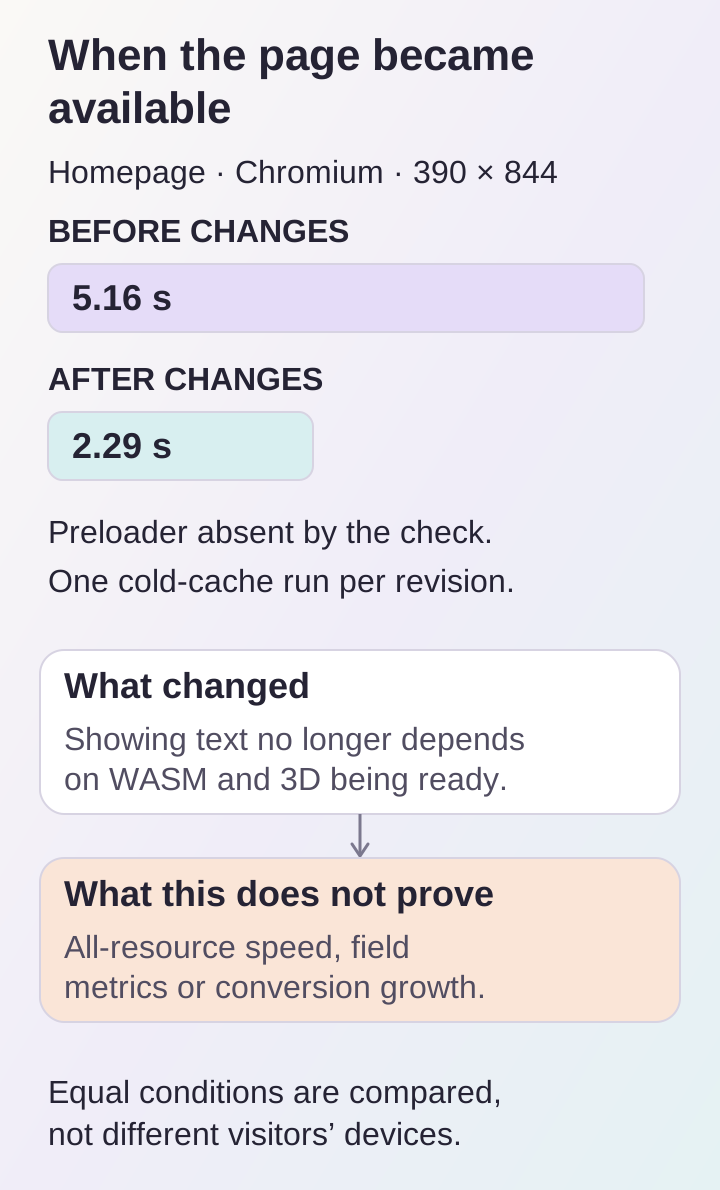
Homepage observation from one cold lab run per revision; this is an upper bound on the preloader wait, rather than full loading time or a field metric.
Why we cannot promise “the website is twice as fast”
The homepage shows a shorter wait for the splash screen, but full loading barely changed. On the service page, the load event happened later. The Brotli-compressed WASM module grew from 677,563 to 686,240 bytes: reducing application weight was not an outcome of this work.
We also did not obtain field Core Web Vitals or measure INP, the responsiveness experienced during real interactions. A Lighthouse score was not part of this comparison. web.dev explains the difference between lab and field data: the conditions of an individual check do not represent the variety of visitors’ devices, networks and actions.
The justified conclusion is narrower: we removed the software dependency between showing text and WASM readiness. A separate scenario with an unavailable module verified this, including following the primary link. These data cannot establish a percentage increase in enquiries or sales.
What we did with the decorative 3D scene
The sphere stops continuously rendering when it leaves the viewport or the tab is hidden. Rendering resumes on return. Pixel density is capped at 2. With reduced motion enabled, a static frame is shown and updated when the theme or size changes.
These changes remove unnecessary scene work in specific states. We verified that WebGL calls stop and resume. We did not separately measure battery usage or device temperature, so we make no quantitative energy-saving promises here.
How we checked the result
We checked the interface at widths of 320, 390, 768, 1024 and 1440 pixels in both themes. Checks included no horizontal overflow, availability of primary actions, operation without ready WASM and automated accessibility checks. After publication, all 45 sitemap URLs returned HTTP 200.
The enquiry journey includes events for opening the form, a valid submission attempt, an error and confirmed acceptance by the server. Event testing used a mocked API: it confirms interface logic, rather than receipt of a real email by a customer. Evaluating conversion requires configured goals, real visits and a sufficient observation period.
If your website shows a splash screen for too long, start with a simple question: what exactly is it waiting for? Then separately check reading the offer, reaching the enquiry and readiness of complex features. This review helps define a concrete website support task without substituting an attractive score from one test.
