A day plan connected to the map
The calendar, timeline and meeting locations help show the whole day. Routes and departure prompts connect the schedule with travel between clients and sites.
Launch your own service connecting meeting planning, preparation, conversations and follow-up. The calendar, map, video rooms and AI tools help retain context, while agreements gain an owner, deadline and next checkpoint.
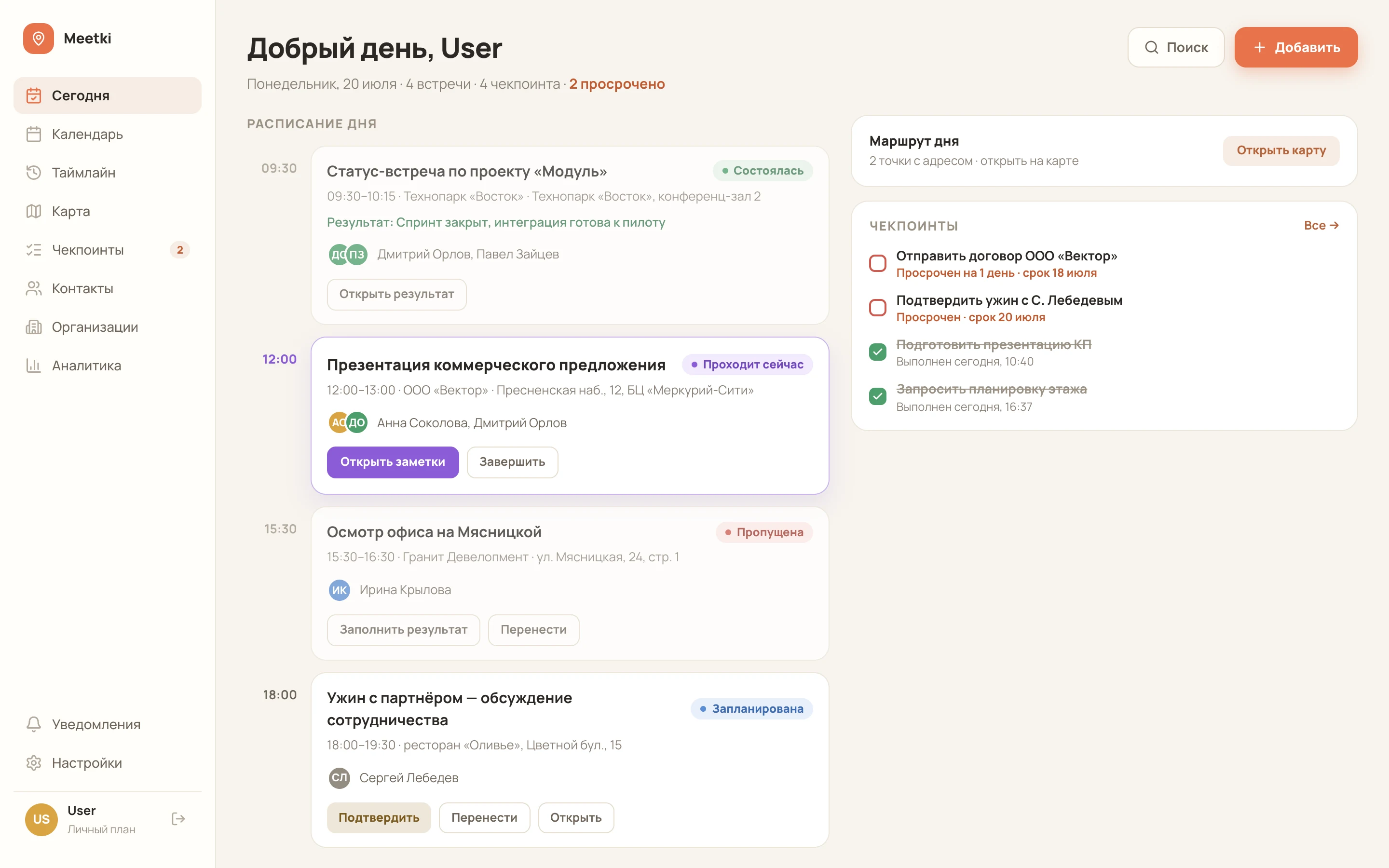
A boxed version for a fast business launch. OEM delivery lets you launch Meetki under your brand; configuration, hosting and licence terms are agreed for your project.
Meetki is a packaged software solution for a fast business launch. OEM delivery lets you launch the product under your own brand, with agreed branding, domain and capabilities.
The package, licence, hosting, integrations and support are defined in the delivery scope.
The Meetki website presents the main screens and product capabilities. A step-by-step video will appear here: meeting preparation, the conversation, its result and agreement follow-up.
This space will show the Meetki calendar, map, video meetings, AI tools and checkpoints.
Meetki is useful when scheduling a conversation is only the beginning: its context, result and follow-up need to stay connected.
The calendar, timeline and meeting locations help show the whole day. Routes and departure prompts connect the schedule with travel between clients and sites.
An owner, deadline and checkpoint turn the conversation’s outcome into further action. Kanban, list and calendar views give teams several ways to work with commitments.
Contacts, materials and previous agreements stay close to the meeting. AI tools help prepare briefings, draft outcomes from notes and find information by meaning.
Video rooms, guest links and a waiting room form part of the online meeting workflow. Recording, transcription and summary modules help revisit the conversation and define next actions.
A personal booking page, time polls and RSVP help coordinate participation. An ICS feed connects meetings to a familiar calendar, while overlap warnings help organise the schedule.
Shared contacts and meetings, roles, comments and an activity log support team workflows. The mobile web interface and PWA let users work with plans and checkpoints from a phone.
The boxed foundation can be adapted to your audience and service model. These directions illustrate potential implementation scenarios.
Launch your own meeting service or an industry platform under your brand. Build an offer for a selected audience using the ready product and an agreed configuration.
Visit plans, contact history and follow-up after negotiations. Meetings connect to a place, outcome and next action for the client.
Viewings, inspections and appointments across different sites. Maps and routes help organise the day, while meeting cards retain materials and agreements for each visit.
Consultations, interviews and repeat conversations with retained context. Appointment booking and meeting materials support the journey from initial contact to further work.
A shared approach to meetings and commitments. Owners, deadlines and checkpoints help track follow-up between team conversations.
Five connected steps lead from a planned conversation to the next contact.
Set the time, location and participants. Review the schedule, route, materials and previous agreements before the conversation.
Hold the meeting in person or in a video room. Record notes and the result; selected AI modules can help prepare a draft for review.
Specify what needs doing, who is responsible and the deadline. Link actions to the particular meeting and its materials.
Work with checkpoints in a list, on a kanban board or in the calendar. Reminders and statuses support follow-up execution.
Continue the cycle with another meeting. History, materials and open agreements provide context for the next conversation.
The ready foundation lets you start with configuration selection and product adaptation to your operating model.
Client branding, audience and main user journeys. We define the product configuration you will offer to your market.
Planning, video, AI modules and team capabilities in an agreed package. Licence and usage terms are recorded in the delivery scope.
The environment, connections to your systems and data-processing requirements. CSV contact import, JSON export and calendar connections are considered within the overall implementation workflow.
Configuration, agreed scenario checks, documentation and team handover. Ongoing support and update scope are agreed for the project.
We connect the boxed foundation, your brand and future users’ workflows step by step.
Define the audience, industry, module configuration and OEM delivery terms.
Agree branding, the environment, integrations and participant access rules.
Validate the complete meeting cycle, selected modules and team interaction.
Prepare the operating configuration, documentation and ongoing support process.
Yes. Meetki is available as a boxed OEM solution for a fast business launch. Branding, configuration, licence terms, hosting and support are agreed for your project.
Yes. In-person meetings connect to locations and routes; online meetings connect to a video room. Outcomes and checkpoints continue the shared workflow.
They help with preparation, draft outcomes, material search, transcripts and summaries. We select the required modules, validate them on your scenarios and define how users review the results.
The product describes CSV contact import, JSON export and an ICS calendar feed. Additional integrations, hosting and data requirements are included in the agreed implementation scope.
The estimate depends on configuration, licensing, branding, hosting, integrations and support. After discussing the task, we prepare an offer with pricing and launch stages.
Tell us which audience the product serves and which meeting scenarios matter. We will select a boxed Meetki configuration and prepare OEM delivery for your business.