
First establish what the buyer is choosing
One product page can combine several ways of obtaining a product. A T-shirt size, package volume or consultation format changes the selected item. Gift wrapping or additional setup complements it. Visitors should understand this distinction without knowing how the catalog is structured.
A practical question for the team is whether the buyer can order the main item without making this choice. If not, it is probably a variant. If so, it may be an add-on. This question helps design the interface but does not replace sales rules: sometimes a combination of attributes defines a separate variant with its own price and availability.

AI-generated illustration. Showing the selected color helps customers verify their choice. The cart receives that specific variation.
Separate variants from add-ons
Consider a hypothetical digital-product consultation. An online meeting costs ₽5,000 and a meeting involving a team visit costs ₽10,000. These are two alternative formats of one service. Do not show them as independent checkboxes: a visitor could accidentally select both and believe they are buying a package of meetings. Offer one explicit choice of format instead.
An additional written review, if it is genuinely sold separately, can be an option. Put its price and the deliverable description beside it. If there are no add-ons, do not create an empty section merely to keep every product template identical. For each element, record what the price includes, what is excluded and which conditions are agreed after ordering.
Show the first available variant immediately
If variants serve an equivalent purpose, preselecting the first available one is convenient. The price and purchase button then refer to a specific item from the start. In the example, visitors see the selected online consultation and its price. This is a recommendation for that type of catalog; individually configured products may require a separate mandatory choice.
Set the variant order deliberately rather than by a random creation date. The label and styling should make the selected state clear. An unavailable variant should not automatically become active. If none are available, the page should say so and offer the planned contact method instead of a purchase button that appears functional.
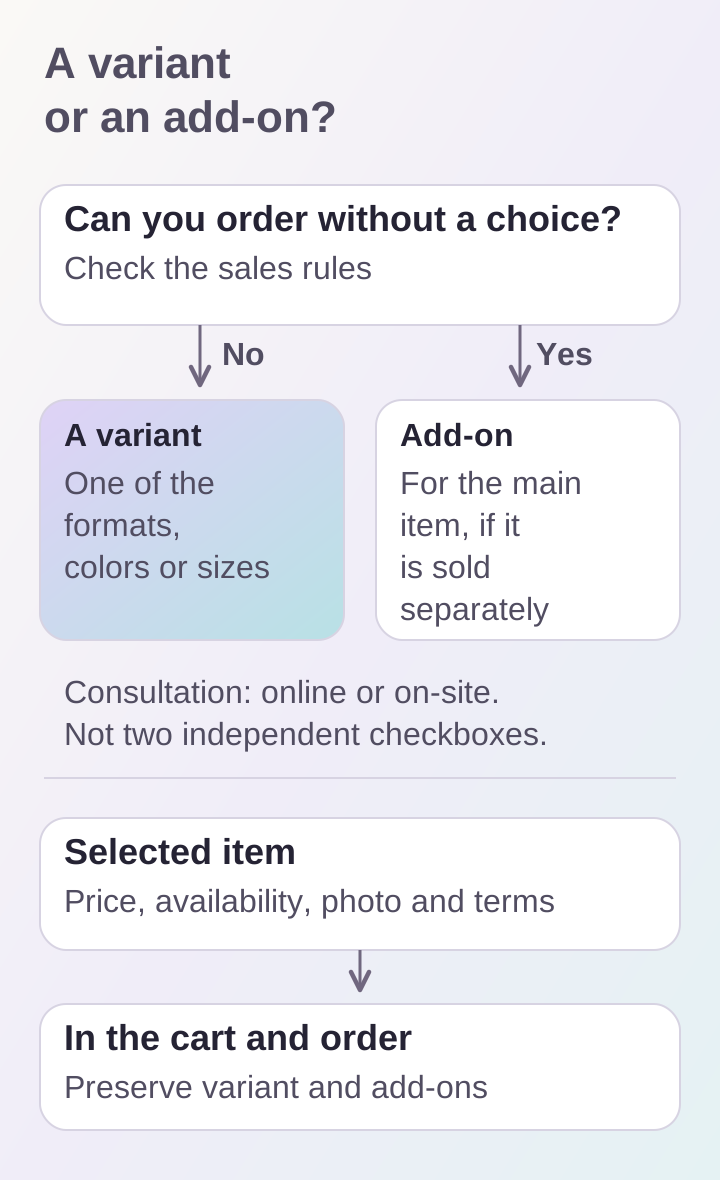
A variant defines the item being ordered; an add-on extends it. Whether an order can be placed without a choice is a starting point for clarifying sales rules.
Connect the price to the selected state
When a variant changes, update the total price and the conditions that actually differ. A photograph showing a specific variation can change as well. General copy that applies to the whole product does not need replacing: clearly identify the difference.
For the hypothetical consultation, switching to an on-site format should show ₽10,000, state that the location and time require agreement, and retain the selected format beside the button. Do not promise team availability on any chosen day in advance. For a physical product, show the chosen size, package and stock status so the customer does not have to hunt for them in a long description.
Define quantity and availability rules
Stock belongs to the item that can be ordered. If two sizes have different availability, a general “in stock” label does not explain the situation. Services may have other constraints instead of warehouse quantities: whether new requests are accepted, how many meetings can be bought in one order, and whether prior agreement is needed.
It is particularly important to define what happens when availability changes after the page opens. A visitor may leave a tab open while the variant sells out or is withdrawn. On adding to the cart and before checkout, the system should check current conditions and provide a clear message asking for the selection to be corrected. An unconfirmed price from an open tab must not itself authorize payment.
Preserve the selection in the cart
Show the product name, specific variant, selected add-ons, quantity and price in the cart. “Consultation” alone is insufficient: the customer must see whether they are ordering an online meeting or a visit. Ideally, restore that choice when they return to the product page, so reopening it does not look like a change to the order.
Decide beforehand whether identical items are merged. Two additions of the same variant without different options can be combined by quantity if the product allows it. Online and on-site consultations must not be merged. If a price changes after an item is added, explain the change before order confirmation and allow the item to be removed. Store the conditions of a placed order separately from subsequent catalog changes.
Run a short product-page check
Take one product and fill out a table: variant, price, availability, differing conditions and possible add-ons. Then walk through five scenarios:
- Open the page and identify the selected item and price without clicking.
- Switch variants and check the price, label and conditions update.
- Add two different variants and distinguish them in the cart.
- Make one variant unavailable and try again from a previously opened tab.
- Return from the cart to the product page and check the selection is preserved.
Repeat the test on a phone: long labels should not obscure the price or selected state. Ask someone who did not help design the product to explain exactly what they are buying. Their answer will reveal wording that needs clarification. Agreeing the variant structure and ordering rules before online-store development is convenient, while catalog-model changes still do not affect filled product cards and existing orders.
