
Consider a backup verified after restoration
A website backup is useful when it can restore the required data and run working journeys. An archive and a successful-save indicator alone do not prove this. Test restoration in a separate environment, compare the data and files, then record the procedure and the actual time taken.
The purpose of this check is to find missing components before an incident. For example, the database may contain references to photographs while the files themselves remain only on the old server. Or an archive exists but the team cannot access its decryption key. Agree on the restoration scope and its owner first, then set the backup schedule.
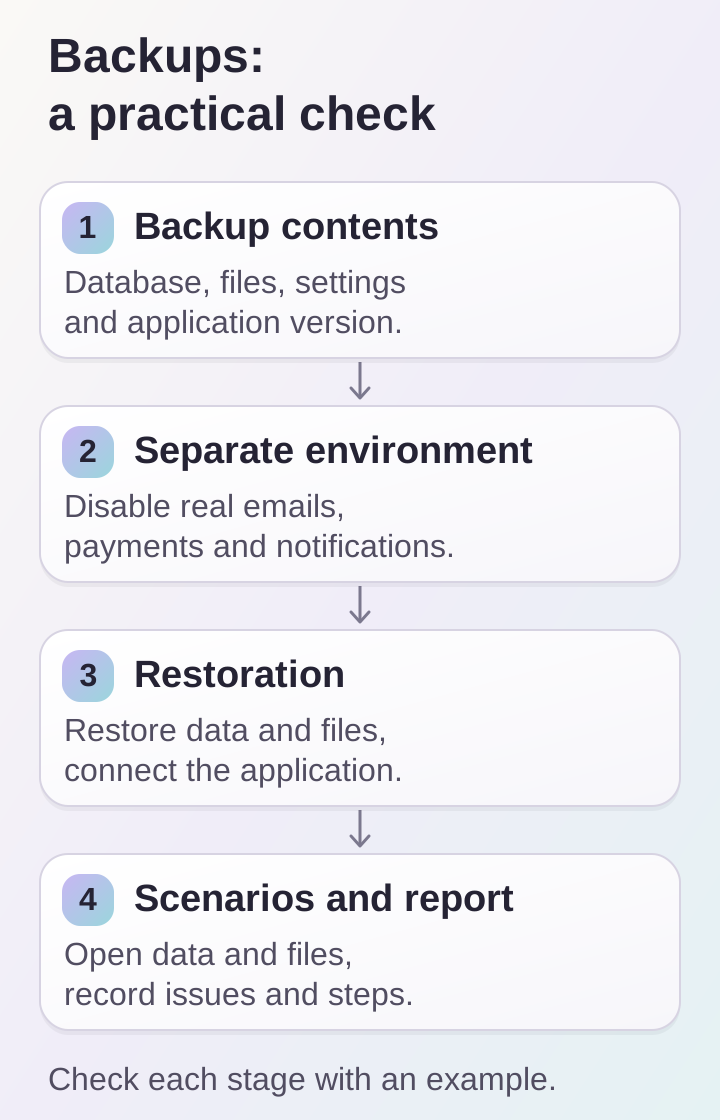
An archive becomes a verified backup after restoration and journey checks in a separate environment without real operations.
Identify what needs to be recovered
The scope depends on the project's architecture. The database, user uploads, application version, configuration and required external dependencies are usually considered separately. A static website may store data differently from a store with orders. List the components and record where each is kept.
Do not confuse source code with the contents of a live website. The repository may help build the application, but it will not restore new orders or photographs uploaded by an editor if they were never stored there. Describe how to obtain configuration and secrets from the designated protected storage; do not include passwords in a publicly accessible procedure.
Agree on acceptable data loss and recovery time
Discuss two practical questions: how many recent changes can be lost, and how long the service can remain unavailable. The answers determine backup frequency and the recovery approach. A rarely updated showcase and a store receiving regular orders may have different requirements.
Define retention and a separate location for backups in advance. If all archives are on the same disk, its failure may affect both the website and the ability to restore it. Check that the responsible person can access the storage and plan for the primary administrator being unavailable. This organizational part of the process cannot be replaced by a scheduling setting.
Prepare an isolated environment
Perform a restoration test separately from the live project. Before starting the application, disable real payments, email, messages, background jobs and external notifications, or redirect them to designated test services. Simply changing the domain does not guarantee that a restored copy will stop performing real operations.
Restrict access to the test environment and use only the necessary data. Prepare compatible database and application versions. Record which backup is being tested and the time it represents. If the database and files have different timestamps, account for that when investigating missing uploads and other inconsistencies.
Restore data with the standard tools
Follow the documentation for the database and archive format in use. For example, PostgreSQL distinguishes plain SQL dumps from archive formats; non-text dumps use pg_restore. Required roles, permissions and extensions can also affect the outcome. Do not stop at checking that the archive is readable: perform the restoration and examine the tool's messages. See the PostgreSQL documentation on SQL dumps.
Then restore files and connect a suitable application version. Record missing components as you find them. Do not fix them only by hand in the test environment: improve the procedure or the backup scope so the next attempt can reproduce the result without guesswork.
Check working journeys
A homepage that opens is the beginning of the check. For a content website, open several articles and their attachments. For a catalog, check categories, images, variants and prices. For an account workspace, confirm that the designated test account sees its own data and the required sections. Use an agreed set of safe journeys.
Compare counts of key records with the expected state at the backup date, check recent records and a sample of older data. For files, open different attachment types rather than just the first photograph. In a store, restoring the database must not automatically repeat the processing of past payments: check background jobs and integrations before enabling them.
Save the results and repeat the test
The report should include the backup date, application version, steps taken, results and unresolved issues. Separate preparation time from restoration itself. If you measure duration, record the measurement conditions; do not assume results from a small test database apply to the full production volume without verification.
Repeat restoration after fixing errors. Update the procedure when the database, file storage, infrastructure or integrations change. Assign a testing frequency and report retention period. Afterwards, remove the unnecessary test environment according to the agreed process, retaining the report and backup.
Frequently asked questions
Is the hosting provider's backup enough? That depends on its scope, retention and available restoration method. Ask for a description and check whether it includes the database, uploads and necessary configuration.
Can an archive be checked without running the website? That is useful, but does not replace restoring the application and testing its journeys. It will not reveal every permissions issue or broken relationship between data and files.
Do we need to back up the entire server? The architecture determines the approach. A complete, verifiable recovery path matters more than automatically choosing the largest archive.
When should the test be repeated? After significant infrastructure changes and on an agreed schedule. Choose the frequency based on project changes and recovery requirements.
Restoration checklist
- The backup scope and responsible people are known.
- Backups are accessible separately from the live server.
- The test environment does not perform real operations.
- The database, files and application version have been restored.
- Key journeys, errors and time taken are recorded.
If your website's recovery procedure currently exists only in one person's memory, start with a component list. Discuss it as part of website support and agree on a separate backup task with specific checks.
