
Look for a specific transition, not “poor conversion”
When inquiries are scarce, it is easy to start changing buttons and headings without understanding the cause. First, break down the visitor's path: entering the page, exploring the offer, moving to a contact option, submitting a request and having a staff member receive it. Each transition can have a different obstacle. One overall metric does not explain where it is.
Start with the analytics already available, the inquiry list and a few manual checks. A new reporting system is not essential for the first review. What matters is understanding what existing events actually mean and which parts of the journey are not yet observed. If data is missing, record it as a gap, not as a lack of visitor interest.

AI-generated illustration. A visible button is only part of the journey. Continue checking until the responsible staff member receives the inquiry.
Check whether the entry meets expectations
Look at the pages, links and sources where the journey starts. A visitor arriving for a particular service needs to see its scope, terms and next step. A general studio page can be useful for an introduction but answer a narrow question from an advertisement poorly.
Form a hypothesis: “The person expects a description of a specific way of working but arrives at a general service list.” Then check the actual destination URLs and first-screen content on a phone. Choose a fix after checking: a link to the relevant page, clearer copy or missing terms. The number of exits alone does not prove that the page is wrong.
Separate exploring the offer from readiness to inquire
A page view, a scroll and opening a form are different actions. Scrolling does not confirm that someone read the terms; no click does not mean the offer was unsuitable. The visitor may have found a phone number, returned later or used another communication channel.
Check whether the page answers these questions: who the service suits, what the work includes, what limitations apply and how to start a discussion. Use real staff and customer questions, removing confidential information. You do not have to rewrite the entire screen to test an idea. Moving terms closer to the offer or explaining the purpose of an existing button may be enough. The article on a service website offers a useful reference for mobile journeys.
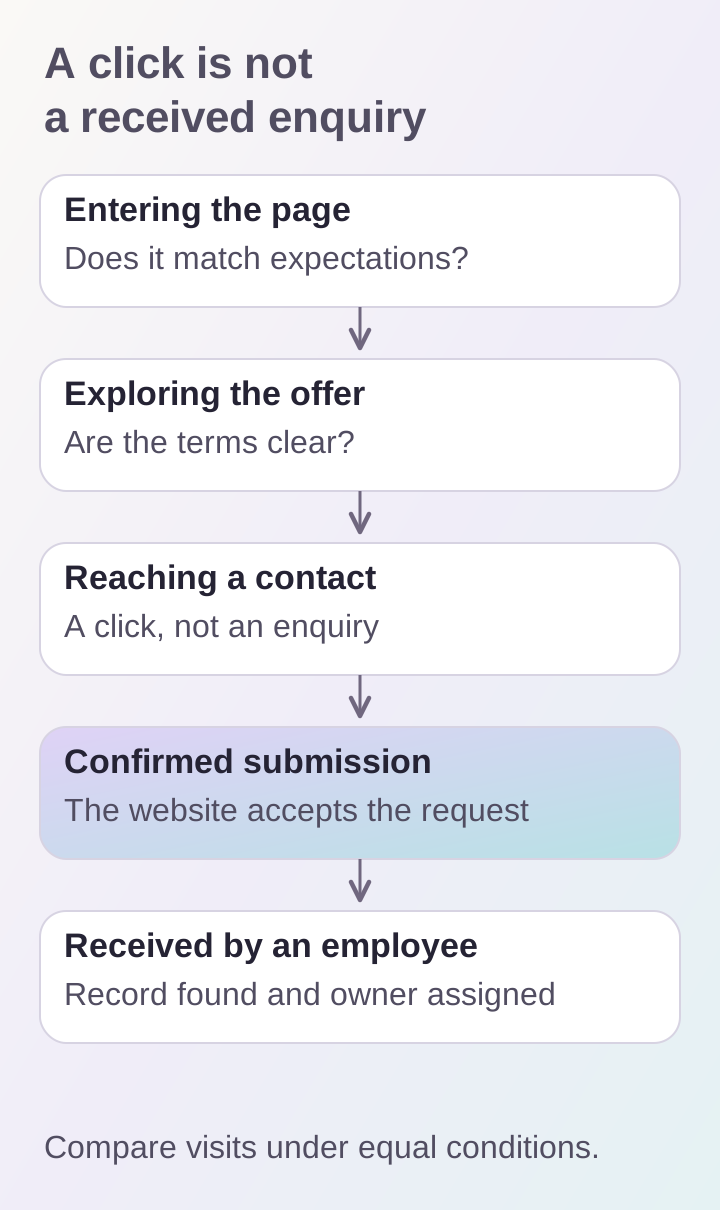
Separate events by their actual meaning. To confirm the last stage, locate a test request with the staff member rather than only in a click report.
Name events according to what they actually mean
If you track a click on “Discuss a project,” call the event a click, not a received lead. Confirmed submission needs a separate signal that the inquiry was saved successfully. Opening a messenger also does not confirm that a message was sent or a conversation started.
Yandex Metrica can track actions with a goal event. The team needs to agree on the precise moment it is sent. It is also important to check goal achievement while following the journey: an event in the configuration does not yet confirm that it fires correctly on the live website.
Create a glossary recording each event's name, trigger condition and what it does not confirm. For example, “Confirmed submission” means the website accepted the request; it does not yet mean a staff member contacted the customer.
Use comparable denominators
A hypothetical example: during the chosen period, 100 visits included opening the form, and 20 of those visits included a confirmed submission. The proportion is 20 out of 100 for this transition. These figures illustrate a calculation, not DDRW's results. They say nothing about the share of inquiries among all website visitors if the remaining visits are excluded from the denominator.
The Metrica documentation defines conversion as the ratio of goal-reaching visits to total visits. Do not replace visits with the number of clicks or events. One person can press the button several times, and one visit can include multiple goal completions. Record the unit of counting, period, source and device. Comparing stages only through totals from different reports does not prove a sequential journey by the same visitor.
Follow the path to the staff member manually
Submit a test inquiry on a phone and a computer. Check whether the button and fields are accessible, error messages are clear and entered data is retained during correction. After submission, find the test record where inquiries are processed and confirm that the responsible person understands the next action.
Separately test repeated clicks and refreshing the page after success. Compare records by inquiry ID: notification counts may differ from the number of unique requests. Do not declare every repeat an error; customers sometimes genuinely send a new inquiry. Define how to distinguish tests, repeats and independent requests. The article on handing an inquiry to a manager examines the form mechanism itself.
Connect the hypothesis, check and decision
For each finding, make a short record: the observation, suspected cause, required event, manual check and action after confirmation. For example: “People open the form but we see no submission; a required field may be an obstacle; check the error and preservation of input; change the field only after clarifying whether it is necessary.”
Account for advertising changes, seasonality and small inquiry volumes. Comparing two periods does not prove that a new button caused the change. After a fix, repeat the journey and check the data under the same counting conditions. Discuss this review as part of SEO and support or interface design, starting with confirmed obstacles and a list of unobserved stages.
