
Start with the decision you need to make
It helps to arrive at a consultation with a question you cannot yet answer confidently: rebuild a website or improve individual pages, release an app or begin with a responsive version, connect a new system or understand the current process. The meeting aims to clarify the situation and choose a reasonable next step. A complete technical specification is not required.
State your expectation in one sentence: “We want to understand why inquiries do not reach our staff,” or “We need to decide what to test in the first app version.” If you have many questions, choose the main one. Otherwise the conversation can easily move to screen design when the actual obstacle lies in inquiry processing or product scope.

AI-generated illustration. Specific examples and constraints are more useful for a meeting than a long list of unagreed features.
Describe symptoms without prescribing the solution
Write down what happens now, whom it affects and under which conditions it repeats. “We need modern design” says little about the problem. “On a phone, visitors cannot see delivery terms before checkout” provides a specific scenario to discuss. Your proposed solution is useful too, but separate it from the observation.
Prepare a short record for each symptom:
- What the person is trying to do.
- What result they expect.
- What actually happens.
- Where it can be observed or reproduced.
- Which consequences are known and which are only assumed.
For example, several complaints about signing in justify checking login, but do not yet prove that the whole customer account needs replacing. Do not label something a cause when it is only known from one participant’s report.
Gather a small set of materials
A link to the live product, a few screenshots of troublesome screens and a process description are enough. If you have designs, a previous estimate, a change list or analytics, add links explaining exactly what should be reviewed. Identify the current version: undated alternatives of the same document complicate discussion.
Prepare a few representative examples instead of an archive of all correspondence. Anonymize client inquiries and remove passwords, payment data and confidential information. Use an agreed test account with the required role when demonstrating access. Access to the live system and permission to change anything are separate matters; screen sharing is often sufficient for the first meeting.
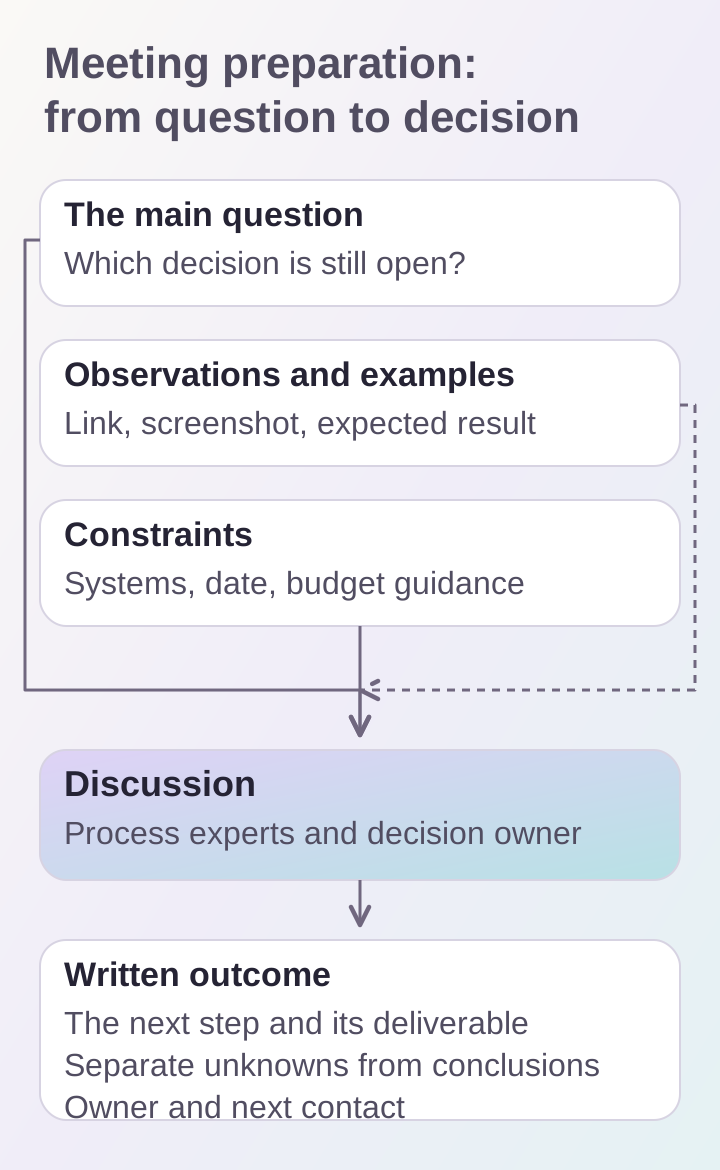
A small set of current materials is more useful at the meeting. The outcome should distinguish verified observations from questions that still need investigation.
State constraints before discussing features
Explain which systems you already use, what cannot be interrupted and who will work with the result. For a website, that may include the catalog, CRM and content editor. For an app, it may be the existing backend, login methods and required platforms. If the exact setup is unknown, mark it for investigation rather than assume integration is ready.
State the desired date and the reason behind it. It is also useful to give a budget guideline and explain how decisions are approved. This helps choose between testing a hypothesis, making a limited improvement and conducting a separate design stage. A guideline given at a meeting does not replace an agreed work estimate.
Invite people who know the process
Someone who makes decisions and someone who encounters the problem daily are useful participants. They may be the same person. If the topic is inquiries, the employee who handles them can provide more useful detail than a long list of desired screens. If the discussion concerns an app, include the owner of its main user scenario.
Agree beforehand who will demonstrate the product and who will record the outcome. There is no need to invite the entire team: additional people are needed when an important question cannot be answered without them. Unknown details can go on a clarification list with assigned owners.
Prepare questions about the next step
Good questions connect a recommendation with its basis: “What needs checking before development can be estimated?”, “Can this scenario be tested using a prototype?”, and “What information is needed to estimate the integration?” Ask what the proposed stage includes and what deliverable can be accepted.
For a live website, discuss whether the obstacle can be removed before a major redesign. The article on choosing between redesign and improvements examines signs of such situations. For an app, compare the idea with the scope of a first version, leaving unknown questions open.
Record an outcome you can use
After the meeting, keep a short record: the initial task, observations, constraints, options considered and the chosen action. List what still needs checking separately. A recommendation to “check inquiry delivery” and a confirmed delivery error are different outcomes; do not combine them in the final document.
A practical next-step template is: “Test a specific scenario and obtain a list of confirmed obstacles, then choose the improvement scope. One participant supplies the materials; another approves the decision.” Add an owner and the next contact date. If the next stage is estimating development, use the website-brief structure.
Choose the appropriate meeting format
Online is usually a convenient starting point for reviewing a website, designs and functionality. Discuss a team visit if it is important to see the working environment or involve several employees on site. Choose the format according to the task rather than the presumed complexity of the future product.
DDRW offers a digital-product consultation. We agree the date, time and meeting location after the order is placed; project work is estimated separately. The discussion can lead to an estimate for a business website or mobile app if that is the appropriate next step for your situation.
