
Turn an impression into a testable problem
“The website looks old” is an understandable impression, but it does not define the work required. Dissatisfaction may come from an unsuitable photo, an outdated offer, difficult navigation or an awkward form. These problems need different solutions. Before discussing a redesign, record who has difficulty, on which page and which action they cannot complete.
A useful statement is: “A visitor on a phone cannot compare services because important terms are spread across several unrelated sections.” It already identifies an audience, obstacle and test scenario. “Make it modern” leaves the choice at the level of taste. Nielsen Norman Group’s article on radical and incremental redesign also connects the choice to verified user needs.

AI-generated illustration. Testing a real user journey helps establish whether one area causes difficulty or the product structure needs changing.
Gather three kinds of evidence
Start with observation: ask someone from the target audience to find the required service, check its terms and submit an inquiry. Do not suggest button names. Note where the person stops, goes back or misunderstands the text. A few such observations cannot support statistical conclusions about the whole audience, but they help identify obstacles for further investigation.
Then examine analytics, provided events are configured and the data is trustworthy. Separate views from completed actions, mobile visits from desktop visits, and new traffic sources from previous ones. Finally, gather staff feedback: which questions repeat and which information managers send manually. Comparing these sources is more useful than deciding from one bounce-rate figure or a single comment.
Example 1: the main journey works, but one area gets in the way
A hypothetical company receives inquiries through its website. The services are clear and visitors find the right pages, but a phone keyboard covers the submit button. Replacing the entire structure does not itself address the cause. It is logical to check the form, responsive layout, validation and post-submission state.
The scope can be limited: fix field placement, show clear errors, deliver the inquiry and test agreed devices. The acceptance criterion is a successfully completed scenario, including invalid input and repeated clicks. If the problem is truly local, other pages do not necessarily need a new design. This journey is covered in the article on inquiry forms and passing requests to a manager.
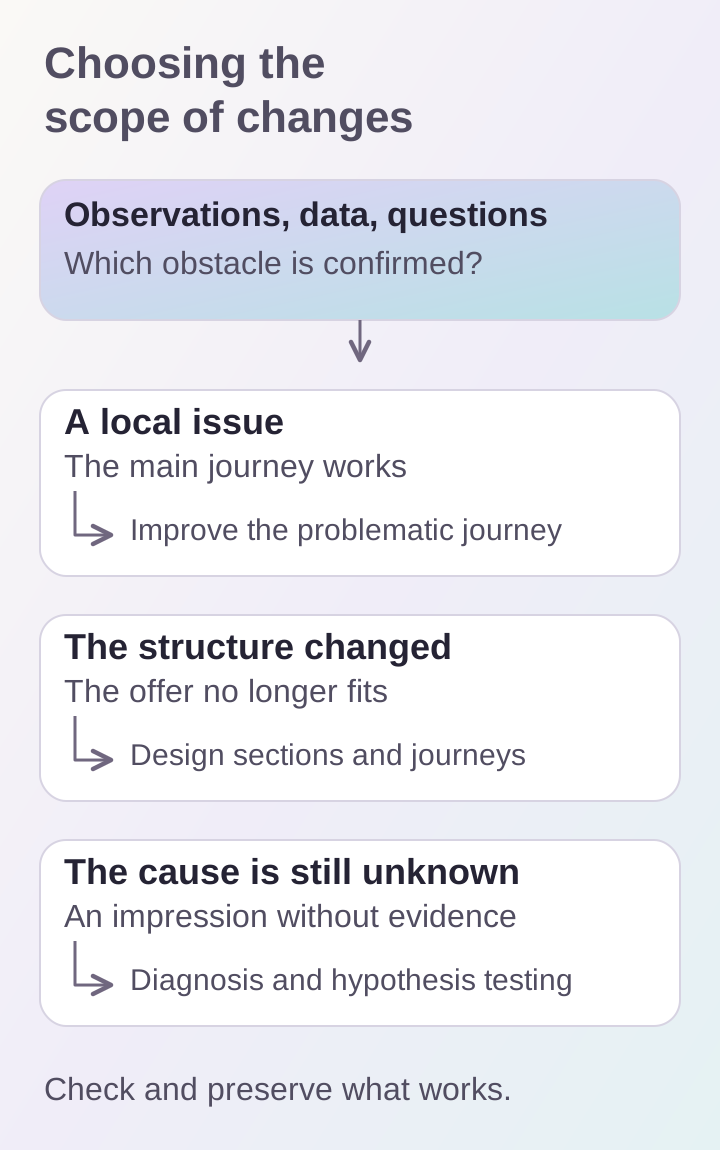
Choose the scale of the update according to the verified problem. Working copy, integrations and URLs do not need to change automatically with the design.
Example 2: the offer has changed and the structure no longer fits
Another hypothetical company used to sell one service but now serves several audiences and handles complex projects. Its old website forces unrelated offers into one long section. New menu items do not explain the differences, and identical forms require different input data.
Here the problem affects content and architecture. It needs a section map, clear names for service areas, navigation rules and distinct inquiry scenarios. This justifies a new design process. Existing photographs, useful copy and working integrations can still be retained after review. A redesign should not mean indiscriminately discarding everything already in place.
Example 3: the team dislikes the appearance, but the cause of losses is unknown
Suppose employees want to replace the whole website because competitors use large videos and animation. Yet nobody knows whether visitors understand the offer, inquiries reach managers or where the audience comes from. First analyze the current journey and data sources.
You can prototype one key screen and compare understanding of its content with the current version. Test a specific question: is the service scope visible, are limitations clear, and can people find the next step? Assess the visual solution together with readability and speed. Nielsen Norman Group illustrates this iterative approach in its own homepage update: alternatives are tested before final implementation.
Separate the interface from the technical foundation
Sometimes a new design is discussed because loading is slow or the catalog cannot be edited. First identify the source of the constraint: images, client code, the server, data model or management tools. Replacing colors and cards will not remove a third-party integration delay. Conversely, technical optimization will not make an unclear offer convincing.
Create two lists: obstacles in the user journey and maintenance limitations. For each, identify the necessary change and its dependencies. If a small task repeatedly requires workarounds in the existing system, a new foundation may be justified. Assess that through specific work rather than the age of the technology or a desire to use another tool.
Agree on the result before design begins
For the chosen approach, prepare a list of pages, scenarios and acceptance criteria. Instead of “increase conversion,” first state requirements you can control: service scope is available on the service page, the form explains errors, and the inquiry appears for the responsible employee. Changes in inquiry rates are assessed separately over comparable periods and traffic sources; appearance cannot guarantee them.
Also check readability, keyboard navigation and field labels. W3C’s basic accessibility checks help begin this review but do not replace a full evaluation. A visual update must preserve access to content and core actions.
Where to start the discussion
Gather the current pages, the three main difficulties and supporting evidence for each. State what already works and should remain: URLs, content, forms, integrations and inquiry-handling procedures. You can then compare targeted improvements, an update to a group of pages and a complete redesign by their scope of work.
Use UI/UX design for interface analysis and business websites for structural changes and implementation. If the redesign decision has already been made, prepare a separate page-URL preservation plan. That is the next stage; it should not replace diagnosing exactly what needs changing.
