
Check the finished version through journeys
Before acceptance, agree on the version being reviewed. The team should identify the staging address, build date and available features. If the designs are already approved, this is not a reason to reopen discussion about every shade: the purpose of this stage is to establish whether the work meets the agreed outcome. Record new requests separately so they do not obscure launch-blocking defects.
We recommend selecting several complete journeys. For a service website, these are finding a suitable offer, reading the scope of work and sending an inquiry. For a catalog, they are choosing a category, comparing specifications and asking about a particular product. Check the path from the first screen to the outcome rather than a collection of isolated pages. Otherwise it is easy to miss a situation where every page opens but the links between them lead to the wrong place.
AI-generated illustration. Check a fixed version through real journeys and record findings that can be reproduced.
Send an actual test inquiry
Start with an ordinary inquiry: fill in the fields, submit the form and wait for confirmation. Then ask the responsible staff member to find the message in the working system. Compare the name, contact details, text, attachment and originating page. Mark the inquiry as a test and use prepared contact details so testing is not mixed with real requests.
Repeat with an incorrect email address, an empty required field and a long comment. Check whether the message helps correct the specific field and preserves text already entered. If the connection fails, the person should understand whether the request was accepted or needs to be sent again. A button that shows loading forever does not answer that question. Do not mark a form ready simply because a green notification appeared.
Read the content as a new visitor
Verify phone numbers, email addresses, links, service names and working terms. Open documents from cards and check that they are current and readable. Look for test prices, temporary photographs, empty sections and template wording. Every disputed fact needs a person who confirms it before publication.
Pay particular attention to navigation. A button's label should match its outcome: “Download catalog” actually supplies a document, and “Discuss a project” opens an appropriate contact option. Review long headings and cards without photographs. These may be ordinary situations for an editor even if the design contains only ideal examples. It is better to see them before launch than after a staff member's first independent publication.
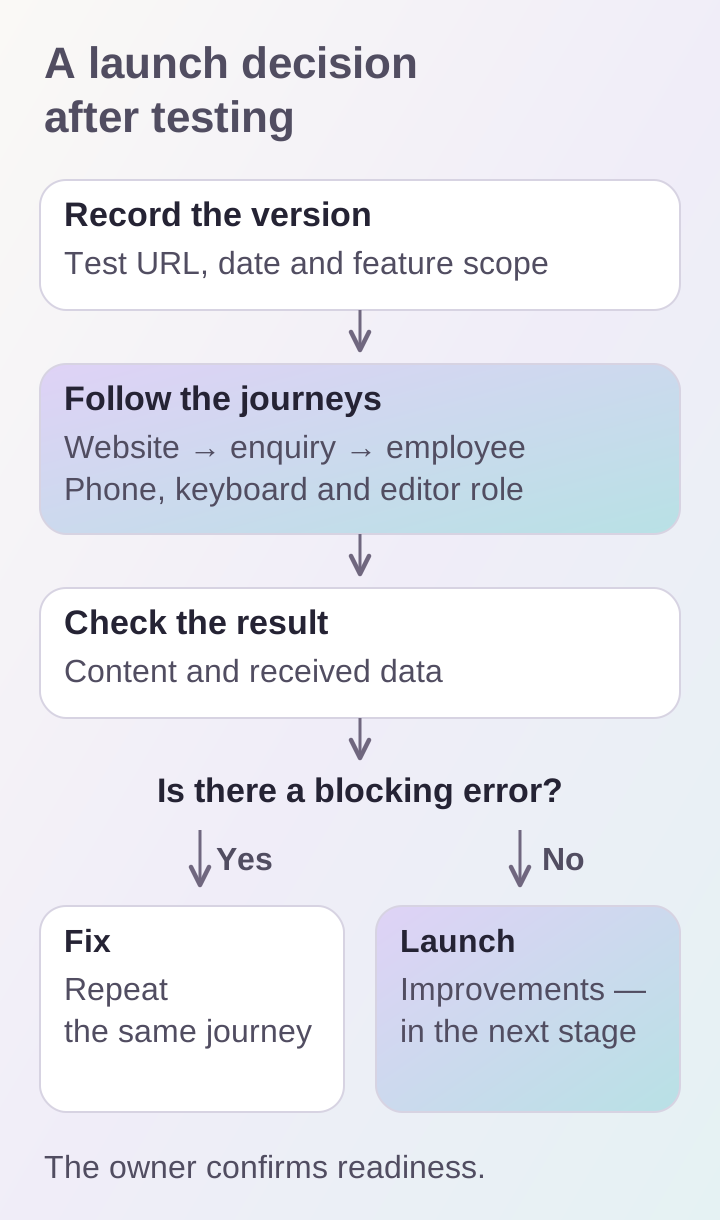
A successful individual screen does not confirm project readiness. Checks must reach the final outcome, and fixes need to be verified again.
Check the website on a phone and with a keyboard
Open pages on a real phone in portrait and landscape. Make sure the keyboard does not cover the active field, the menu can be closed and fixed elements do not obscure buttons. Check both themes if theme switching is provided. Important actions should remain accessible when text is enlarged.
W3C WAI preliminary checks specifically cover keyboard navigation, visible focus, field labels and errors. Follow the main journeys using Tab, Shift+Tab and Enter. This is a useful manual check but does not replace a full accessibility assessment. Read automated reports alongside human observations too: the number of reported errors alone does not show how easy it is to complete a task.
Have the editor perform a working task
Ask the future editor to update text, replace an image and save a draft without prompting. Then check publication and subsequent editing. If a routine operation requires a developer to change a file, clarify whether that matches the agreed workflow. A limitation may be reasonable, but it needs to be known in advance.
Test using the role the employee will actually have. An administrator may have additional permissions that hide a problem. Separately check whether a draft is visible to ordinary visitors and what happens when someone tries to open a deleted article. Use test records for error checks to avoid unnecessarily changing content prepared for launch.
Record findings so they can be reproduced
Instead of “everything moved on mobile,” specify the page, device, sequence of actions, expected result and actual result. Attach a screenshot or short recording. One entry per issue helps assign an owner and verify a fix. A general chat with dozens of messages is less suitable for a final review.
We recommend separating launch blockers, important fixes and improvements for the next version. A broken inquiry submission belongs in the first group; a new animation request usually needs a separate discussion. Priority is determined by the effect on the agreed journey, not the element's size on the screen.
Before deciding to launch, check that:
- key journeys have been completed through to the final outcome;
- responsible staff have received test inquiries;
- content has been confirmed and temporary material removed;
- the mobile version and keyboard operation have been checked;
- the editor has completed typical operations;
- blocking findings have been corrected and retested;
- the launch version and decision owner are known.
This list helps run a concrete acceptance review for a business website. If you need an existing project reviewed, share its address and main journeys through contacts.
