
Define the step after an inquiry
Start with a simple question: what should a staff member do when an inquiry arrives? If they first clarify the task by phone, the form usually does not need a detailed project calculation. If a reply requires product dimensions or an order number, the inquiry is incomplete without them. Choose fields according to the workflow rather than a desire to collect more information.
We recommend describing one typical path: a visitor chooses a service, leaves contact details and a comment, and a manager receives the request and responds through the agreed channel. If requests differ substantially, separate inquiry topics may help. But do not make the visitor understand the company's internal structure: “I need help with an order” is clearer than the name of a department they do not know exists.

AI-generated illustration. On a phone, test the form in the context of the page: what to send, how to correct an error and what step to expect next.
Justify every required field
For each field, record how the answer will be used before the first contact. If there is no explanation, consider removing the field or making it optional. A company name can help prepare for a conversation, but it is not always necessary to accept a request. Likewise, a budget is not useful in every journey and not every visitor has set one yet.
The label must remain understandable after input. Do not rely solely on text inside an empty field: it disappears when typing begins. The W3C tutorial on form labels explains the connection between the label and field, including for assistive technologies. A short example next to the field can clarify the format but should not replace its name.
Make input convenient on a phone
Try filling out the form one-handed on a real device. Check field order, keyboard type, submit-button visibility and the ability to return to a previous field. Appropriate input types help with phone numbers and email addresses. Do not block pasting: someone may copy contact details from another application.
Browser autofill can be supported with the autocomplete attribute, documented by MDN. Name, email and phone fields, for example, can tell the browser which kind of data is expected. That does not mean any saved information is suitable: after autofill, the visitor should still see the values and be able to correct them before submission.
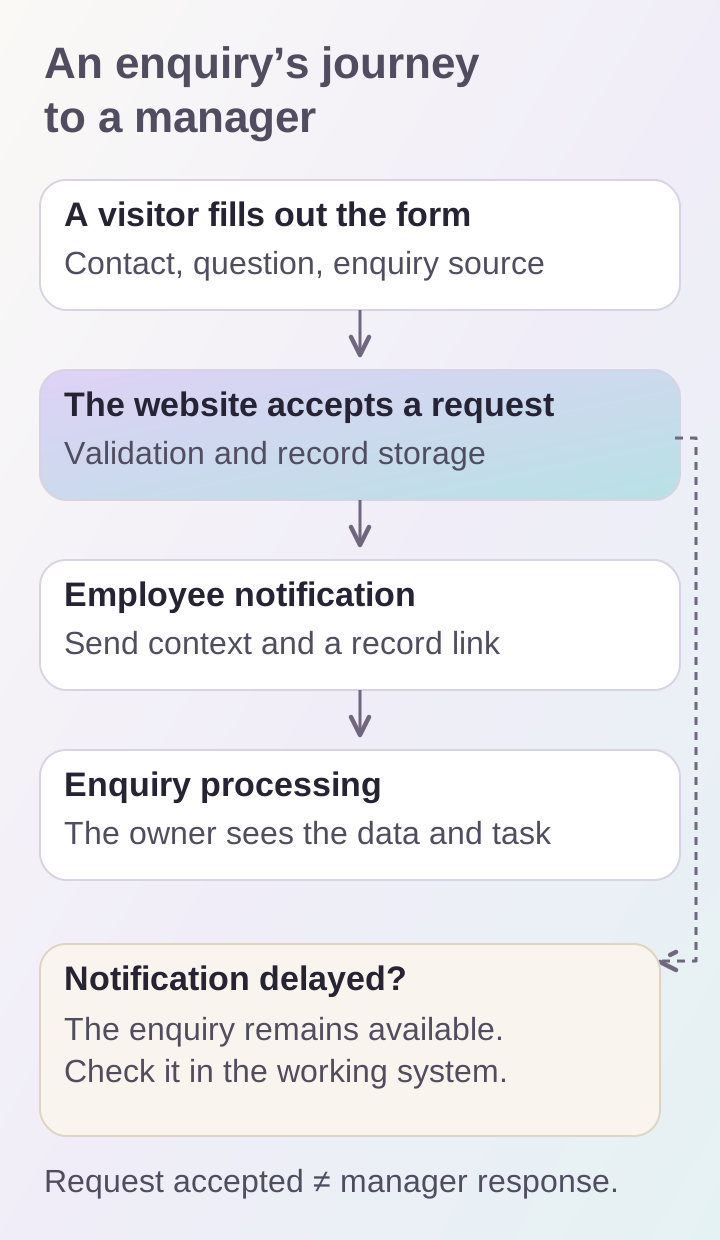
Accepting an inquiry and delivering a notification are separate stages. Check both with the manager, comparing contact details, text and the source of a test inquiry.
Explain an error next to its cause
“Invalid data” leaves the person to find the problem. Name the field and action instead: “Check the email address” or “Add a contact for our reply.” If a field is required, make that visible in advance. A colored border can be an additional signal, but the meaning of the error must be expressed in words.
We recommend preserving correctly entered values after an error. If a long comment disappears because of one typo, the visitor has to repeat completed work. For attachments, show accepted formats and size limits in advance. Test rejection too: uploading an unsuitable file should end with a clear message, after which the person can continue filling in the form.
Distinguish sending from receiving
A click needs clear feedback. A waiting state shows that the request is being processed; confirmation says the inquiry has been accepted. Avoid promising an exact response time if the team has no process that can meet it. State the real next step instead: a staff member will review the question and respond using the supplied contact method.
Inside the company, distinguish saving the inquiry from delivering its notification. A message might be saved while the notification to a work channel is delayed. Staff need a way to find the inquiry itself. Whether this lives in a management system, CRM or another tool depends on the company's process. What matters is that success on the visitor's screen corresponds to a verifiable outcome for the team.
Pass context without unnecessary noise
If the form opens from a particular service or product, we recommend sending that context with the inquiry. A manager benefits more from a name and link than from guessing which item “I want this one” refers to. Keep the context understandable in the staff interface: a long technical identifier alone is of little help.
Agree on a consistent notification format. Start with the topic, contact details and request text, then useful details and a link to the record. Do not turn an email into a raw dump of dozens of fields. If an employee forwards the message to a colleague, it should be clear who already owns the request. Agreeing on a handling process is better than adding another decorative status to the public page.
Test together with the manager
Use inquiries marked as tests in advance. Send an ordinary request and a message with long text and an allowed attachment. Then check errors and repeated clicks on the button. Compare the records staff receive and whether a repeated submission can be distinguished from a new question. Do not try to solve this only by looking at the form.
Before launch, confirm that:
- required fields are needed for the next step;
- labels and hints are clear without explanation;
- the form can be completed on a phone;
- errors help correct the data;
- confirmation corresponds to an accepted inquiry;
- staff see the contact details, text and request source;
- inquiry handling has an owner.
Forms fit naturally into a business website project, while more complex processes may belong in a web platform. To start a discussion, show the current form and describe what happens after submission.
