
Start with the decision the visitor makes
“We need a modern website” describes a visual expectation but says almost nothing about the work involved. Clarify who the website is for and what question brings them there. Equipment buyers need specifications and delivery terms; potential partners need expertise and project examples; candidates need working conditions and a way to apply.
Choose one primary action for the first version: sending a request, booking an appointment, placing an order or obtaining a document. Next to it, write down what information helps the visitor complete it. This becomes the starting point for the structure, animation and contact form.
Example wording: “A purchasing manager should find the relevant category, compare specifications and send an inquiry with the selected model. The inquiry reaches the responsible manager with a link to the product.”

AI-generated illustration. Structure, journeys and constraints form the basis of a brief that can be used to estimate the scope of work.
Describe journeys instead of listing screens
A page name does not reveal how it behaves. A catalog may include search, filters, configuration options, documents and products available to order. Each such journey changes the amount of design and development work.
Describe three things: who takes the action, what they do and what outcome they receive. For a contact form, that means choosing a topic, entering contact details, receiving submission confirmation and having the inquiry appear for a manager. Add failure cases: a required field is empty, a file is too large or the inquiry service is temporarily unavailable.
Record staff actions separately. Who changes prices, publishes materials and receives notifications? Is review required before publication? Define editor and administrator permissions before building the account workspace.
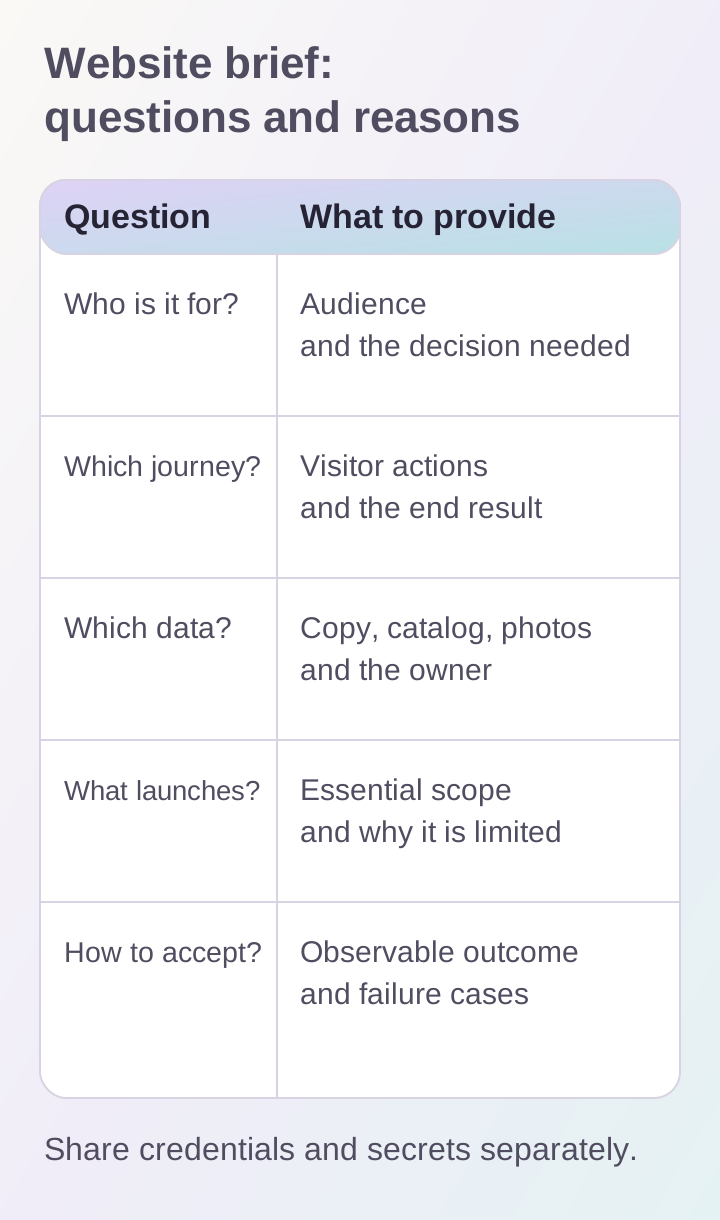
Journeys and source data reveal the scope of work. Link acceptance criteria to actions that can be repeated and checked.
Collect source materials and identify gaps
Provide the available copy, photographs, visual identity, catalog structure and existing website address. Assign an owner to each set of data. If copy is still being written, that is useful information too: its preparation can be included in the plan.
Do not stop at links to websites you like. Explain what works for you: navigation, information density, image style or the presentation of projects. These notes help separate visual preferences from functionality.
For an existing website, list the pages that need to be preserved or migrated. Mark important URLs, forms, connected systems and outdated materials. Share credentials and secrets separately from the general document.
Separate launch scope from later versions
Divide requirements into those essential for the first launch and those that can wait. Every essential requirement needs a reason: without it, the visitor cannot complete the journey, a staff member cannot process an inquiry or the team cannot maintain the content.
For example, the first version of a catalog might accept inquiries without online payments. But if independent purchasing is the project's goal, the cart and shipping calculation already belong to the core journey. The decision depends on the business task.
Record constraints: the desired date, budget range, staff availability for approvals and dependencies on external vendors. Identify any hard constraint from the outset.
Agree in advance on how to verify the outcome
“Convenient and beautiful” allows too many interpretations. Replace it with observable actions: the form submits, errors are clear, the catalog works on a phone and an editor can update an article without a developer.
Include accessibility checks from the beginning and repeat them as development progresses. W3C WAI recommends this approach. The brief can list the checks required: keyboard operation, field labels, readable contrast and visible focus.
A short document with these sections is enough for an estimate:
- audience and primary action;
- key user journeys;
- content and data sources;
- integrations and responsible people within the company;
- required scope of the first version;
- acceptance criteria and constraints.
Send this document and supporting links through the project discussion form. You can review the scope of services and initial guidance in the business websites section.
