
Choose a focused first scenario
Do not start with a requirement to “answer any question about the company.” A specific task is more useful for the first launch: helping users choose a product category, find a document or understand the differences between several items. Every scenario needs accessible sources and a clear next step for the user.
List questions the assistant should not answer independently. A final discount, non-standard compatibility or individual delivery terms may require a specialist’s review, for example. Declining to provide an unsupported answer and handing over to a manager are parts of a good scenario, rather than product errors.
- One main task for the first launch.
- Permitted answer sources and consultation boundaries.
- Conditions for handing a question over to a team member.

AI-generated illustration. Photos, product pages and current data must refer to the same product.
Bring the catalog into a consistent format
Each item needs a stable identifier, name, category, specifications with units of measurement and a link to its original product page. Record the same parameter consistently: a mixture of millimeters, centimeters and arbitrary abbreviations makes matching harder. Store synonyms separately from the official name.
Separate stable information from rapidly changing data. A material description may change rarely, while a price or stock level changes often. If current values are available only in the business management system, design access to that system or clearly tell users that a manager will confirm availability and price.
- A product identifier and a link to its page.
- Consistent specification names and measurement units.
- A separate source for current prices and availability.
- Flags for discontinued or replaced items.
Check documents and responsibility for updates
Collect instructions, delivery terms, certificates and specialists’ answers. Each document should have a version, an effective date and a responsible team member. Review outdated and conflicting materials before connecting them: the assistant should not decide independently which of two procedures applies.
Check whether text can be extracted from the files. A scan without a readable text layer and a table without headings will need preparation. Preserve links between excerpts and the original document: this helps verify answers and show users the source. For internal materials, define in advance which users are allowed access.
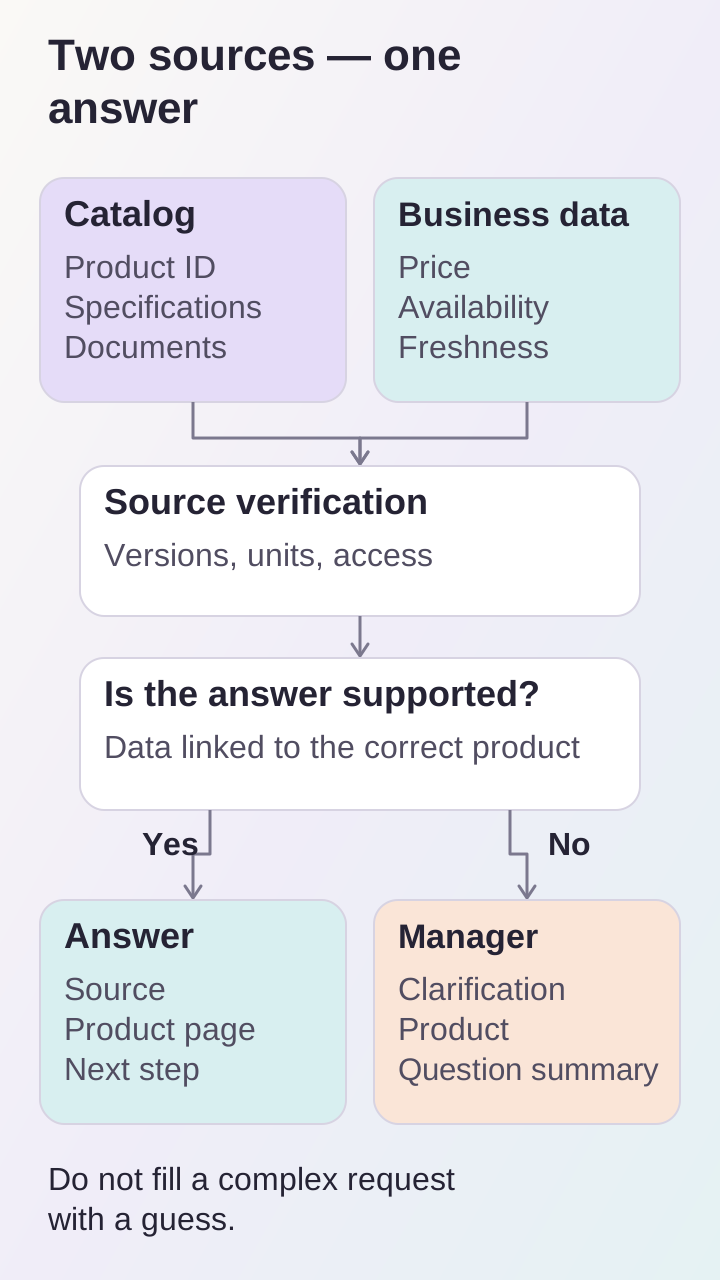
Stable specifications and current prices are checked separately; when information is missing, the consultation continues with a manager.
Prepare a set of test questions
Take real enquiries, remove personal data and group the questions by scenario. Add ambiguous wording, typos, product comparisons and requests for which the knowledge base has no answer. For each question, specify the expected source, an acceptable answer or the need for clarification.
Do not assess wording alone. What matters is consistency with the source, the correct product, the absence of invented specifications and a timely handover to a person. Repeat this set after catalog updates: it can reveal that a new data version has made previously resolved answers worse.
- Typical customer questions and difficult edge cases.
- Questions not answered by the available sources.
- Expected links, clarifications and handovers to a manager.
- Someone responsible for reviewing incorrect consultations.
Connect advice with an action
After an answer, visitors need a next step: opening a product page, downloading a document, comparing options or leaving a request. When handing over to a manager, preserve the selected items and a short summary of the question so the customer does not have to start again. Define what data will be saved and how long it will be retained before launch.
In BRAER AI, advice on materials sits alongside document search, dealer information and a visualizer. This is an example of connecting a conversation to a practical choice. For your project, the toolset follows the catalog and customers’ needs, rather than a requirement to reproduce every feature in the example.
