
First, identify the source of every value
Some store data describes the product; other data concerns the sale. Names, descriptions and images may be edited on the website, while stock levels and prices arrive from an inventory system. Decide in advance where the authoritative version of each field lives and who is allowed to change it.
If two systems can edit a price at the same time, you need a conflict resolution policy. Otherwise, the next synchronization may overwrite a manual change. Start with a table: field, source, recipient, update method and acceptable delay.
Each product and variant needs a stable identifier. Matching names is insufficient for data exchange: items with identical names can differ in size, color or configuration.

AI-generated illustration. The photograph, selected variant and order should describe the same item. Payment and fulfillment are checked separately.
Separate the order into independent states
Payment and delivery are different processes. An order may be created but not yet paid; paid but not yet packed; shipped in parts; or canceled after stock has been reserved. A single overall status soon becomes ambiguous.
Describe which transitions are allowed, who performs them and what the customer should see. For example, payment confirmation changes the payment status, while handing a parcel to the carrier changes the fulfillment status. Money refunds and product returns should also be treated separately.
Below are two conceptual illustrations: the store's connections to external systems and the stages of order processing. These are not screenshots of a finished product.

Agree how repeated notifications are handled
An external system may send the same event again. The order in which messages arrive does not always match the order of the original actions. For example, Stripe's webhook documentation specifically describes duplicate events and the absence of guaranteed delivery order. This is an example of one particular API's behavior; check the terms of your chosen payment service separately.
It helps to define in advance how the store recognizes an event it has already processed. A repeated message must not create another shipment or change the stock quantity again. Integrations typically store the event identifier and processing result.
An email to the customer, an on-screen confirmation and confirmation from the payment service mean different things. Closing a tab does not mean payment was canceled, and landing on a success page does not replace a server-side check of the payment status.
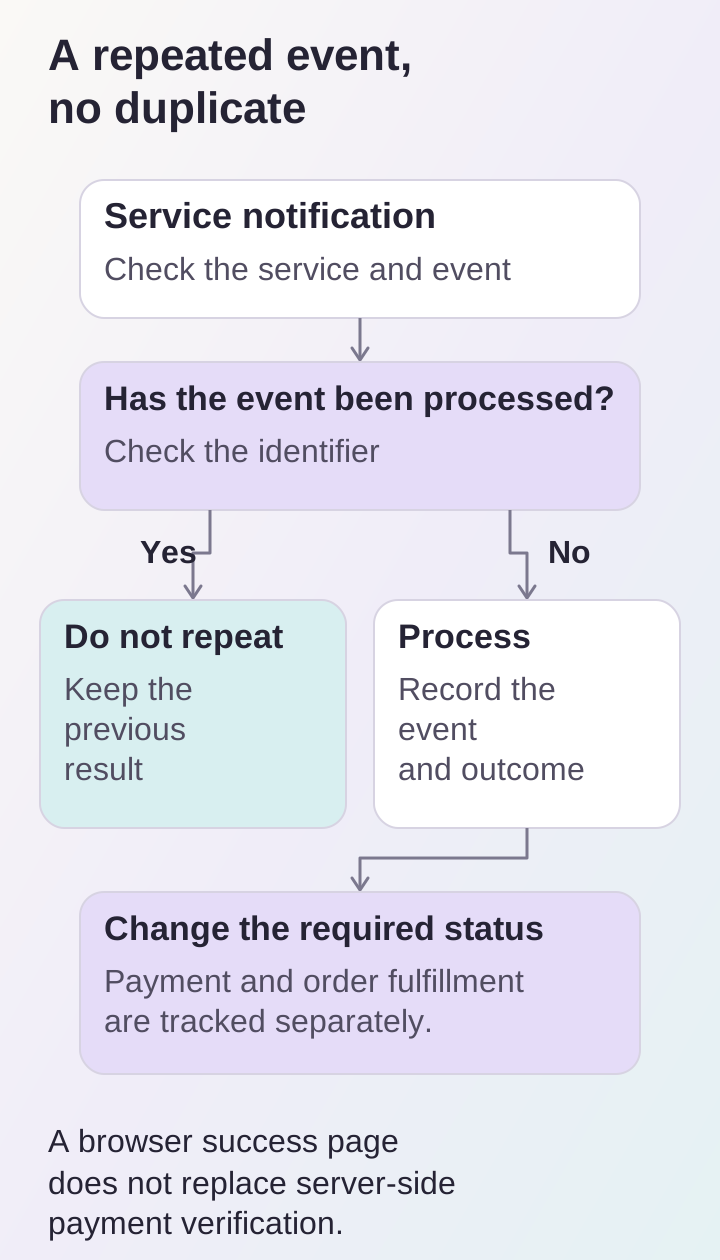
A repeated notification must not create a duplicate shipment; payment is confirmed on the server and tracked separately from order fulfillment.
Make errors visible to the team
If the warehouse is temporarily unavailable, the exchange needs a clear next step. That might be a retry, a processing queue or a decision by a staff member. Each option needs limits and an observable status.
A manager should be able to see the time of the last successful exchange, problem items and a clear explanation of why an order stopped. Developers need technical logs, but logs should not be the only way to discover a failure.
Separately agree what customers see when stock information is out of date. Options include asking a manager to confirm availability or temporarily restricting checkout. The choice depends on the sales process and acceptable risk.
Test the entire journey before launch
A test scenario should pass through every connected system. Creating an order on the website is not enough: verify that staff receive it with the correct items and prices.
Include the following in your test plan:
- a normal purchase and a declined or abandoned payment;
- a repeated notification for the same payment;
- a stock change between product selection and checkout;
- temporary unavailability of an external API;
- cancellation and the agreed refund scenario;
- partial shipment, if supported;
- restoring data exchange after a failure.
Before estimating an integration, collect the systems' documentation, their responsible contacts and access to a test environment. See the scope of work in our ecommerce section, or use the contact form to share a diagram of your current process.
