
Choose an ecommerce platform according to how your company sells products and processes orders. A hosted service may suit a standard catalog and ordinary purchasing. When you need control over hosting, extensions and changes, consider a self-hosted CMS. Custom development makes sense when a business-critical scenario is difficult to implement on an existing foundation.
To compare options, use your own catalog, several representative orders and your staff's tasks. Test them on each platform before choosing the design. This reveals constraints that a demonstration storefront can hide.
Start with your store's constraints
Product count alone says little about project complexity. A store with many similar items may follow a standard process. A small equipment catalog may need compatible-part selection, configuration pricing and manager approval of orders.
For an initial comparison, record a few conditions:
- what constitutes a separate product and which variants it has;
- how prices and stock change, and where their current values live;
- who buys: individuals, businesses or both;
- which actions customers must complete independently;
- what the team will regularly change after launch.
Separate mandatory conditions from possible future development. If dealer-specific pricing is needed at launch, test it immediately. The possibility of adding a complex configurator someday does not, by itself, justify changing the whole architecture.
We cover initial requirements in detail in “Ecommerce project brief: what to agree before development”. Here, those requirements become platform-selection criteria.
How a hosted service, CMS and custom development differ
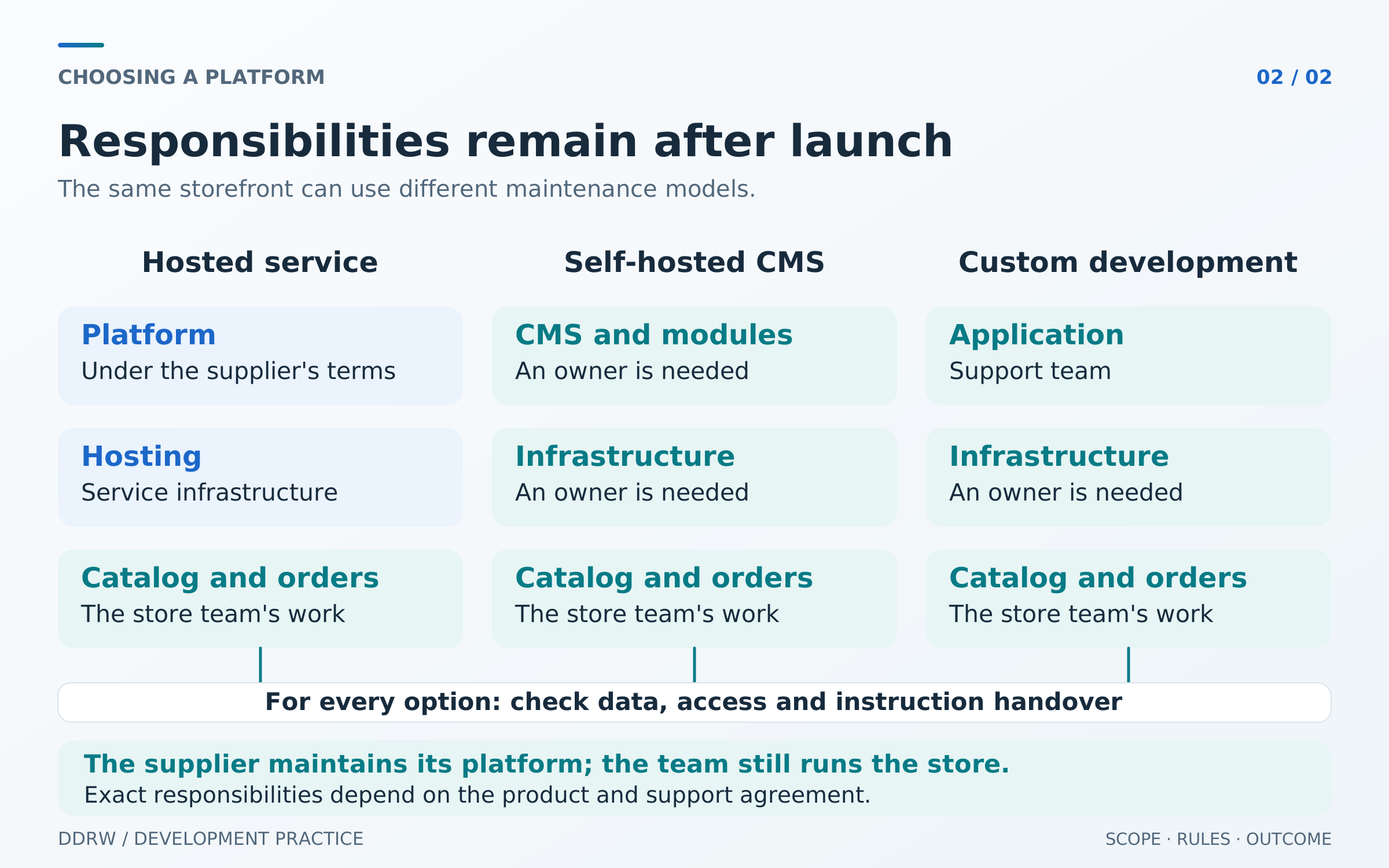
A hosted service, or SaaS, provides a store on the supplier's infrastructure. You work through its administration panel and use available features, plans and extensions. This reduces the work needed to maintain the platform itself. Catalog setup, integration checks and order processing remain the store team's responsibility.
A CMS is a content management system. In this comparison, we mean a self-hosted CMS, installed on a chosen server or with a hosting provider. For example, “1C-Bitrix: Site Management” is distributed as an installable product, while WooCommerce adds store features to WordPress. Check the capabilities of the specific edition, modules and configuration separately. 1C-Bitrix product description, WooCommerce documentation.
With custom development, the store's structure and interfaces are designed for specific processes. The team can still use existing libraries, payment services and other proven components. Custom development does not require writing every element from scratch.
These approaches can be combined. For example, keep an existing system for the catalog and orders while building a separate storefront or product selector. The comparison must then account for maintaining both parts and the connection between them.
| Criterion | Hosted service | Self-hosted CMS | Custom development |
|---|---|---|---|
Launch foundation | The service's available features and settings | CMS, theme and module capabilities | Agreed processes and existing components |
Changing behavior | Within settings and permitted extensions | Settings, modules and modifications within the architecture | Within the architecture and team's capabilities |
Hosting | Supplier infrastructure | Chosen hosting that meets CMS requirements | Chosen infrastructure that meets project requirements |
Maintenance | Under the service's terms; integrations and data still need team attention | An owner is needed for the CMS, modules and infrastructure | An owner is needed for the application and infrastructure |
Main dependency | Service terms and data-export availability | CMS, extensions and maintenance expertise | Code, documentation and maintenance expertise |
The table helps choose what to investigate. It does not replace testing a specific service, plan and implementation.
Which CMS or platform fits your scenario?
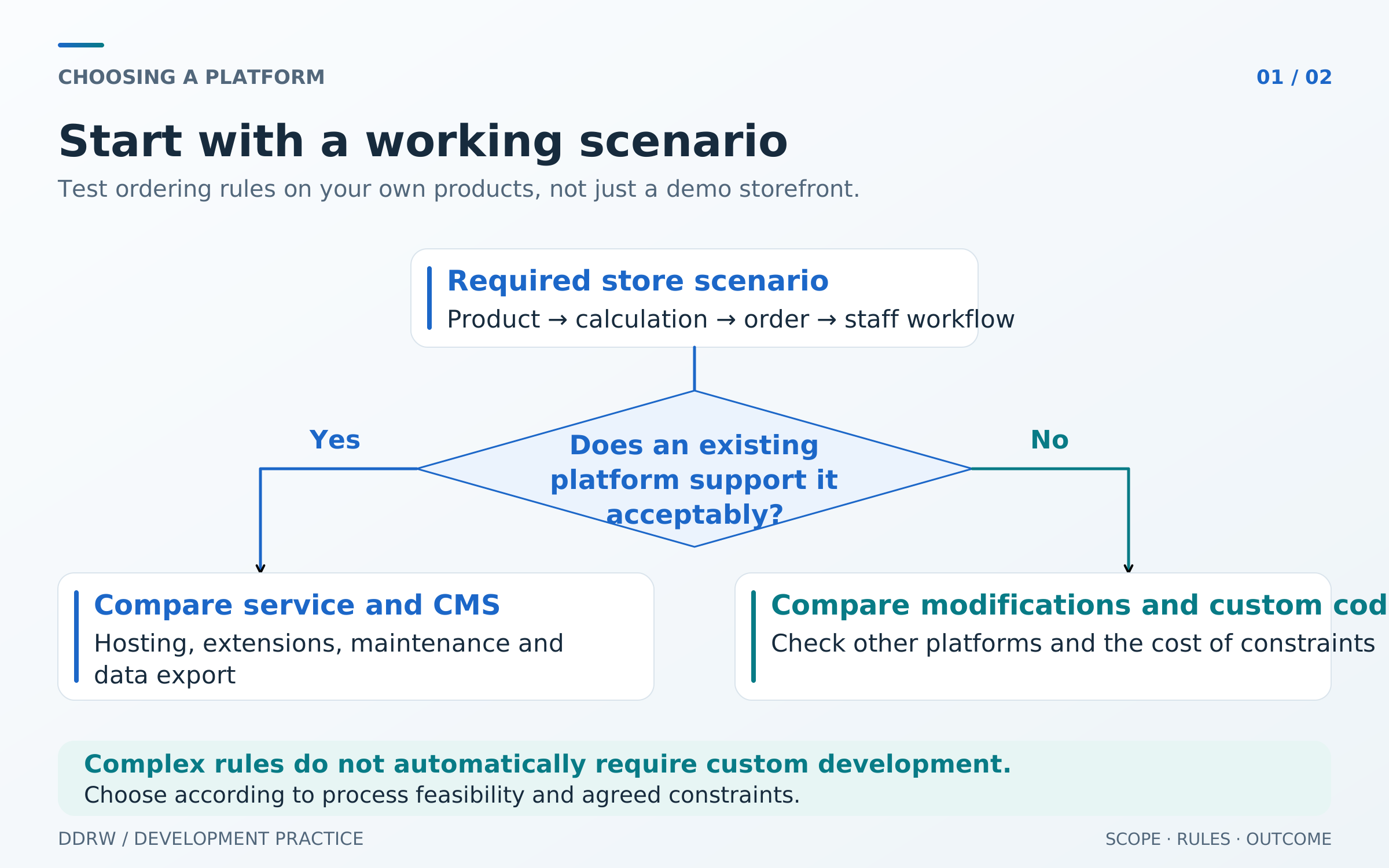
For a small retail storefront with ordinary checkout, it is reasonable to test a hosted service or website builder with ecommerce first. Verify that it supports your variants, payments and delivery, and that staff can update the catalog without constant developer assistance.
If you need control over hosting and extensive behavioral changes, compare self-hosted CMS options. An existing module is useful when its capabilities match the task. A large extension marketplace does not prove that your required combination will be compatible or maintainable.
For a wholesale store with negotiated prices, order multiples and special approvals, test the business rules in a working example. They may be supported by an existing platform, a module or a modification. Consider a custom solution when platform constraints obstruct a core process, rather than just the preferred appearance of a page.
There is no universally best ecommerce platform. A useful selection outcome explains why one solution meets your mandatory conditions and lists the limitations your company accepts.
Consider two hypothetical stores with identical catalogs of 120 items. The first sells home goods to individuals: one retail price, standard variants and ordinary checkout. Its team wants to publish seasonal collections independently. It is reasonable to test a hosted service using real product pages and a staff member's catalog workflow first.
The second sells equipment to organizations. Each buyer group has its own price list, orders must use pack multiples, and some products are available only to order. The key question is how the platform supports these rules together. First test a suitable CMS or commerce service with the required capabilities; if a critical process cannot be implemented acceptably, compare custom development.
Both catalogs have the same size. Sales rules and team workflows change the decision. The examples are hypothetical: they illustrate the comparison logic, not product-count limits for any particular platform.
Test the catalog using your own products
Ask to see several different items from your range: a simple product, one with variants and the most complex item. Examine how the system distinguishes SKUs, prices, stock and images, what employees can change in bulk and which data would require manual upkeep.
An import button does not mean the entire catalog can be migrated. For example, WooCommerce's built-in CSV tool works with a defined field and metadata schema; unknown columns are not automatically imported. Its documentation also specifies image-import limitations. Test your fields and files on a sample rather than blindly transferring the whole range. WooCommerce import documentation.
For automotive parts, also test compatibility-based selection. For materials, check required sales units and packaging. For clothing, check combinations of sizes, colors and stock. These conditions reveal a platform's suitability more clearly than the product count in its marketing copy.
Test integrations through your store's scenario
“There is a 1C integration” needs clarification: which configuration, which module and which supported actions? For platform selection, establish whether you can transfer the necessary data, receive a processing result and diagnose errors without manually searching several systems.
If an API—a programming interface for exchanging data—is available, check which operations it permits. Reading the catalog is not the same as updating stock, creating orders or handling order changes. Confirm that the chosen plan includes the interface and identify limits relevant to your load.
The exchange structure and system responsibilities are covered in our article on ecommerce integrations. When choosing a platform, establish that the required process can be implemented in the agreed configuration.
Consider search and URL management
If the store expects search traffic, check category and product pages: individual URLs, editable titles and descriptions, indexing controls and redirects. On the test storefront, open a direct product link: its description, images, price and required variant should be available. Customers should be able to continue choosing without visiting the homepage first.
URL structure also matters to search crawlers. Google explains how URL structure helps discover and index ecommerce pages. Google Search Central recommendations.
“SEO included” does not describe these capabilities. A platform supplies tools; catalog structure, page content and crawl configuration require separate work. Choosing a CMS does not, by itself, secure search rankings.
Distinguish product export from migrating the store
Before launch, determine what the company can obtain if it changes platforms or contractors: products and variants, images, orders, customer information and page URLs. For each data group, inspect a sample export and establish whether another system can use it.
For example, InSales documents CSV product exports from warehouse and storefront categories. This confirms a product-export capability, but migrating the whole store requires separate checks of other data and functions. InSales product exports.
Exporting page code does not necessarily transfer its management tools. Tilda's documentation states that the catalog administration panel is not exported and product changes remain inside the service account. An HTML archive therefore does not, by itself, make the store independent of the original platform. Tilda export limitations.
A self-hosted CMS and custom code also need preparation for handover. Check which credentials, source files, instructions and backups the company will receive. Transferring the project to another team depends on component licensing terms, complete materials and documentation quality.
Compare costs together with responsibility
Platform selection requires understanding the obligations. A service may involve a subscription and paid apps; a self-hosted CMS may require licenses, modules and maintenance; a custom solution needs application and infrastructure development. The exact combination depends on the product and support agreement.
For each mandatory condition, record how it is implemented: a built-in setting, extension, custom modification or manual operation. Separately flag unavoidable limitations. This enables like-for-like proposal comparisons without producing a detailed estimate for the whole project.
Check everyday team work too. If updating a collection or correcting a product page requires a developer, make that dependency clear in advance. We discuss editorial workflows separately in our article on a usable CMS for the team.
How to test a platform before the final choice
Run the same small demonstration on two or three suitable solutions. This is a selection test, so a representative catalog sample and the most important actions are sufficient.
- Import a catalog sample. Include a simple item, variants and a product with unusual sales conditions.
- Complete a representative order. Use the required buyer type, payment method and delivery terms in test mode.
- Change the source data. Demonstrate a price or availability update on the storefront and place another test order. Check existing orders' behavior against the agreed rules.
- Give a store employee an ordinary task. Have them correct a product page or update a collection without a developer doing it for them.
- Obtain a sample export. Check that important fields and relationships survive, rather than merely confirming a file exists.
Record results in a table: “condition,” “how tested,” “what works,” “required modification” and “remaining limitation.” If a mandatory process has not been demonstrated, it remains unverified regardless of the platform's reputation.
This approach gives clear reasons for choosing an ecommerce platform. The company sees which tasks are supported out of the box, where development is required and who will maintain the outcome after launch.
If you are choosing a foundation for a future store, see DDRW ecommerce and storefront development. Use our contacts to share a sample catalog, an important purchase scenario and your current system's constraints—enough to begin a concrete comparison.
