
Start with the buyer’s questions
A database may contain many attributes, but not every one helps a customer choose. We recommend starting with the questions buyers ask when comparing products: will the size fit, is the required material available, is the model compatible, and what is it used for? Filter parameters should reflect these differences rather than simply repeat every available column in the inventory system.
Different categories usually need different sets of filters. A light fixture calls for power and mounting method; furniture calls for dimensions and material. A shared filter with half its fields irrelevant to the selected category makes the task harder. Establish the category first, then show genuinely useful constraints. Check the names with someone unfamiliar with the company’s internal abbreviations.

AI-generated illustration. Filters should use verified attributes and present comparable product cards.
Standardize the values
A filter does not fix inconsistent data. If a material is recorded as “steel,” “Steel” and “metal: steel,” the results may offer duplicate versions of the same value. Before designing the interface, check measurement units, names and the completeness of key properties. Decide separately how to display products with an unknown attribute.
Store and compare a numeric parameter as a number in agreed units. Choose a convenient display for visitors, but keep the meaning of a range unambiguous. For example, package dimensions must not be mixed with the dimensions of the item itself. Discuss this catalog-model recommendation with the data owner before drawing the filter panel.
Explain what is already selected
After applying a filter, visitors should see the active conditions and how to remove them. Displaying selected values beside the results is useful, especially on a phone where the filter panel may close. A “Reset all” action helps with complex selections, but does not replace the ability to remove just one constraint.
Agree in advance when the list updates: immediately after a selection, or after a separate button is pressed. Either approach can be appropriate. If someone chooses several parameters in succession, constant page rearrangement can interfere. If a separate button applies the selection, its position and label should make clear that the choices are not yet confirmed. Consistent behavior across categories matters.
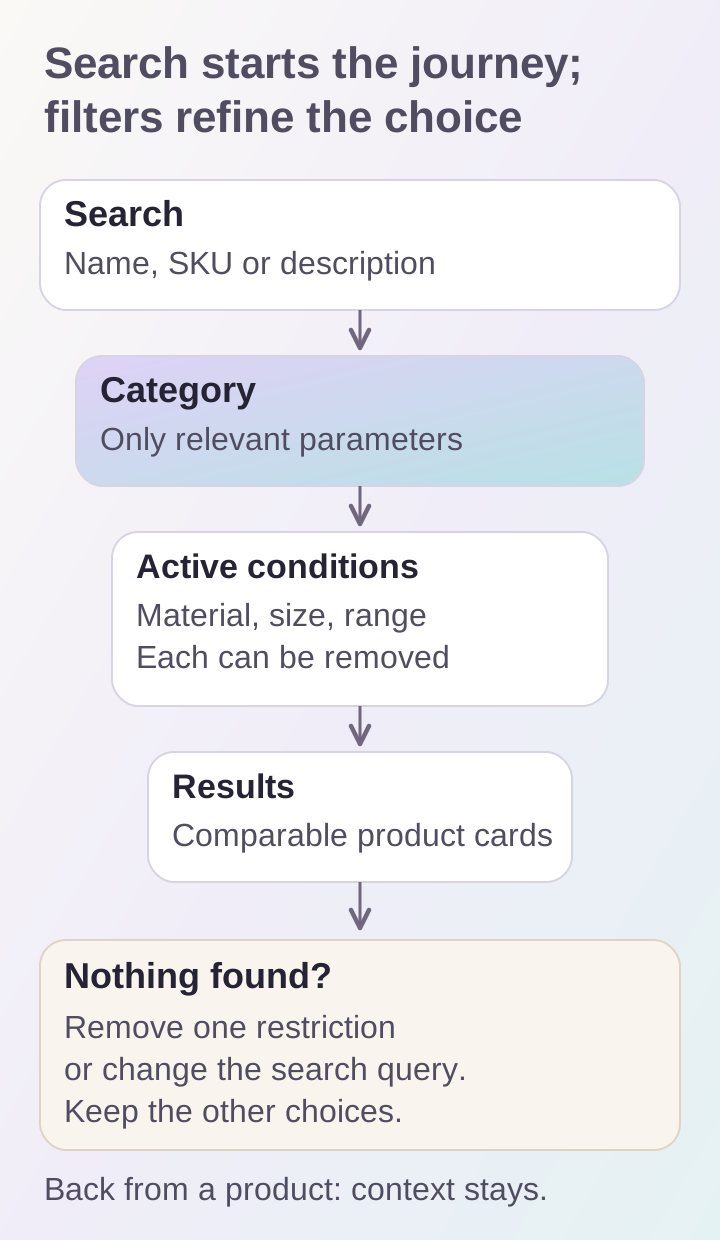
Search and filters solve different tasks. With empty results, changing one condition while keeping the selection context is helpful.
Separate search from refining results
Search lets someone start with a product name, SKU or description; filters narrow the resulting set. Check the queries people actually use: a full name, a short series name or a model designation. In an equipment catalog, searching by SKU may be more important than sophisticated free-text processing.
We recommend preparing a small query set with expected results in advance. Include an exact match, a common abbreviation, a typo and a query with no suitable products. Do not promise support for every spelling if that mechanism is not implemented. If the system corrects a query, show the correction and explain which words produced the results. Otherwise, a seemingly suitable result might actually be the wrong model.
Plan for empty results
“Nothing found” should not become a blank page. Keep the query and active filters visible. Suggest removing a specific constraint, changing the wording or opening a category. Do not replace a missing exact match with a random selection without explanation.
For example, a visitor selects a material and a narrow width range. If no products match, showing how to widen the range is more useful than resetting every condition. For made-to-order products, a separate consultation link may be appropriate. That decision depends on the company’s real process: the button should not promise a supply option employees cannot arrange.
Preserve the path to a product
After opening a product card and pressing “Back,” people expect to see the previous list with their selected conditions. We recommend testing filter, page and scroll-position restoration as a separate scenario. Otherwise, comparing several products requires repeating the search after each card.
Long lists need an understandable way to reach the next section. Google’s guidance on catalog pagination explains why crawlers need accessible page links and why user-button clicks cannot be relied on to reveal an entire list. Incremental loading can be combined with page URLs; assess the chosen solution for both visitors and catalog crawling.
Test the catalog on a phone
On narrow screens, filters often open in a separate panel. Check closing, scrolling, applying and resetting it. Buttons should not disappear beneath the system keyboard, and active conditions should remain after the panel closes. Long values such as material names should be readable without making the entire screen scroll horizontally.
Cards also support selection: names, prices and important parameters should be comparable. Avoid overloading them with every property at once. We recommend keeping what helps someone decide which card to open next, with detailed information on the product page.
Use a short acceptance checklist:
- Parameters match the buyer’s questions.
- Identical values are not duplicated.
- Active filters are visible and can be removed individually.
- Search is tested against prepared queries.
- Empty results offer a clear next step.
- Returning from a card preserves context.
- The catalog works on phones and with a keyboard.
This work can be included in developing an online store or storefront. For an initial estimate, provide sample product data and several tasks a buyer should be able to complete in the catalog.
