
First define the decision the customer needs to make
If the task is to compare the overall look and combinations of materials, a photo-based generative workflow may be suitable. Placing a specific model accurately at specified dimensions requires other approaches: prepared models, measurements or a constrained configurator. The same word, “visualizer,” can describe different products.
Define the user’s outcome: choosing several options for discussion, obtaining an image for a consultation or assembling an exact order configuration. The last scenario requires a verifiable connection between each selected element and the catalog. An attractive image is not enough to specify an order.
- What decision should the visitor make after viewing?
- Is a concept needed, or an exact match to a model?
- Which parameters must remain unchanged: dimensions, openings or the number of elements?

AI-generated illustration. The material sample and source photo need checking before visualization. The image alone does not confirm exact color or order specifications.
Source-photo quality affects the result
Give the user clear photo requirements: the whole object is visible, people or vehicles do not obscure the relevant surface, and the image is sharp without severe overexposure. A strongly tilted or blurred photo makes it difficult to separate material from shadows and preserve surface boundaries.
Show an example of a suitable image immediately before upload. Explain whether sketches are accepted, which formats are supported and how oversized files are handled. If a photo is unsuitable, a request to upload another with a specific explanation is more useful than an unconvincing visualization without context.
- A sharp image with the working surface visible.
- Few obstructing objects or pronounced distortions.
- Clear instructions beside the upload control.
- Agreed rules for storing and deleting uploaded photographs.
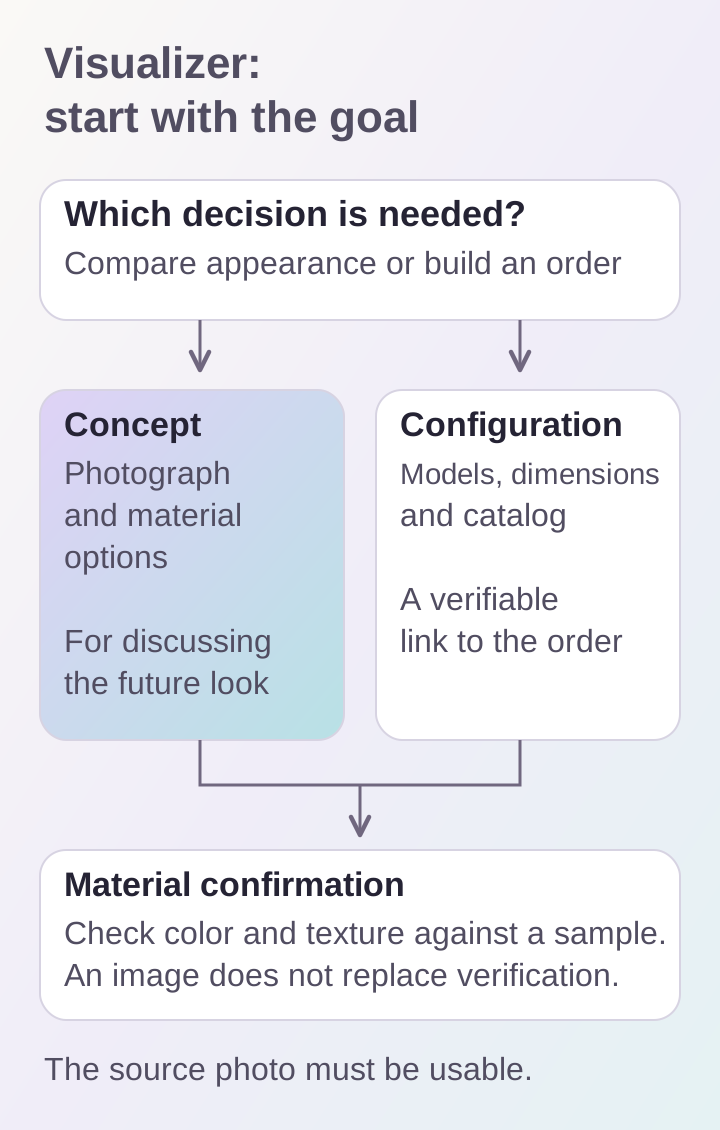
Conceptual visualization and exact order configuration require different approaches. An image helps discuss a choice but does not confirm precise shades or dimensions.
Explain limitations in advance
Color appearance depends on the lighting in the source photo and the user’s display. Generative processing can alter small details, surface patterns or object boundaries. The image should therefore not be presented as confirmation of an exact shade, texture or structural solution.
If a material has a repeating pattern or a defined format, check its scale and orientation. Bricks require correct proportions and joints, panels require a layout, and furniture requires dimensions. Where an error would affect an order, additional checks and specialist confirmation are needed. Compare the final material choice with a physical sample.
How to test a visualizer before launch
Collect a set of different source scenes: bright and dark, simple and complex, partly obscured, taken from unusual angles or containing many details. Define criteria for each scene: preserving the object, processing the correct area, matching the selected material and avoiding unrelated changes.
Check the entire phone journey: uploading from the gallery, waiting, retrying, viewing before and after, and saving the result. An external-service error or slow network should not leave someone facing an endless indicator. The interface should explain the current state and offer a next step.
- Are the object’s shape and important details preserved?
- Are the selected material options distinguishable?
- Are waiting, errors and retries understandable?
- Is it easy to compare and save the result on a phone?
How to connect visualization with sales
Link the result to the selected product’s name and a way to continue the discussion. The source photo, visualization option and selection parameters are useful to a manager, within the agreed data-processing workflow. This makes the image part of a consultation rather than a separate diversion.
In BRAER AI, the visualizer is available alongside building-material consultations and supports photographs, drawings and reference examples. We treat this workflow as a tool for discussing a building’s future appearance. Sales growth can only be substantiated through analytics and comparable measurement conditions, not the quality of the pictures.
