
Views, clicks, inquiries and payments answer different questions. Combining them into one “conversions” figure may make a report look convincing without explaining what happened to the business. A visitor can press a button several times, never submit a form or place an order that remains unpaid.
Useful analytics starts with a decision: what do we want to understand, and what action will we take depending on the result? Only then do we choose events, parameters, reports and a way to verify the data.
We will examine the process using a hypothetical store and service website. The store sells products with variants, while the website accepts project-development inquiries. The examples illustrate measurement logic, not real DDRW metrics or a promise of growth. This article does not install a tracker or replace a separate review of a particular website's data.
1. From a business goal to a question and decision
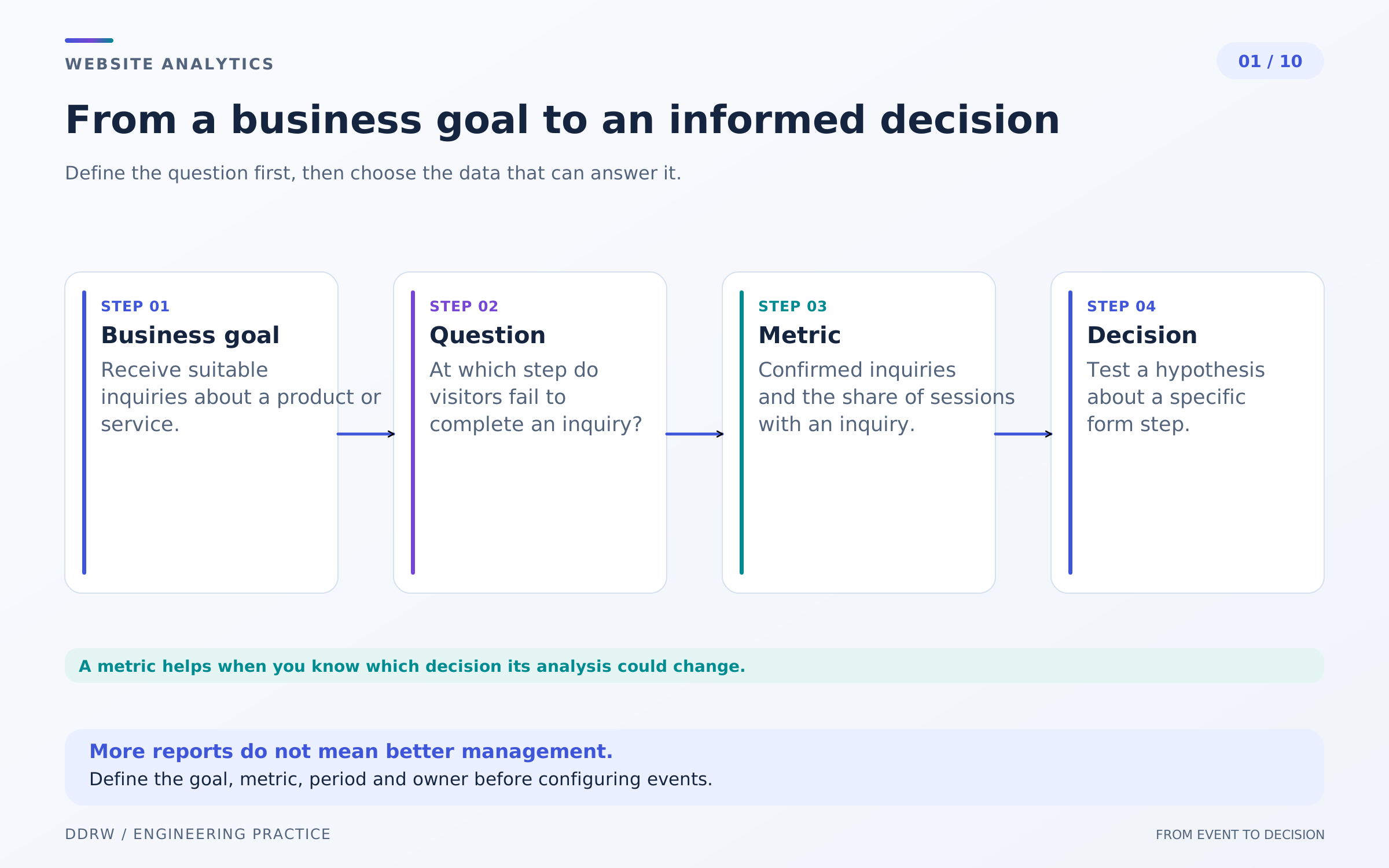
“I want more website numbers” is a weak brief. A more useful question is why visitors begin checkout without creating an order, or which service pages bring inquiries the team actually takes on.
For a store, the business outcome can be connected to paid and fulfilled orders, accounting for returns and costs. For a service website, it can be suitable inquiries and subsequent agreements. View counts help explain the journey but do not replace these outcomes.
Every question needs a metric and a possible decision. If checkout errors occur frequently on mobile, investigate the affected step. If inquiries are numerous but unsuitable, review the offer and traffic quality rather than just button size.
Define the unit of analysis in advance: a visit, visitor, inquiry or order. Specify the period and inclusion conditions. Otherwise, the same name can refer to different numbers that cannot meaningfully be compared.
Identify limits on the conclusion too: information available only in the admin system, missing links to advertising sources, inquiries arriving by phone. An incomplete picture can still be useful when its boundaries are known.
A small set of metrics connected to current questions is enough to begin. Add a new metric when it is clear who reads it and what they will do with the result.
2. Measurement plan: a shared event dictionary
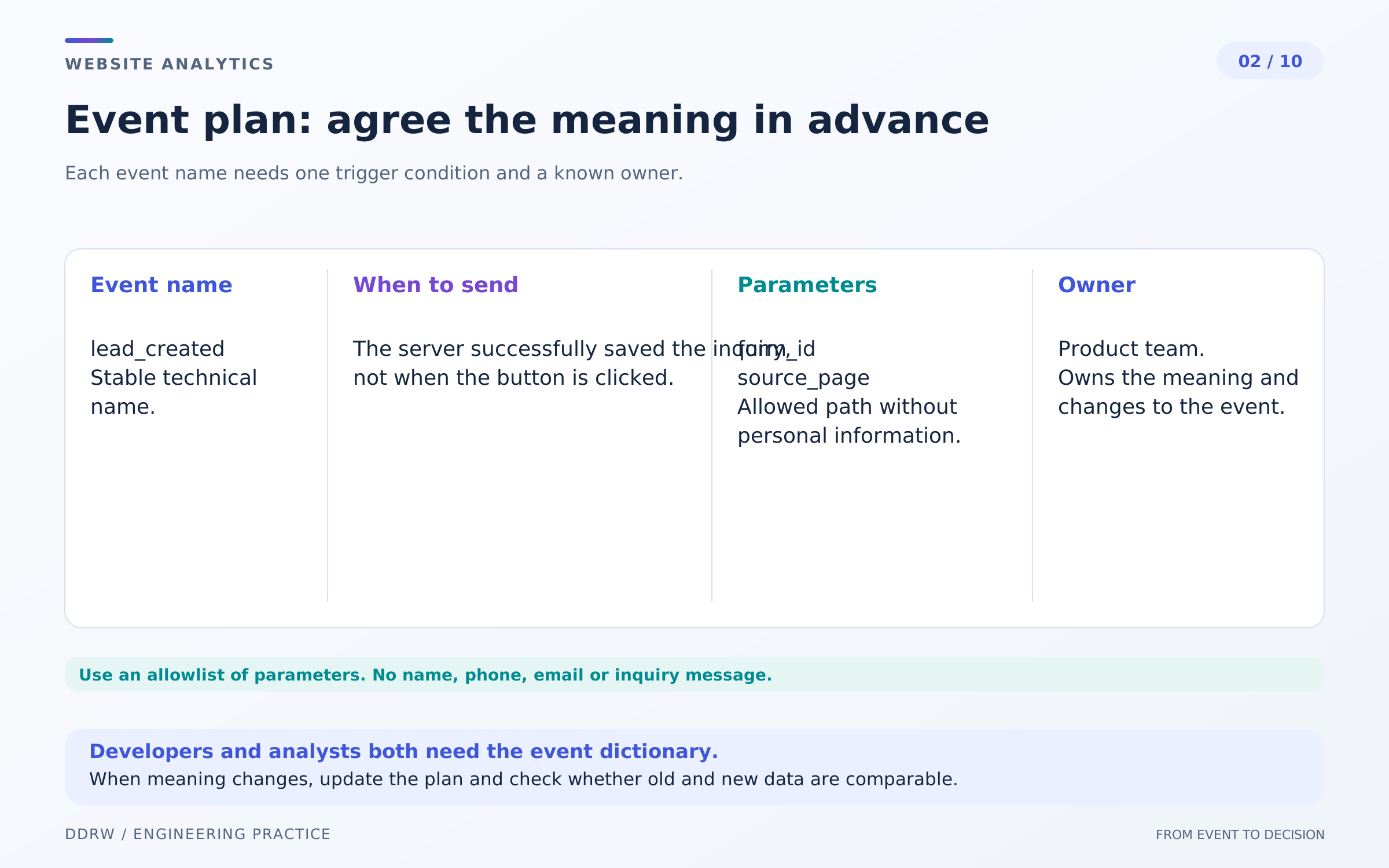
An event describes a specific fact: a form opened, a submission attempt began or an inquiry was saved. The measurement plan records its name, precise condition, allowed parameters and the person responsible for its meaning.
A hypothetical dictionary for a service website might distinguish opening the form, an error and confirmed inquiry saving. For a store, describe product viewing, adding a variant to the cart, creating an order and confirming payment separately. These are examples of structure, not mandatory identifiers for a particular tracker.
In Yandex Metrica, information about reaching a custom goal can be sent through reachGoal. The identifier must match a configured goal, and different facts should be explicitly distinguished. Calling the method does not itself confirm the event's business meaning. reachGoal documentation.
Parameters may include page type, service area, form placement or product category. Names, phone numbers, email addresses, free-form inquiry text and secret links are unnecessary in ordinary analytics parameters. Sending the entire form object “just in case” is a poor measurement design.
For every event, record an example of the expected result and the repeat rule. Opening a form again may be a new interaction; receiving confirmation for the same purchase again must not create another purchase.
Versioning the dictionary helps during redesigns. Record changes in meaning: old and new periods cannot silently be combined under one name and treated as fully comparable.
3. Views, clicks and inquiries: count different facts
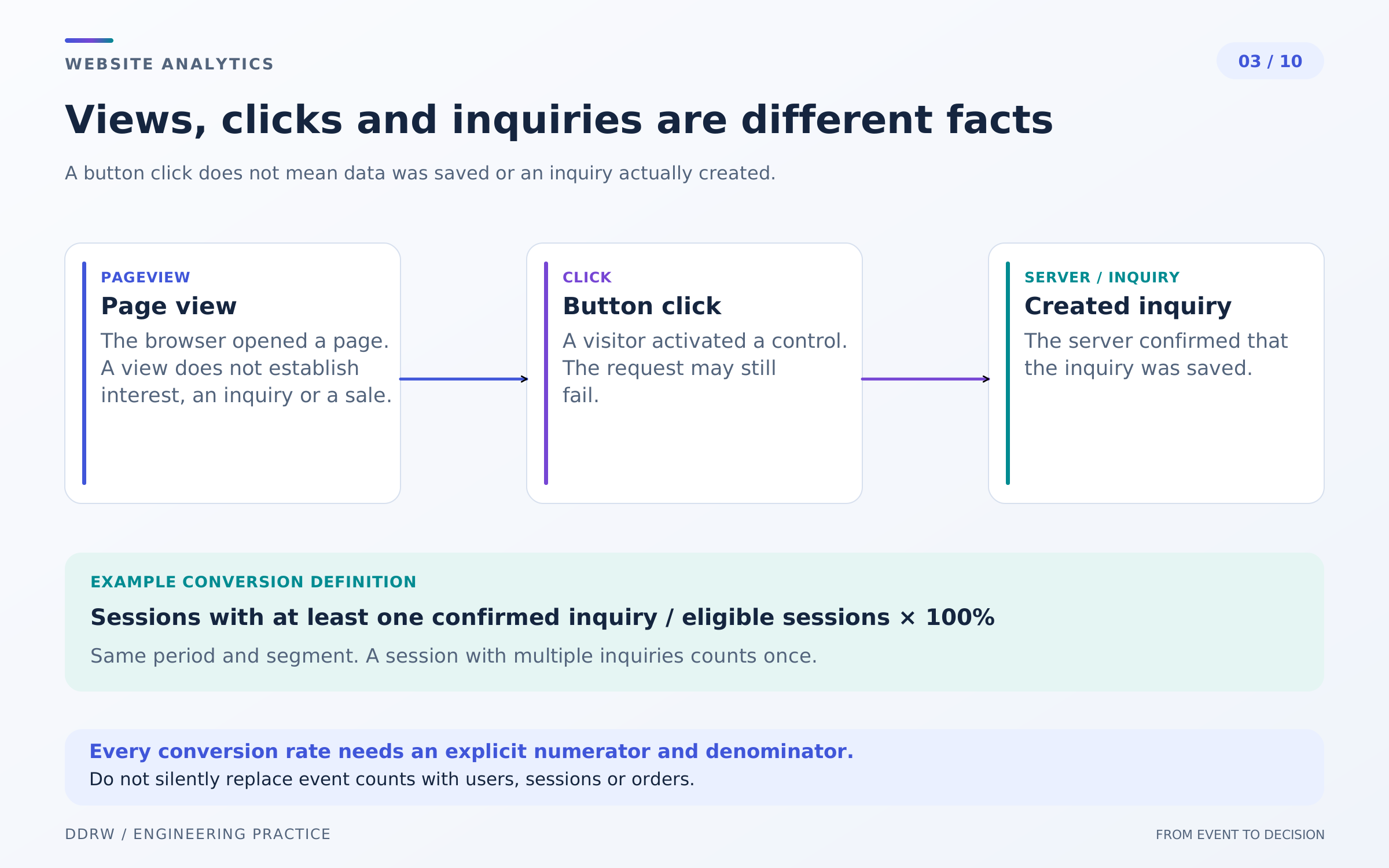
A view means the analytics system registered a page opening. A click on “Discuss a project” is interaction with a control. Neither fact means the server received an inquiry.
A saved-inquiry event needs confirmation of that operation. Even saving a record does not yet prove the contact is valid, the task suits the company or the conversation will lead to a contract. These statuses appear later in the working process.
A form submission attempt and successful completion differ too. A field error, network failure or server rejection should leave a separate trace rather than count as a successful inquiry. Confirmation that data reached the tracker is also not confirmation that the inquiry reached a staff member.
Conversion always requires a denominator. In Metrica, visit conversion is the ratio of goal-reaching visits to all visits, while visitor conversion is the share of visitors who achieved a goal. These are different calculations. Metrica definitions of goals and conversion.
If someone presses a button several times during one visit, the number of completions may differ from the number of goal-reaching visits and visitors. Use the metric's full name in reports rather than just “conversion.”
For a service website, compare confirmed inquiries with administrative records; for a store, compare with orders. Investigate discrepancies through definitions and collection limits first, rather than automatically declaring an interface bug.
4. Funnels: finding a stage to investigate
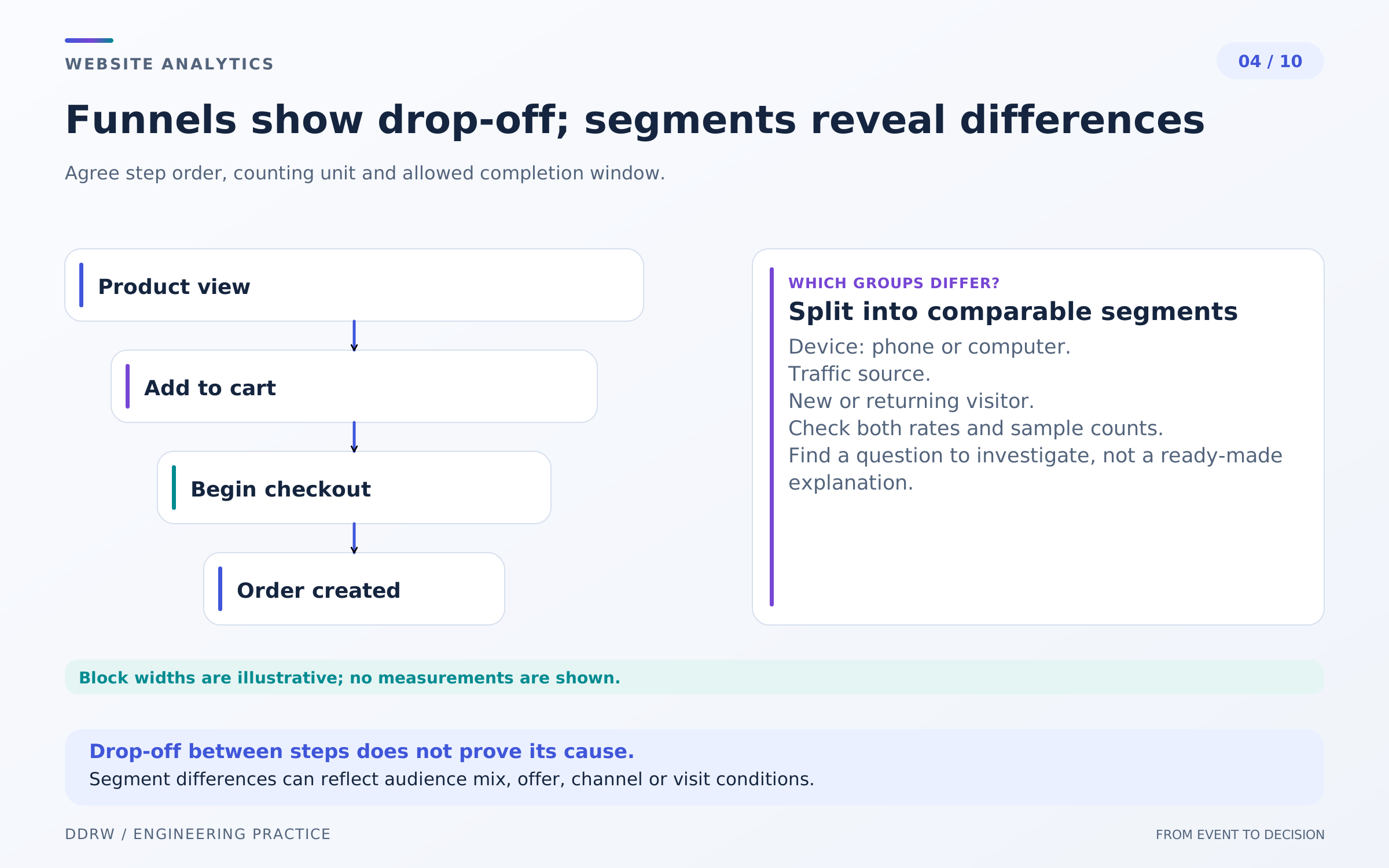
A funnel orders steps: product view, add to cart, start checkout, order, payment. A service website has a different path: explore the offer, open the form, submit and save the inquiry.
Agree on how steps are connected. Did they occur in one visit, for one recognized visitor or for one order? How long is the transition allowed to take? Must every intermediate action be completed? Changing these conditions changes the picture.
Not every buyer follows an ideal sequence. Some open a direct product link, return later or switch devices. For a service, someone may read a case study and call without opening the form at all. Such a path does not necessarily represent a lost customer.
Segments refine the question. Compare mobile and desktop, browsers, new and returning visits, categories or sources. Keep step definitions consistent and avoid dividing data into almost empty groups.
A noticeable exit at size selection is a reason to check option availability, interface clarity and stock. It is not yet proof that design is the cause: the range and visitor intent also affect the action.
A funnel shows an observed sequence and helps choose where to investigate. Explaining causes requires further checks: reviewing technical errors, discussing inquiries with the team, researching the journey or running a carefully planned experiment.
5. UTM and attribution: where the visitor came from
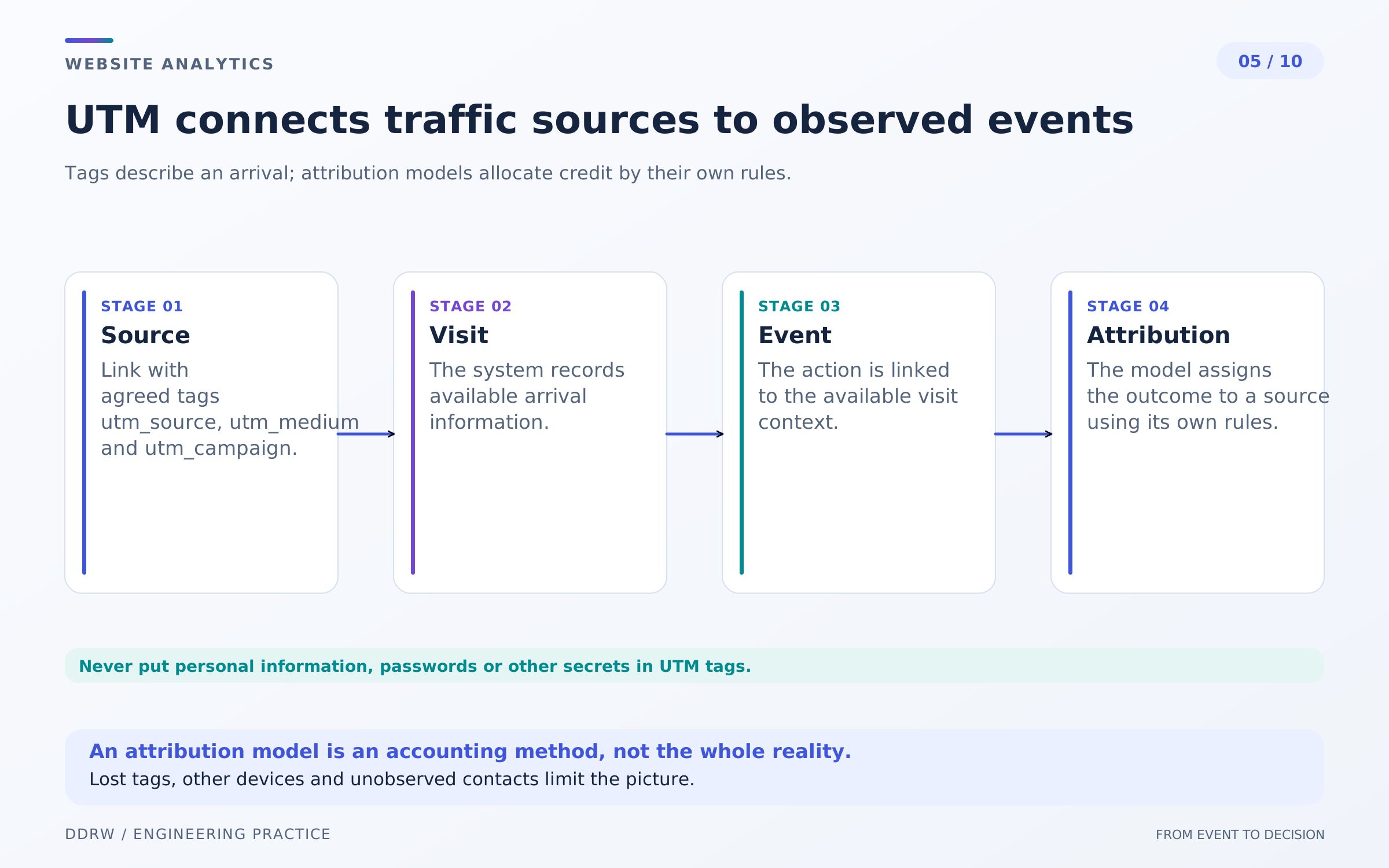
UTM parameters distinguish external campaigns and placements: source, channel, campaign and link variant. A shared naming reference helps the team. Arbitrary abbreviations and inconsistent case can split one source into several rows. Email addresses, phone numbers and other contact details do not belong in tags: URL parameters may be retained in history, logs and third-party systems. Metrica UTM report.
Tags do not prove advertising alone caused a purchase. A link may have been forwarded, saved or reopened. Information can be lost during navigation or through browser restrictions; the source may also be determined from the referring page.
Distinguish internal navigation with separate events and placement parameters. Adding campaign tags to your own buttons can confuse source interpretation and subsequent comparisons.
Attribution defines how an outcome is connected to observed sources. Someone may first read an article from search, later open an email and return directly. The chosen model represents those contacts' contribution differently. Metrica attribution models.
When comparing reports, record the model, period and available history. Do not change the rule mid-campaign and treat the difference as proof of improvement. Product capabilities change too, so verify current settings in the system's documentation and report.
Do not automatically interpret “direct visits” as “people remembered the brand.” It reflects source information available to the system. Inquiry quality and the limits of the observed journey also matter for budget decisions.
6. Commerce: separate order, payment and refund
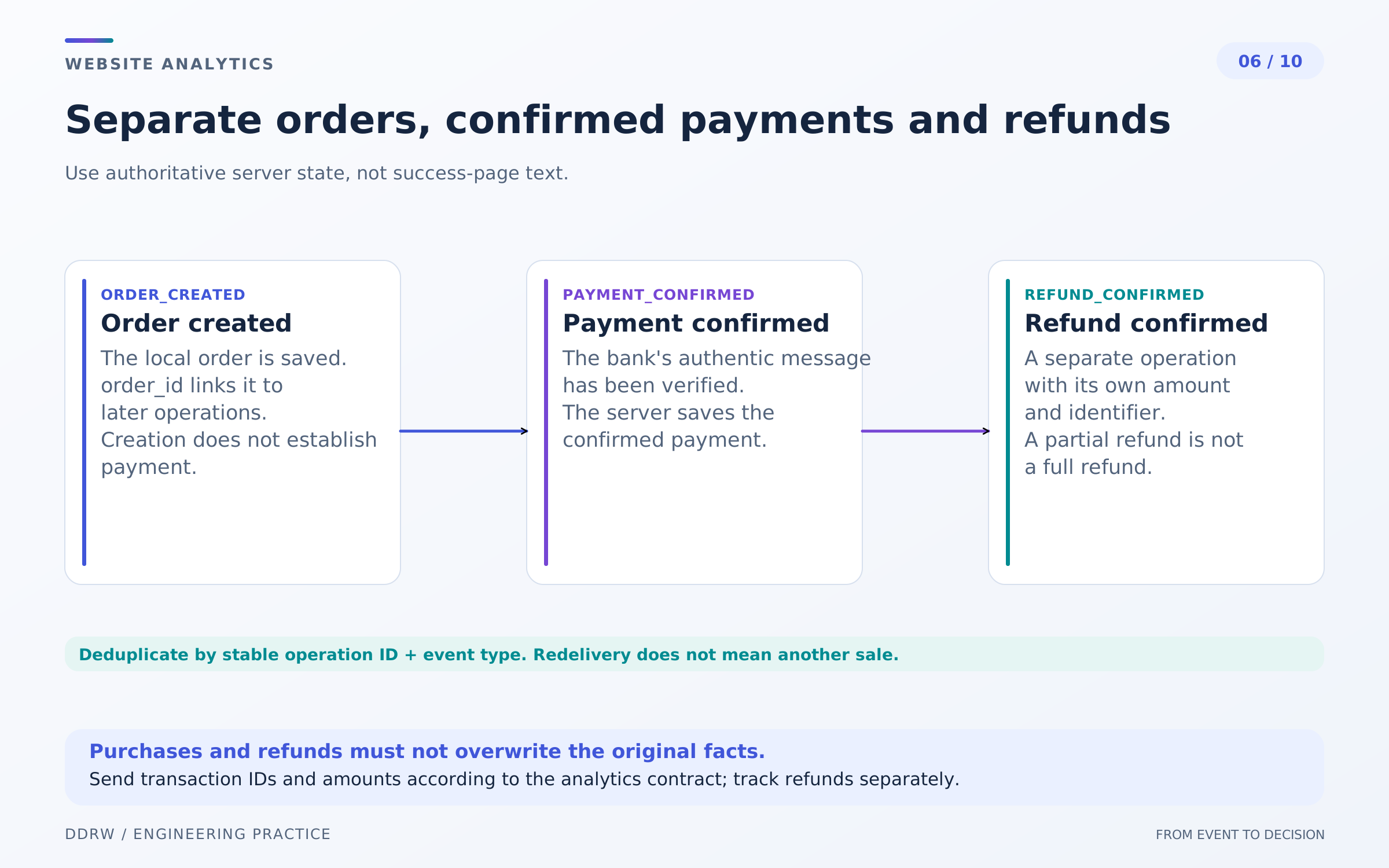
A created order, confirmed payment and fulfilled purchase are different facts. Calling all of them a “sale” mixes expected money with actual receipt. Define in the dictionary which state each event represents.
A browser returning from the payment page does not prove payment. A financial event needs a confirmed status from the server process. Rejection and waiting retain separate meanings, and a partial refund cannot be treated as the disappearance of the whole order.
Analytics systems offer dedicated ecommerce events. Google Analytics, for example, distinguishes purchase and refund and supports a transaction identifier and item list. The store integration still determines the meaning of the submitted data. Ecommerce documentation.
Every recorded purchase needs a stable unique identifier. Reopening a page or redelivering an event must not create a new transaction. GA4 web streams support purchase deduplication through transaction_id under the conditions stated in the documentation. Transaction identifier rules.
Do not give different orders the same identifier or create a new one for each retry. Nor should one product's behavior be assumed for every analytics system: verify deduplication and refund rules separately.
Analytics reports do not replace order accounting and payment reconciliation. For comparison, agree on currency, period, discounts, shipping, taxes and refunds. An amount sent to a tracker does not itself confirm a bank receipt or profit.
7. Data quality: checking the event's path
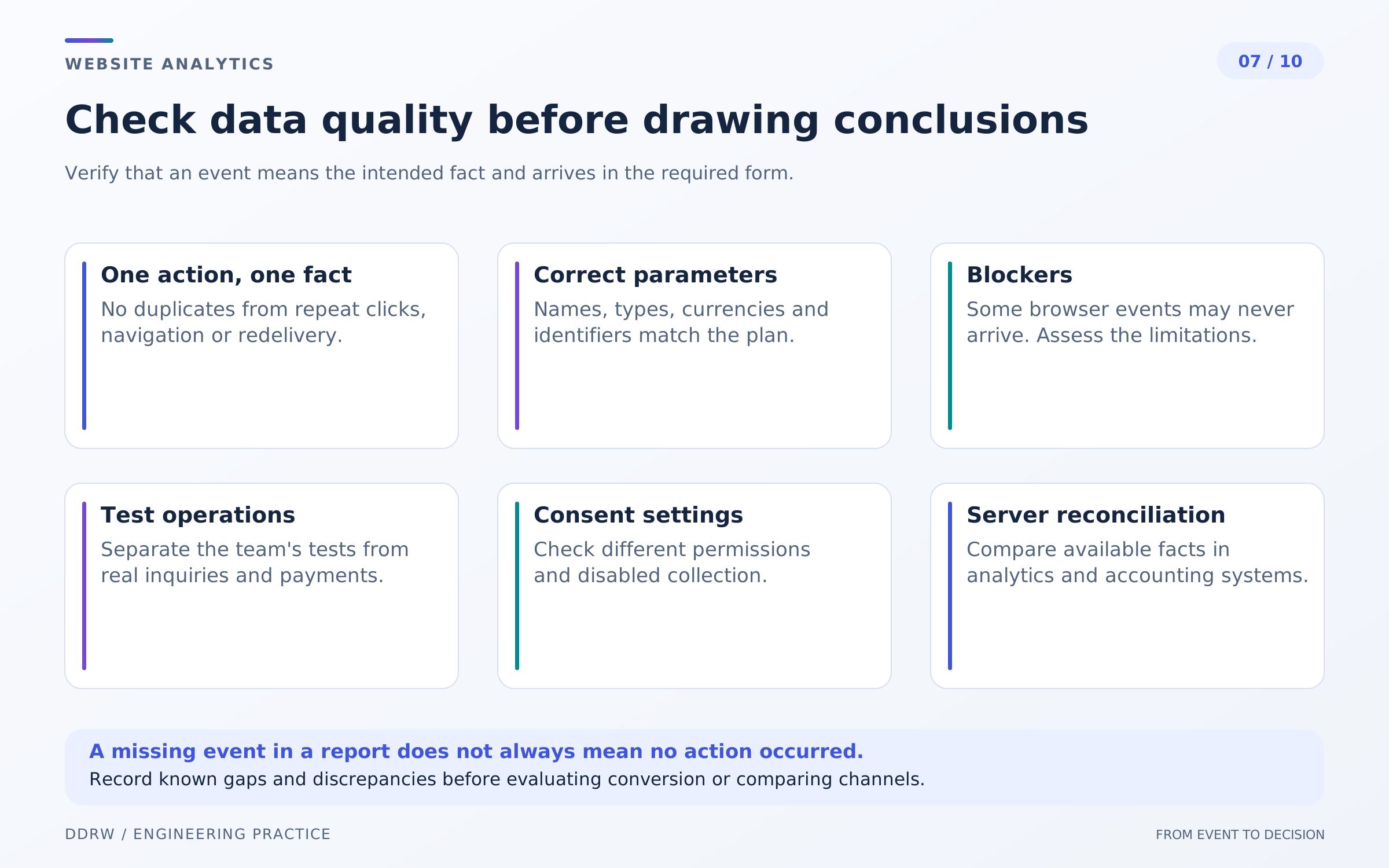
Separate measurement verification from business verification. First establish that an event appears at the correct moment, has the right parameters and is not duplicated. Then match it to a fact in the application. A test order verifies the testing journey, not the arrival of a real buyer.
Analytics systems have debugging tools. Metrica can check goal achievement and its appearance in reports. This is a separate step after defining the event condition. Goal verification instructions.
Test different outcomes: success, error, resubmission, page refresh and internal navigation without a reload. Uncoordinated automatic and manual registration can double views or events.
Mark or exclude test operations and staff visits under an agreed rule. Avoid hiding real inquiries, and retain a way to confirm that data is arriving at all. Record the date of filter changes for later comparisons.
Browser blockers, network errors and privacy restrictions affect collection completeness. The tracker's operating mode and consent management also change the observed audience. This is a technical data limitation, not a reason to bypass user settings. Consider each project's requirements separately.
Check confidentiality too: URLs, event names and parameters must not accidentally contain contact details, inquiry contents or an access token. Fewer meaningful parameters are often more useful than an uncontrolled copy of every page value.
8. Performance: real audiences and the lab
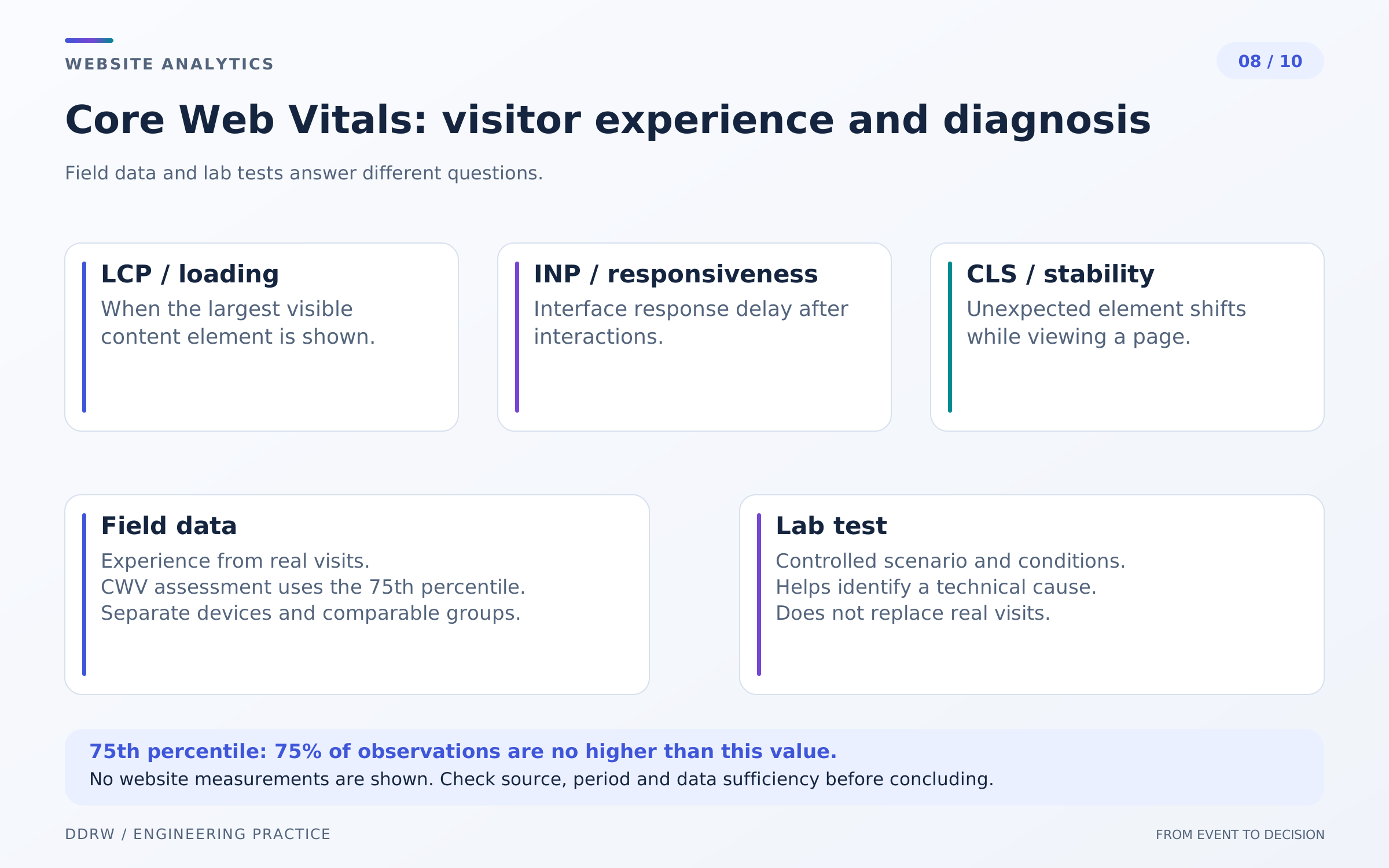
Website speed is part of user experience, not one universal number. LCP characterizes the appearance of the largest content element in the viewport, INP responsiveness to interactions and CLS visual stability. They describe different problems.
Good Core Web Vitals thresholds are LCP at most 2.5 seconds, INP at most 200 milliseconds and CLS at most 0.1. Assess the 75th percentile, separating mobile and desktop. These are methodological recommendations, not measurements of our hypothetical store. Web Vitals definitions and thresholds.
A percentile describes a distribution: for the corresponding share of observations, the value does not exceed the chosen boundary. It does not mean every user experienced the same speed. An average can also conceal difficulties for part of the audience.
The lab is useful for reproducible diagnosis with a chosen device, network and journey. Field data describes real visits within the covered audience. Differences between them are expected. Field and lab data explained.
Account for browser, device, connection and page mix. A report restricted to one browser or collection method cannot represent all buyers without qualification. Some metrics also require actual interactions throughout the visit.
After optimization, compare comparable conditions and check errors. A good lab score does not guarantee more inquiries; an improved field metric does not prove it caused changed sales. A business conclusion needs appropriate data and a comparison method.
9. Reports: context matters more than an attractive percentage
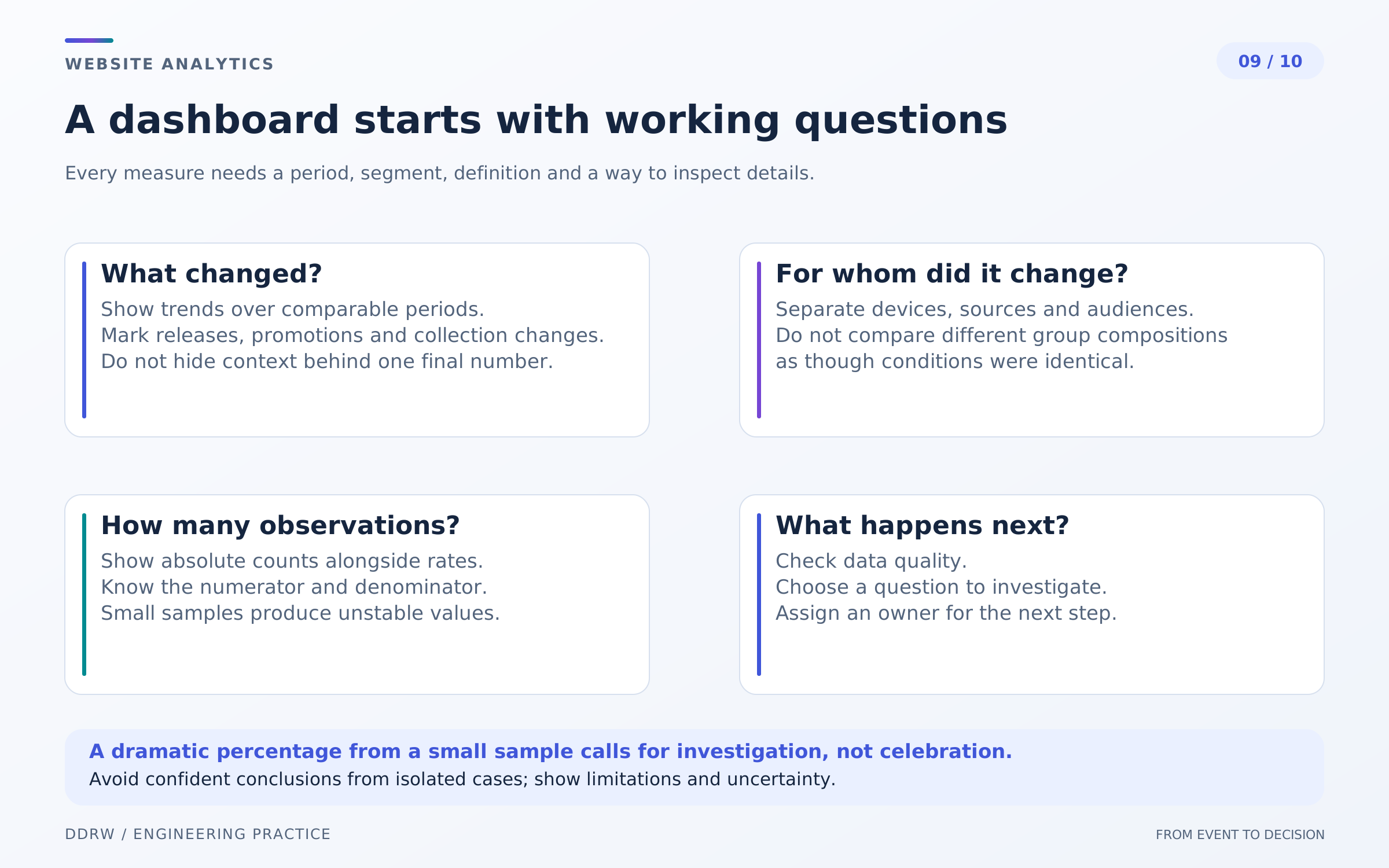
A useful report answers the question posed. Beside conversion, show visit or visitor counts and the number of outcomes. For sources, add inquiry quality where it is reliably linked to data. For a store, distinguish orders from confirmed payments.
With few observations, one outcome can change a proportion substantially. A large relative increase without absolute values is easy to overestimate. Instead of a confident conclusion, flag insufficient data and continue observing or choose a qualitative journey review.
Compare comparable periods and audiences. Overall conversion can change because of the mobile visitor share, product range or new campaigns even if behavior within each segment stays the same. Look at both the total and justified breakdowns.
Check report settings: time zone, filters, definitions, attribution and sample completeness. Sampling is another property of the specific calculation and must not be confused with a small number of actual inquiries. Metrica sampling guidance.
Annotate charts with page releases, goal changes, advertising activity and technical incidents. A month later, this helps explain possible trend breaks and where the data stopped being directly comparable.
End the report with a limited conclusion: what we observe, what we do not know and what we will check next. “Form errors occur more frequently in the selected segment” is more useful than an unsupported “mobile design reduces sales.”
10. From data to improvement: a hypothesis and comparison
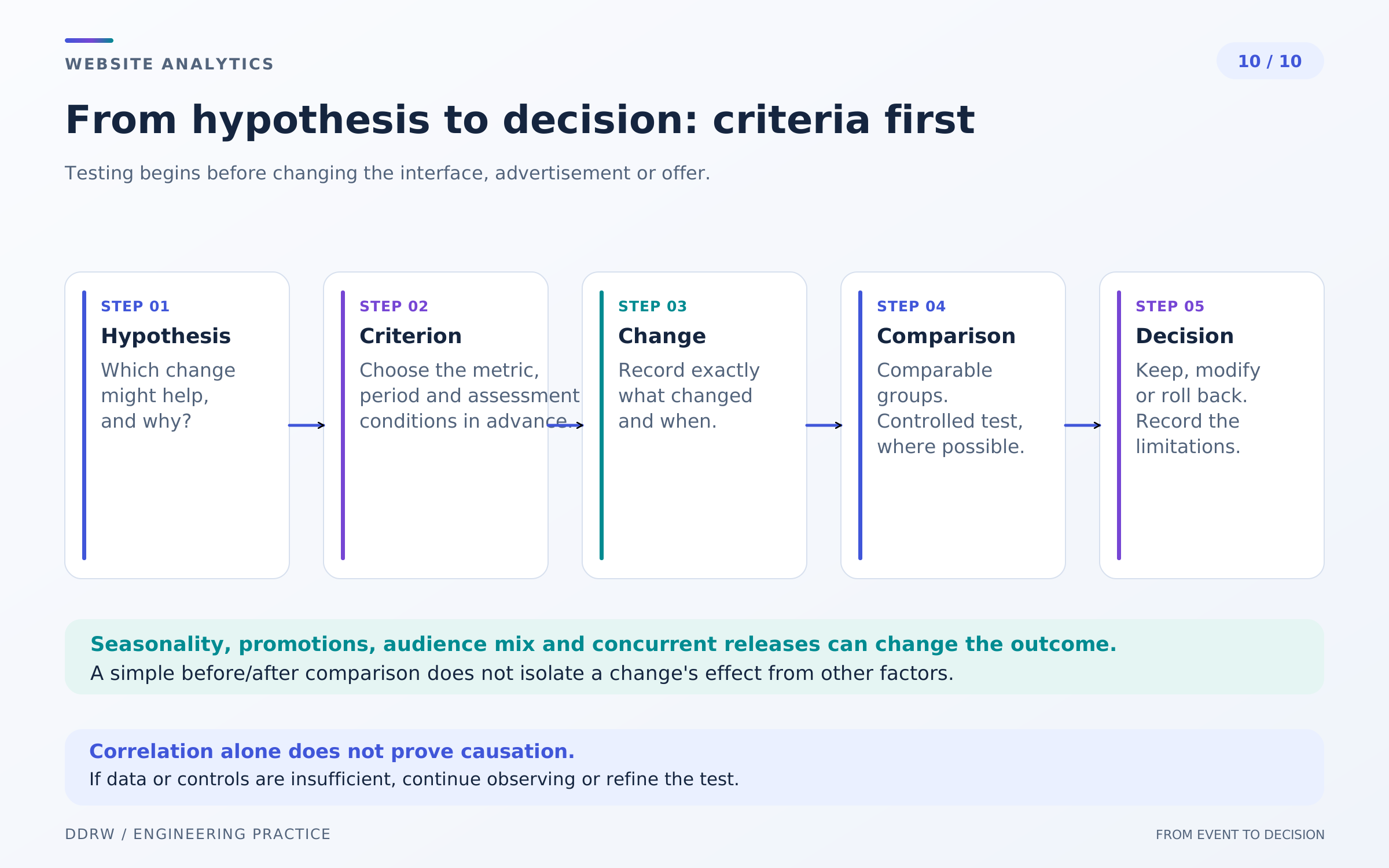
A hypothesis connects an observation to a testable change. For example: visitors struggle to understand which materials to attach; add a short explanation and review form completion and the quality of incoming tasks. Define the primary outcome and unwanted side effects before release.
Changing copy, advertising and form fields simultaneously makes conclusions harder. Where possible, limit the change and record the remaining conditions. For a store, account for stock, shipping costs and payment errors; for services, account for seasonality and the team's inquiry handling.
A before-and-after comparison is useful as an observation but does not always establish causality. Different people may arrive or external demand may change between periods. The more consequential the decision, the more important it is to understand how well the comparison supports the conclusion.
When data is sufficient, plan an experiment with comparable groups, preselected metrics and a duration. Required volume depends on the baseline event rate and the effect you need to distinguish; there is no universal visit count for every website. Do not end a test merely when a favorable result appears.
With insufficient traffic, checking errors, following journeys with users and clarifying content is more useful than declaring a statistically proven victory. Rejecting the hypothesis can also be a valid outcome.
Meaningful measurement checklist
- There is a business question and a decision the data can support.
- Events have precise conditions, parameters and an owner.
- Clicks, saved inquiries, orders, payments and refunds are distinguished.
- Conversion denominator, period, segment and attribution are stated.
- Test operations, duplicates and collection limits are known.
- Performance is assessed with appropriate field and lab data.
- Conclusions include absolute values and limits of confidence.
- Changes are checked using a comparison method selected in advance.
Frequently asked questions
Why do the admin panel and analytics show different numbers? They may represent different facts, periods and accounting rules. Blockers, repeats, filters and incomplete collection also matter. Investigate the data chain to find the reason.
Is tracking a click on the inquiry button enough? It shows interest in the action. A saved inquiry and its quality need separate confirmation and statuses.
When can growth be promised after changes? Installing analytics alone does not justify that promise. It requires data, comparable measurement and an honest account of uncertainty.
Related reading
Continue with the articles on the visitor's path to an inquiry and on DDRW website loading. They cover individual parts of this topic: completing a useful action and verifying user experience.
