
An HTTPS certificate, a strong administrator password and a backup solve different problems. None replaces the others. A connection can be encrypted while exposing other people's orders; a database can be backed up regularly while a leak goes unnoticed; a form can be validated in the browser while the server trusts a submitted payment amount.
We will examine protection in a hypothetical store with customer accounts: a buyer logs in, chooses a product, attaches a document, places an order and pays. Staff process inquiries, change the catalog and perform permitted financial actions. Each step needs its own checks.
Ten diagrams help reveal these connections and frame questions for a developer. This is educational material: it does not confirm the security of DDRW or another specific website and does not replace implementation review. There is no universal promise of “protection against everything” here, but clear boundaries, decisions and ways to verify they work.
1. Threat modeling: what we protect and whom we trust
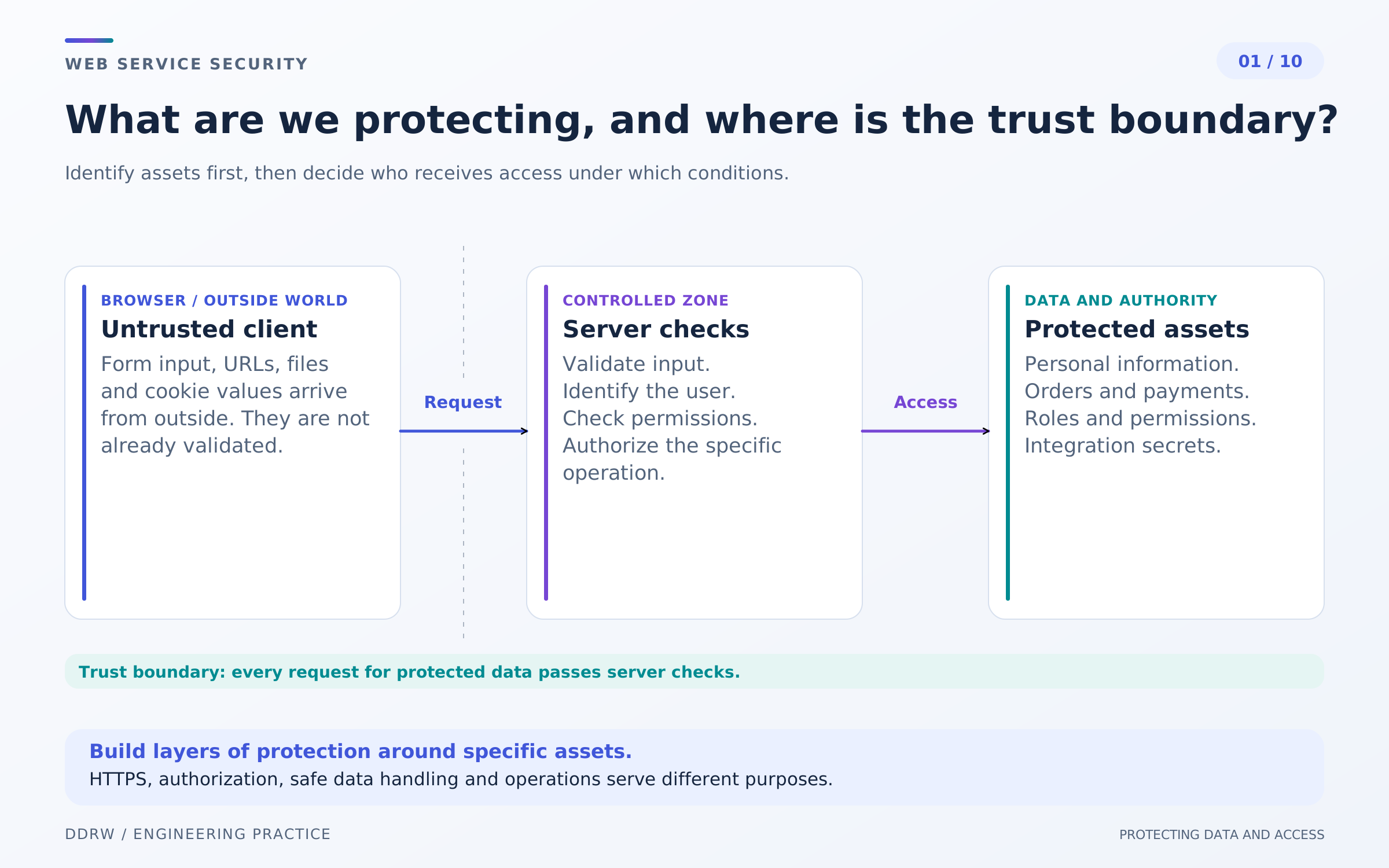
Start with assets: buyer contact details, orders, uploaded documents, staff accounts and integration keys. For each, identify the consequences of reading, changing or losing it. A public product photograph and a private customer document require different rules.
Then identify the actors: visitor, buyer, employee, administrator and payment provider. Moving data between their areas of responsibility crosses a trust boundary. A browser request cannot be considered trustworthy just because our own form sent it.
A threat model describes possible unwanted events and measures against them. Another buyer's order must not open, for example; a catalog editor must not issue refunds; an email failure must not lose a completed purchase. Update this process as website features change. OWASP threat modeling approach.
HTTPS protects transmission between the connection's endpoints but does not confirm correct calculations, data storage quality or user authority. Transport encryption does not fix a server sending a private document to the wrong recipient.
The practical outcome is a data diagram and a list of testable requirements with owners. Replace “we need a secure admin panel” with specifics: who sees documents, who changes access and how a former employee's authority ends.
2. Login: passwords, sessions and account recovery
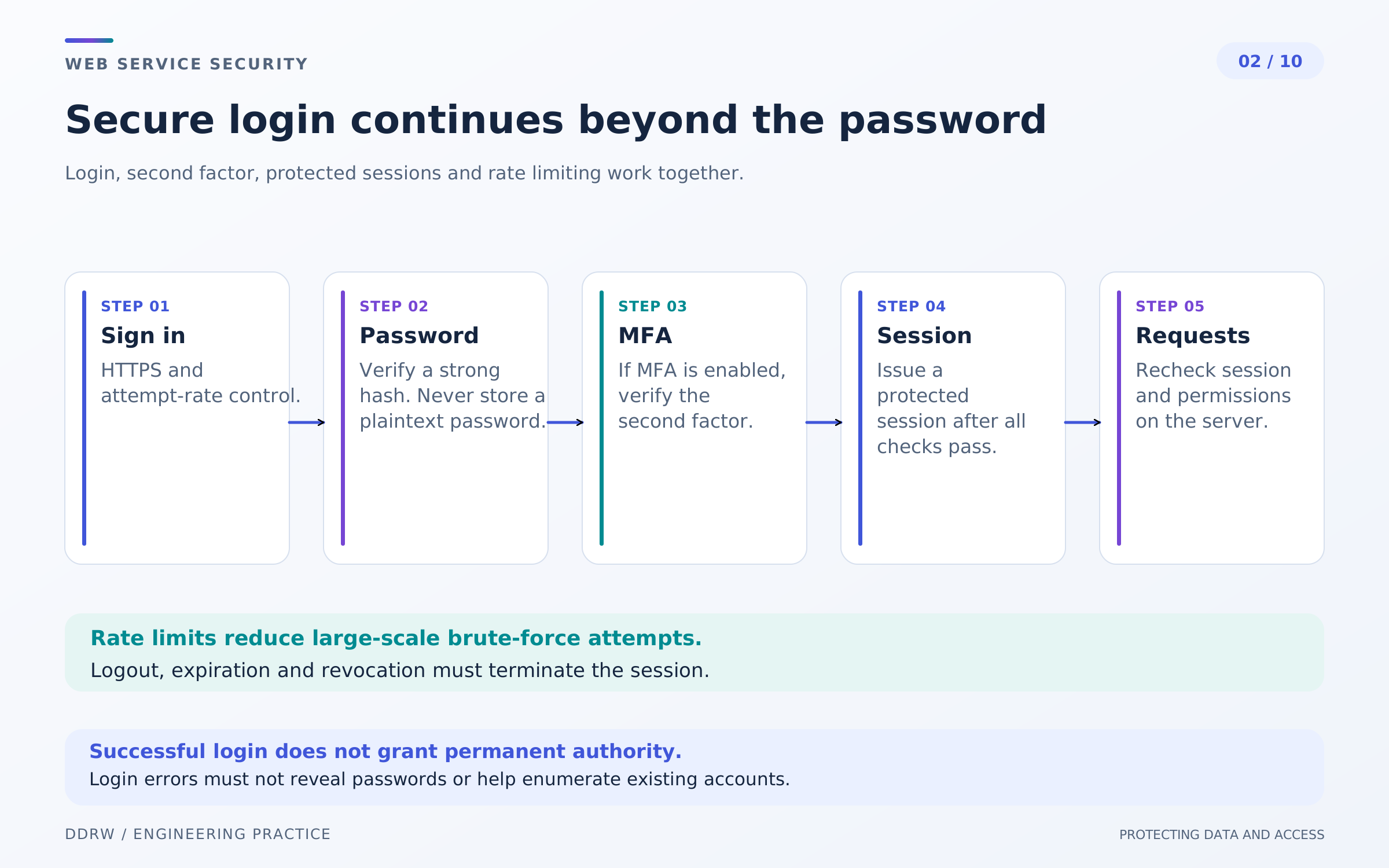
Login verifies a user's identity, but security does not end at the password check. Password storage, an additional factor, recovery and management of issued sessions are also needed.
Do not store passwords as plaintext or reversibly encrypted values for ordinary login checks. Use specialized password hashing with a salt and agreed parameters. A general-purpose fast hash is not an equivalent substitute.
In our store, staff receive individual accounts. Sensitive permissions require MFA, while financial actions may require fresh confirmation. A second factor reduces certain risks but does not remove the need to protect active sessions and recovery procedures. OWASP authentication guidance.
Sessions have an expiry and can be revoked. Logging out must actually end the required access, not just remove the username from the header. Password changes and employee deactivation also need explicitly defined session behavior.
Apply attempt limits considering both the account and network source. One network address may serve many buyers, and excessive blocking can prevent the account owner from entering. Define delays, notifications and a safe recovery path in advance.
A password-reset link must be limited in time and use. Its token must not enter analytics or logs. The email must not contain an active password, and recovery must not bypass the second factor without the intended verification.
3. Permissions: check the action and the specific object
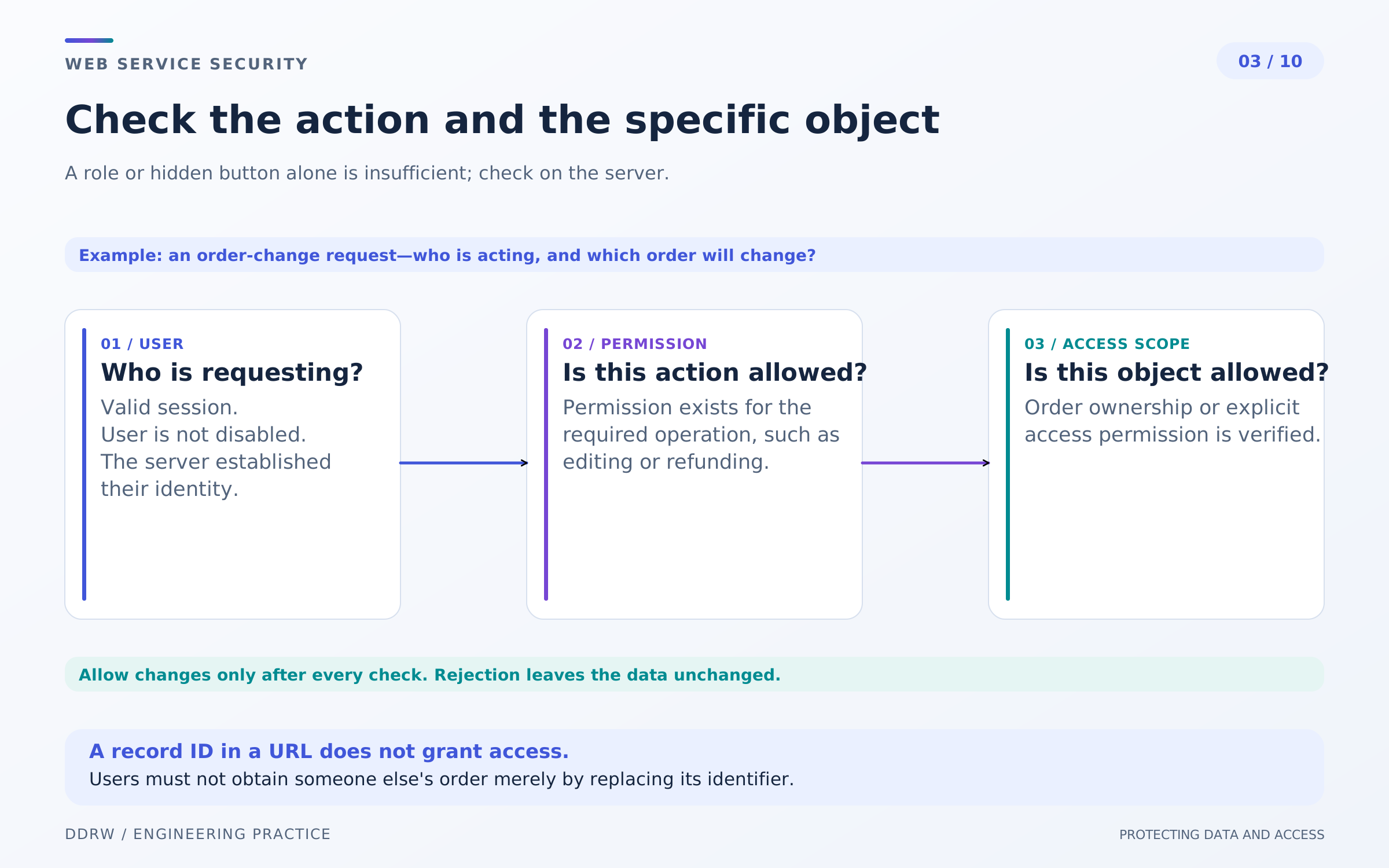
Authentication asks “Who is this?” Authorization asks “What may they do?” A buyer can successfully log in yet still have no right to read a particular order.
For every request, the server checks both the action and the object. Access to one's own purchase list does not mean access to every store order. Permission to edit a product does not include changing staff roles or issuing a refund.
The working principle is deny by default. Permission needs a clear basis: record ownership, an assigned role or another verified condition. Checks are required for ordinary pages, APIs and background execution alike. OWASP authorization guidance.
A hidden button does not enforce a prohibition. A complex order identifier does not replace ownership checks either; it only makes the address less predictable. The authority source is server state, not browser-supplied role or user_id fields.
In the hypothetical admin panel, separate reading an order, changing its processing and financial operations. Staff receive the minimum they need. When a role changes, check not just the new menu but access through direct URLs, APIs and files.
Shared caches, exports and search must respect access boundaries too. Protecting the main card will not help if the same contact details are available from an export or another data view.
4. Input and output: validation, SQL and XSS address different problems
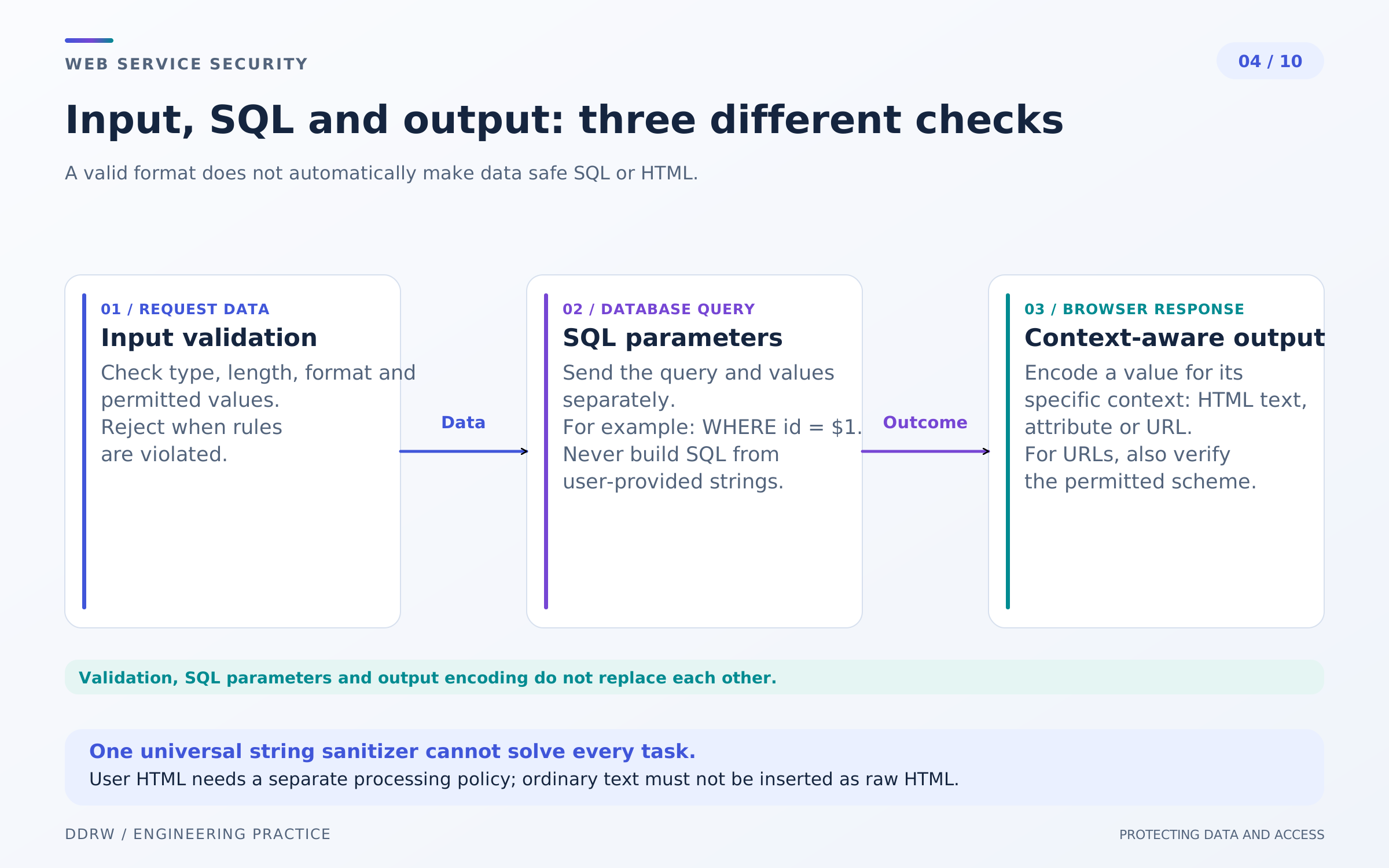
Validation determines whether data is acceptable for an operation: quantity is a positive integer, the selected variant exists and comment length is limited. Browser validation helps the person, but the server performs it independently.
SQL protection requires separating commands from values. Use parameterized queries for ordinary values rather than constructing SQL from user-input strings. Even a well-formed search string remains data, not part of the program. OWASP SQL injection prevention guidance.
Parameters do not solve every dynamic SQL case. If the interface supports sorting, map allowed options to known columns and directions. Arbitrary user text must not determine the command's structure.
XSS concerns another stage: the browser must not interpret user data as executable markup or code. Display an ordinary comment as text with context-appropriate encoding. If formatted HTML is needed, sanitize allowed markup separately. OWASP output protection guidance.
HTML, attributes, URLs and JavaScript are different contexts. Replacing a few characters universally does not protect every use. Check a link's allowed scheme separately; escaping its text does not make every address safe.
Data in your own database may also originate from an untrusted source. Buyer comments, imported catalogs and incoming email need the appropriate display rules even when a record has long been stored on the server.
5. Cookies and CSRF: protecting actions from another page
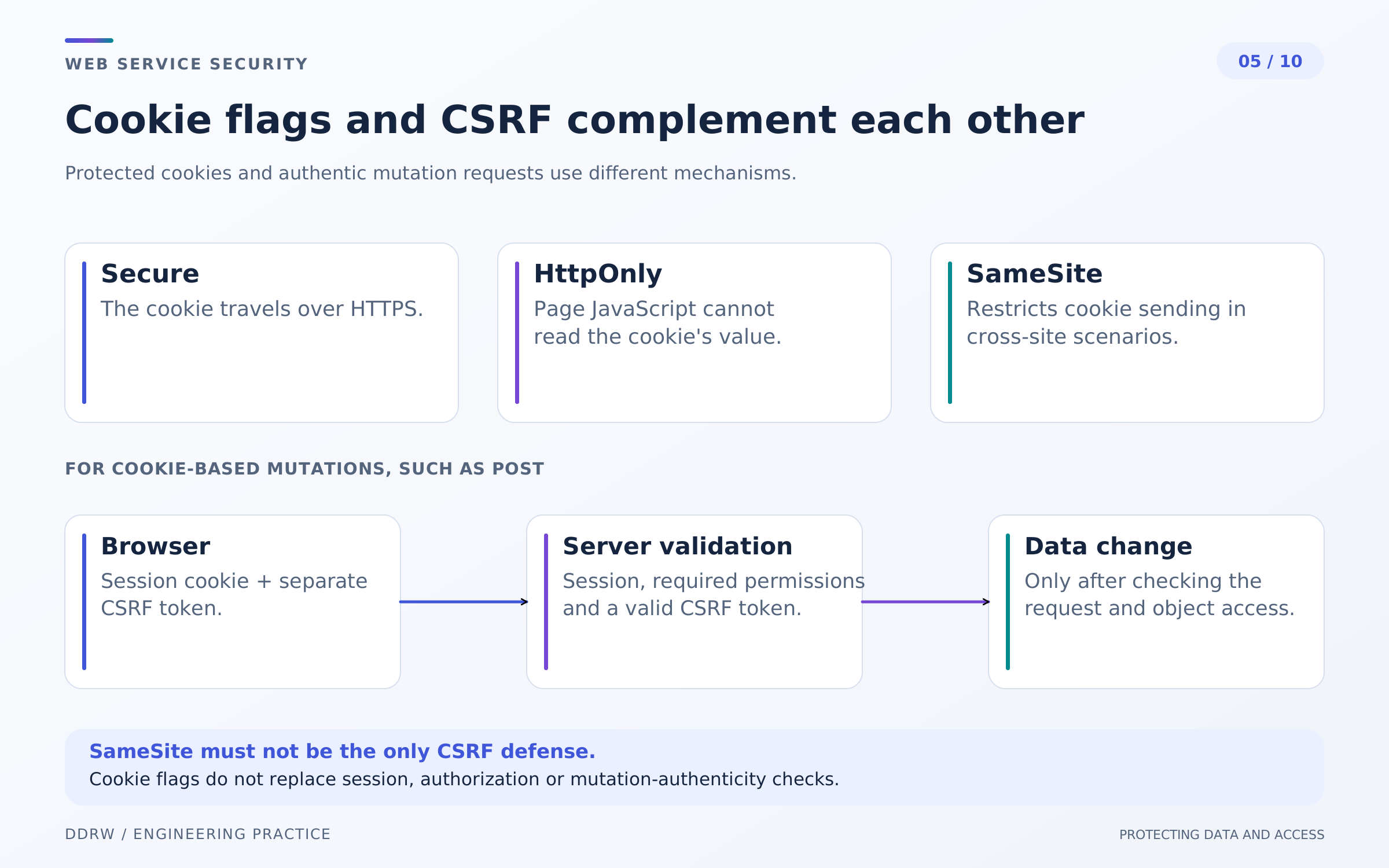
The browser automatically attaches applicable cookies to a request. This is convenient for sessions but creates a separate risk: an external page may attempt to trigger an action using an already logged-in user's authority.
CSRF protection helps the server distinguish an allowed state-changing request from such a cross-site request. Depending on the architecture, check a token and request origin. Reading a public card and canceling an order have different meanings: state-changing actions should not be ordinary GET navigations.
Secure restricts cookie transmission to protected connections. HttpOnly prevents ordinary JavaScript from reading its contents. SameSite governs sending in cross-site scenarios. These properties are useful together but are not a general guarantee against every attack. OWASP CSRF guidance.
In particular, HttpOnly does not stop the browser sending the cookie, and SameSite does not replace full protection for most applications. Domain scope, navigation method and neighboring subdomains matter. Do not choose a setting merely because its name sounds strictest without testing working journeys.
For our store, protection applies to cart changes, checkout, contact details and administrative operations. Bank server notifications use a different authenticity mechanism: they do not come from a user form.
CSRF protection does not fix XSS or establish permission to access an object. Even after origin validation passes, the server must check order ownership and whether the action is allowed.
6. Uploads: checking a file as content
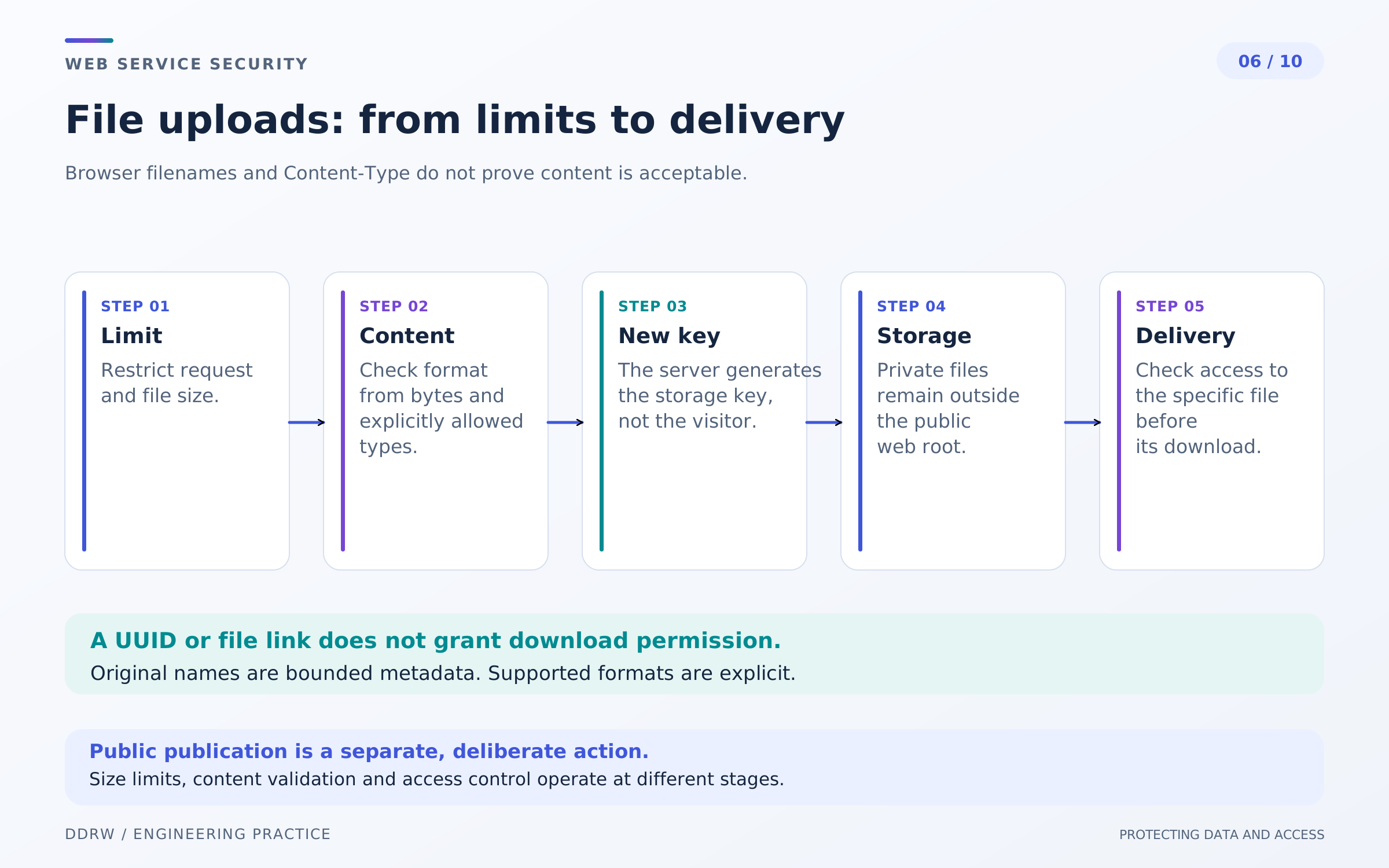
A buyer may attach a document to an order, and a staff member may upload a product photograph. These operations differ in permissions and subsequent access even if both begin with a file-picker button.
The client supplies the name and Content-Type. These help the interface but do not prove the contents. Limit formats, size and file count, and check the actual type and suitability for expected processing. A signature in the first bytes alone does not prove the entire file safe. OWASP file upload guidance.
Images can be decoded by a supported decoder and converted into prepared copies. Dimension and processing-resource limits are required separately: a small source file does not always mean low memory use after decompression.
The application generates the storage name. The user's name may be retained as a separate display field but must not choose the disk path itself. Storage must not execute uploads as application code.
A private order attachment must not become accessible merely because its link looks random. Delivery checks the user and object or uses time-limited access under an agreed design. A published product photo and a customer document do not automatically share one public-access mode.
Antivirus checks or isolated processing can add protection. They do not remove limits or authorization; using an external scanner also requires evaluating whether customer documents may be transferred there.
7. Integrations: secrets, outgoing requests and notifications
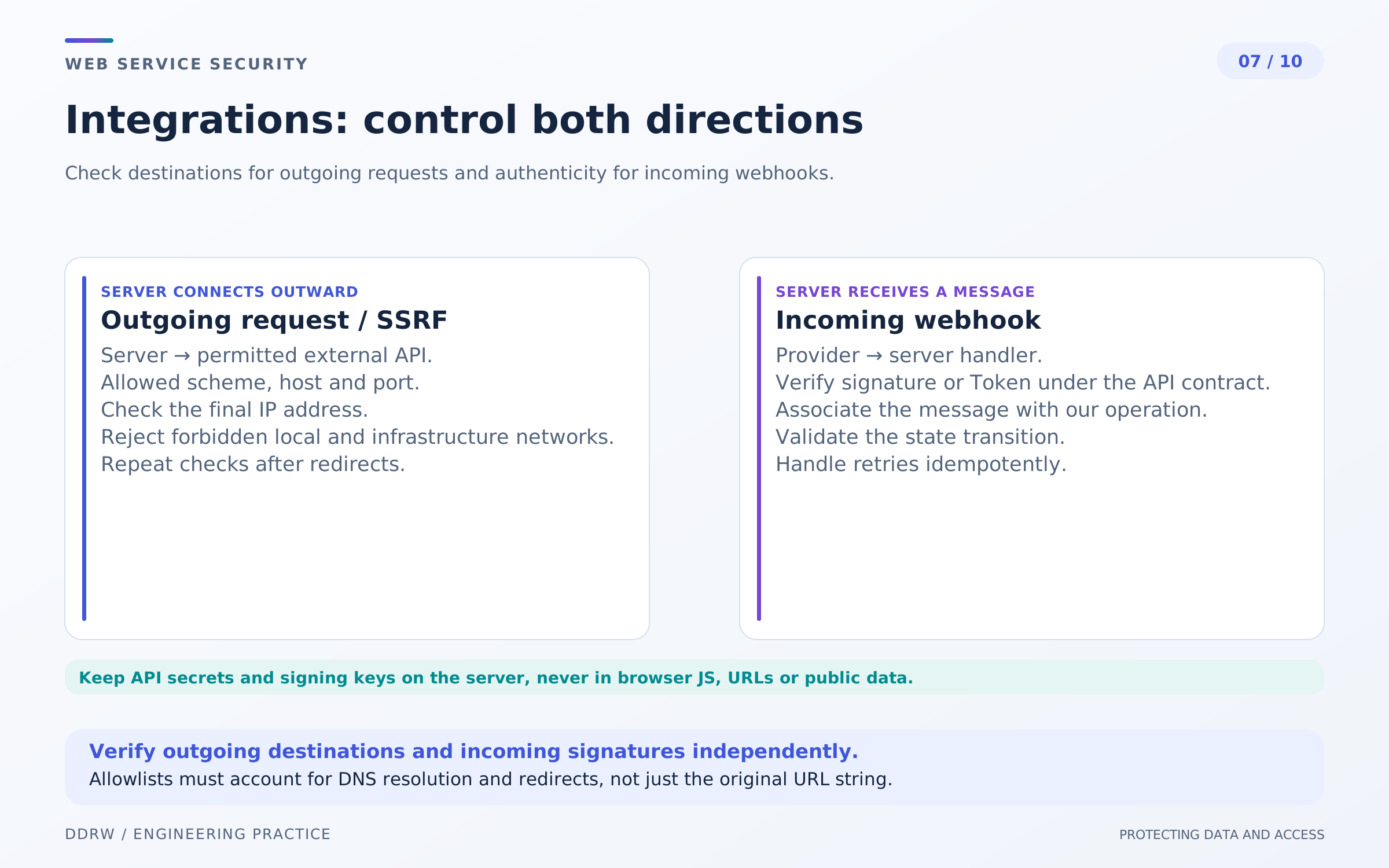
Mail, bank and external API keys stay in protected server configuration. They must not enter the client bundle, a public repository or ordinary logs. Test environments receive separate permissions; access to production secrets is granted only as needed.
Distinguish integration direction. If the store downloads a file or requests a user-entered URL, SSRF becomes a concern: users must not arbitrarily control the server's network capabilities.
Limit allowed destinations, schemes and ports, accounting for the actual connection address and redirects. Checking only a URL's appearance is insufficient. If the business process permits a known provider list, define it explicitly. OWASP SSRF guidance.
An incoming webhook, in contrast, reports an external event. Verify authenticity according to the provider's contract: a signature, token or another designated mechanism. A familiar sender name in the request body is not confirmation, nor is HTTPS alone.
Before processing, define size limits, allowed event types and repeat rules. An old or repeated notification must not change order state without control. Validate an external API response's structure and expected meaning too: a third-party system does not become fully trusted after a successful connection.
Plan key rotation in advance: who replaces it, how the new configuration is checked and when the old key stops working. If a leak is suspected, deleting the file containing a key does not replace revoking it with the provider.
8. Payment: protecting state, amounts and repeated actions
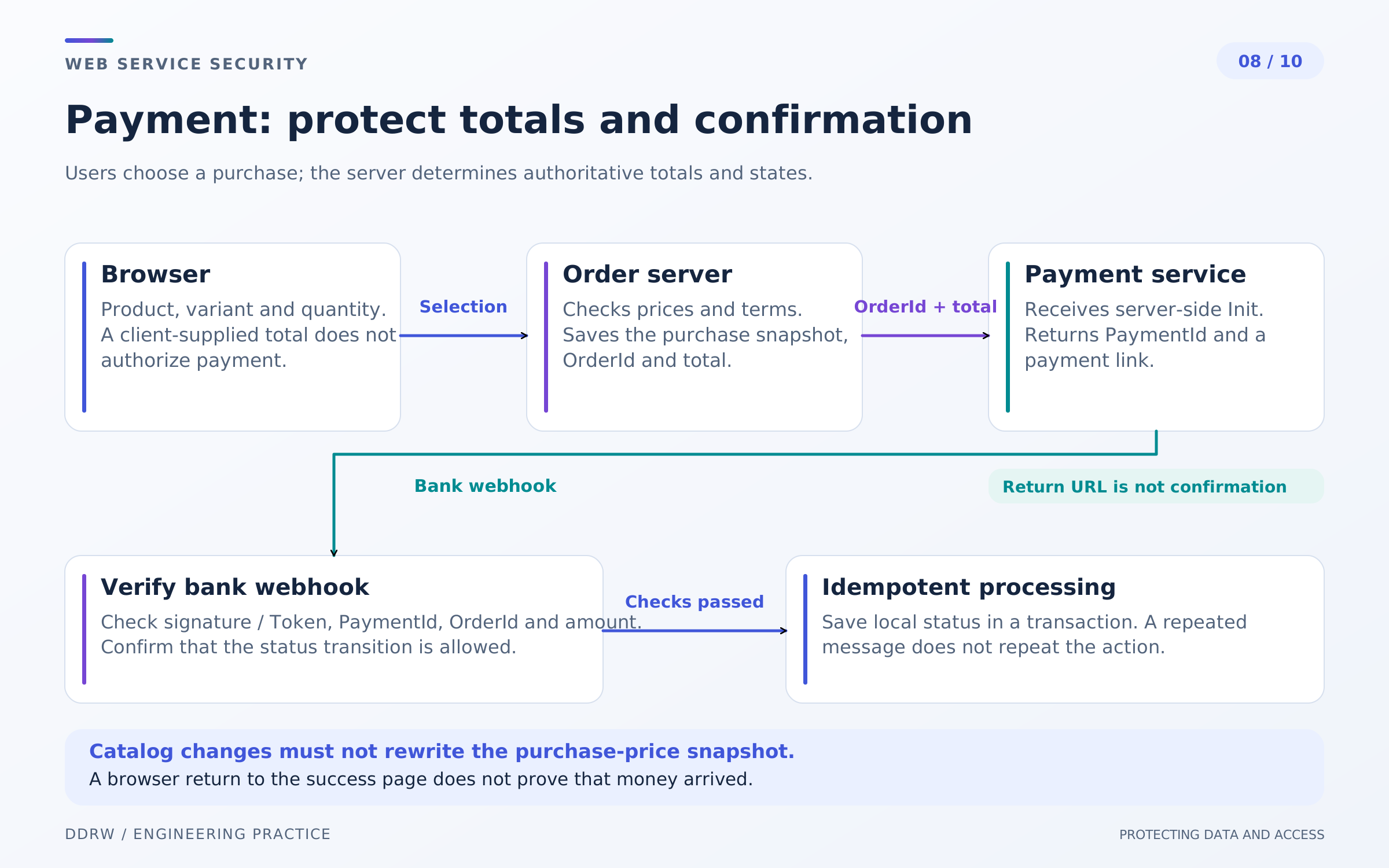
Before checkout, the server rechecks the product, variant, quantity and purchase conditions. The browser's amount is a provisional display, not authorization to charge that amount. The order preserves a snapshot of the agreed contents and cost.
Orders and payments have related but separate states. An order can exist before payment; bank authorization does not always mean a final charge. Define allowed transitions according to the specific payment flow.
Returning the browser to a success page does not prove payment. The server receives an authenticated notification or requests status through a protected API. It then matches the internal order, external payment, amount, currency and required status. OWASP payment integration guidance.
Design retries separately. Double clicks, lost responses and repeated webhooks must not repeatedly reduce stock, create duplicate jobs or perform financial actions. Use operation identifiers, database constraints and verified state transitions. A disabled button alone is not grounds to promise idempotency.
Changing a local database does not reverse an external charge. If a response is uncertain, first establish the actual status instead of automatically retrying a payment or refund.
In the admin panel, canceling order processing and refunding money are different commands and permissions. Show staff the confirmed state, rejection reason and action history. Secret credentials and payment data must not become contents of an ordinary support card.
9. Dependencies and monitoring: security after release
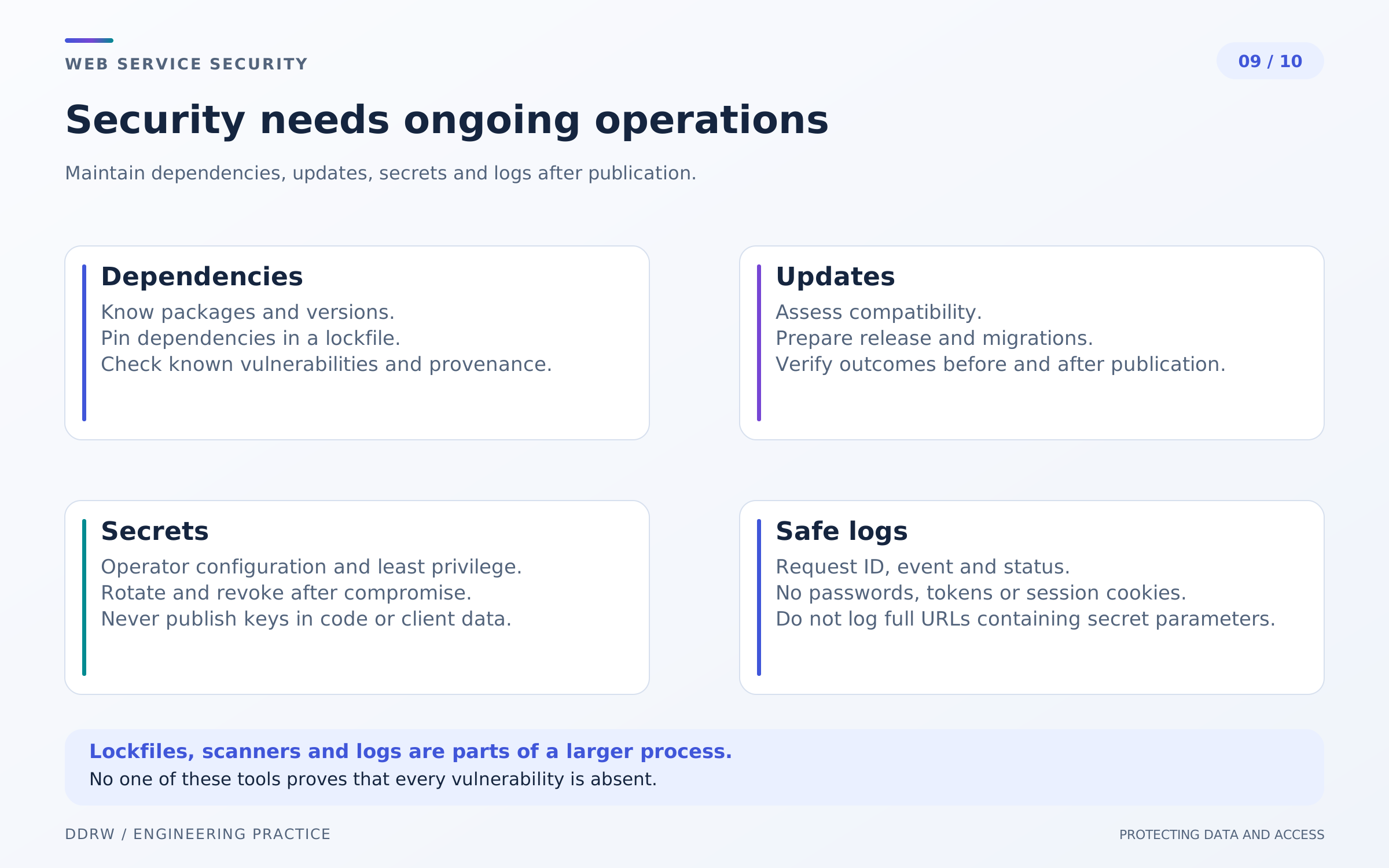
Security changes with libraries, infrastructure and settings. Track dependencies, including transitive ones, and establish a process for receiving vulnerability information. Application updates are not the only concern: images, file processors and administration tools need maintenance too.
A discovered vulnerability needs an applicability assessment and a remediation priority. Test updates for compatibility and critical journeys; record a decision to defer with an owner and review conditions. A dependency scan is not proof that other problems do not exist. OWASP vulnerable dependency management guidance.
Logs help investigate login errors, access denials, role changes and financial actions. Useful fields include time, operation identifier, actor, object and result. A record does not need the full order or document contents.
Do not put passwords, session tokens, recovery links or integration secrets in ordinary logs. User text must not unconditionally become log structure. Restrict access to logs and their retention too. OWASP logging guidance.
In the hypothetical store, an alert about widespread login denials is useful only with a clear response process. Who receives it, how do they distinguish an outage from suspicious activity, and where do they check the consequences? A chart does not replace these agreements.
Monitoring needs balance: enough data for diagnosis without creating another uncontrolled copy of personal information. Exporting logs to an external service requires the same access assessment as any other integration.
10. Incidents: revoke access and restore a controlled system
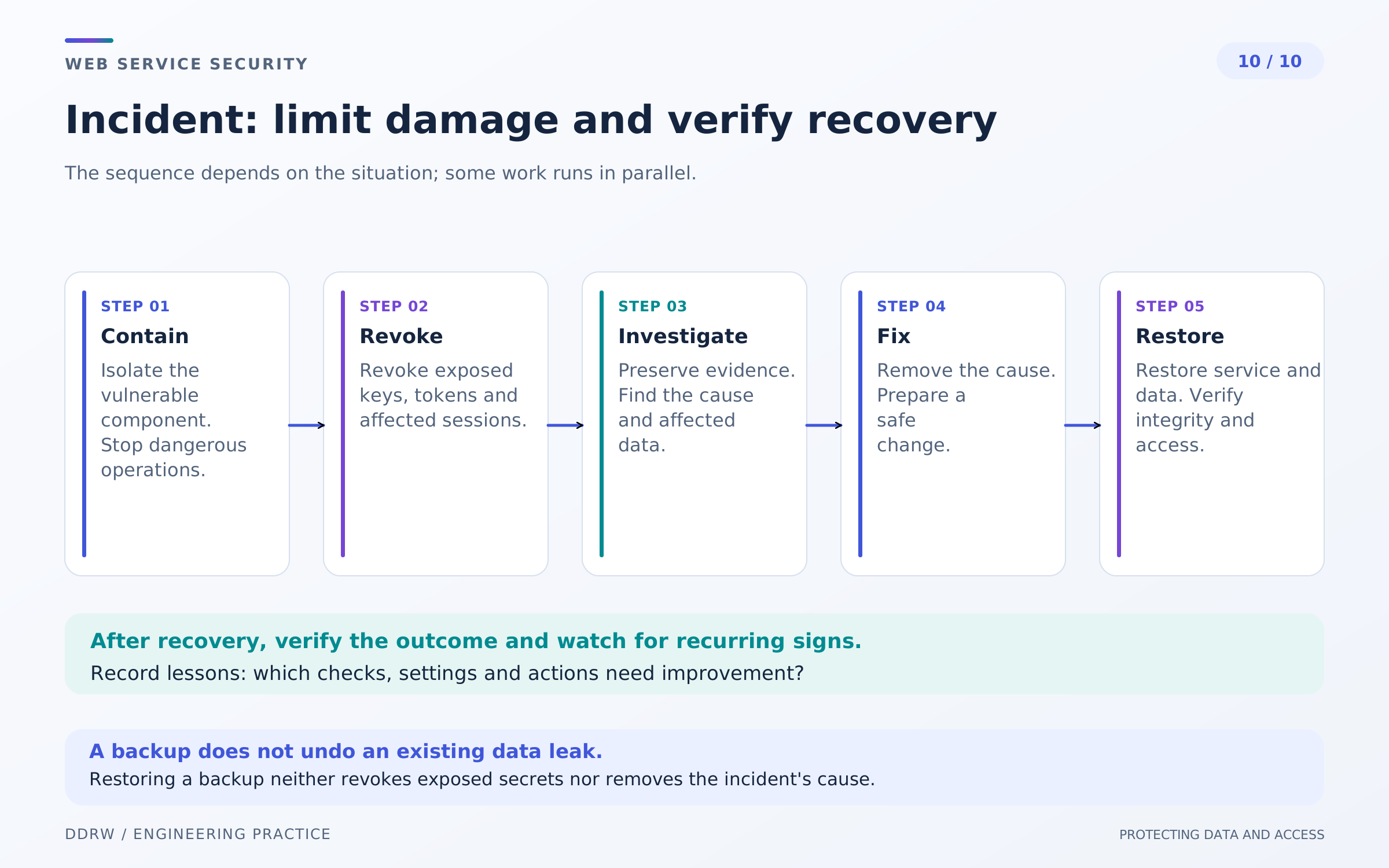
Define the response process before an incident. Identify owners, communication methods and authority to disable a problematic feature. Response includes detection, analysis, containment and recovery; it is part of risk management. NIST SP 800-61r3 guidance.
If compromise is suspected, preserve available evidence and the event sequence, restrict dangerous access and identify affected components. Carelessly overwriting logs or immediately restoring over the live system can destroy important investigation data.
Revoke a compromised session, terminate staff access under the designated procedure and replace integration keys with the relevant providers. Changing one password does not guarantee all issued authority has ended. Understand which tokens and connections remain valid.
A backup helps recover availability and data, but does not undo an information disclosure. Identify a trusted recovery point and eliminate the cause before restoration. Restoring an old database with previous keys or vulnerable configuration can bring the problem back.
Test the copy in an isolated environment with real messages and financial operations disabled. After restoration, reconcile order states with external systems: a bank does not have to “return to the past” alongside the store database.
Website owner's checklist
- Private data and access owners are identified.
- Staff have individual accounts and only the permissions they need.
- Account recovery and session revocation follow a testable process.
- The server checks every object and financial action independently of the interface.
- Input, SQL, output and uploads use the appropriate protection mechanisms.
- Integrations are restricted, secrets are not public and notifications are authenticated.
- Orders and payments tolerate the intended retries and uncertain responses.
- Updates, logs, incident response and recovery have owners.
Frequently asked questions
Are HTTPS and MFA enough? They are important measures for transport and login. They do not replace permission checks, data protection and correct business-operation handling.
Can a website be checked once and security never revisited? Changes to features, dependencies and access change the risks. Repeat checks on an agreed plan and after significant changes.
What does “security verified” mean? It requires the scope, date, method and results of the review. A checklist or absence of known incidents does not prove security across every possible journey.
A useful starting point is one complete buyer and staff journey: who receives the data, who authorizes the action, what is recorded and how access ends. This produces a concrete improvement plan without promises of absolute protection.
