
A B2B dealer portal connects a supplier’s range with the terms of a particular buyer. Dealers select their organization, see available products and agreed prices, assemble a wholesale order and receive a clear checkout result. This requires joining the price list, sales units, order restrictions and product availability in one working process.
We covered general customer portal tasks in “When a business needs a customer portal”. Here we focus on wholesale sales: presenting contract terms, accepting a valid quantity and explaining what is already confirmed and what still needs a supplier decision.
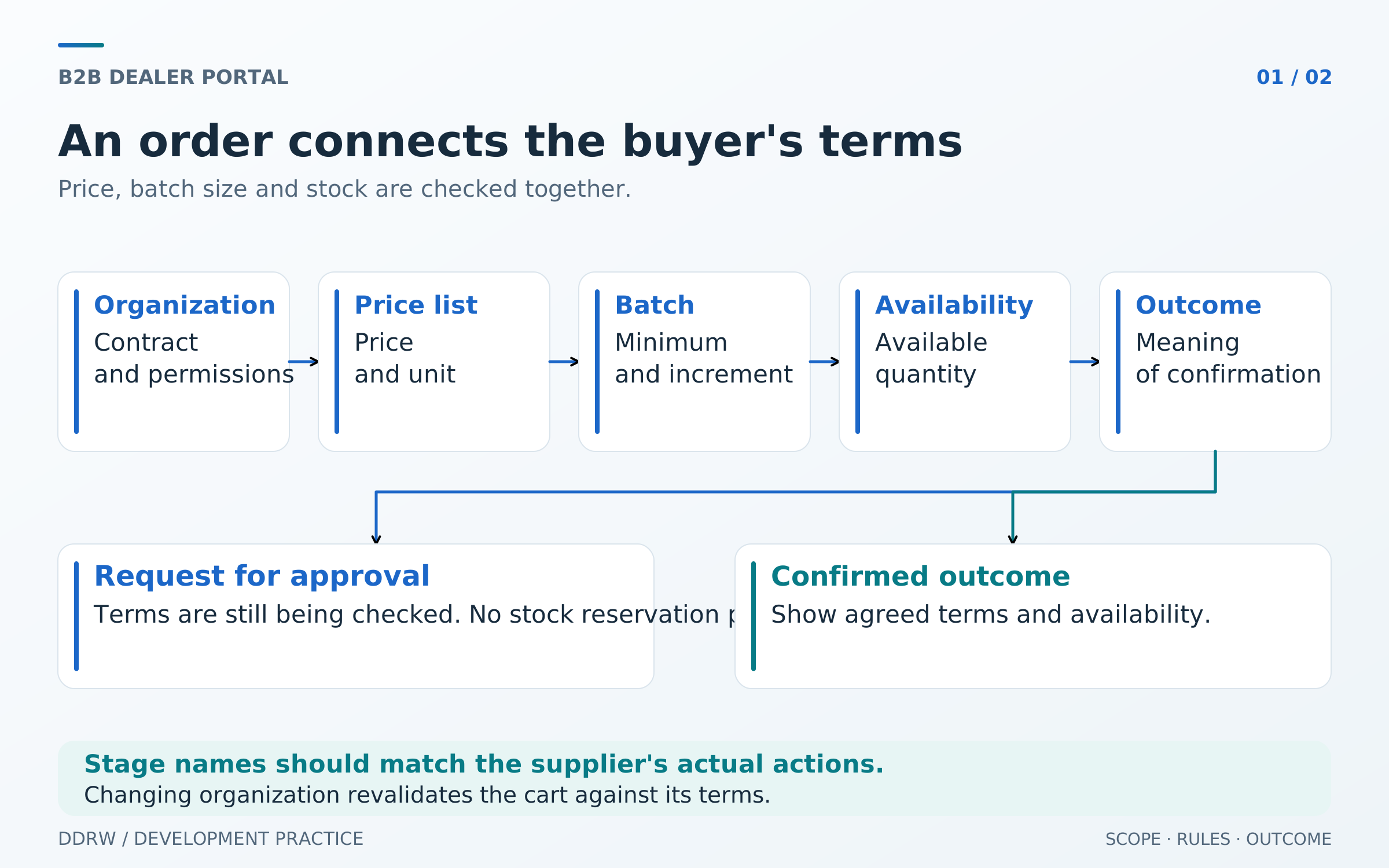
First establish the organization and purchase terms
An individual price list does not always belong to a person. Terms may apply to a company, selected contract, location or dealer group. One employee may place orders on behalf of several organizations with different prices and receiving addresses.
Before showing contract terms, establish on whose behalf the purchase is made. The interface should explicitly show the selected organization and applicable terms. When a user switches companies, the system must recheck the available range and cart calculation.
Two organizations might buy the same item using different price lists. A cart assembled for the first must not silently transfer to the second with its former prices. Show buyers the changes and let them confirm the new contents before checkout.
This connection between catalogs and companies also exists in ready-made B2B systems. In Shopify, catalogs define available products and prices, while direct assignment to companies and locations depends on the plan. Check the specific model for the product you choose. Shopify B2B catalogs and prices.
Access to organizations and employee authority are a separate part of the project. Granting and revoking access are described in our article on customer portal roles and permissions.
How individual price lists should work
For each price, understand its source, validity period and pricing unit. A price per item, box or set produces a different total even when the quantity field contains the same number. Buyers should see what the amount applies to and how it relates to the ordered batch.
Agree separately on the interaction of contract prices, quantity discounts and temporary promotions. Rules may differ: a fixed price replaces a discount, a discount applies on top of the price list, or a promotion has a separate condition. There is no single approach for every supplier, so test specific combinations.
A product without a price for the selected buyer also needs clear behavior. Depending on the company’s process, it can be hidden, offered through an estimate request or referred to a manager. Substituting zero for a missing price creates an incorrect expectation about order cost.
Define when prices become fixed as well. If a price list changes after an item is added to the cart, show the new calculation before checkout. An order already placed should preserve its contents, prices and agreed terms; updating the catalog must not silently rewrite purchase history.
Separate minimum quantities from pack multiples
Wholesale orders have different restrictions that are easily confused. A minimum quantity sets an item’s lower purchase limit. A multiple defines the permitted step. A minimum order value applies to the cart and may depend on other sales terms.
| Rule | Hypothetical example | What the dealer should understand |
|---|---|---|
Minimum item quantity | At least 12 units | Buying one unit of this item is not supported |
Pack multiple | Increments of 6 units | With a minimum of 12, valid quantities are 12, 18, 24 and so on |
Minimum order value | Set for the selected purchase terms | Even valid quantities may fall below the overall threshold |
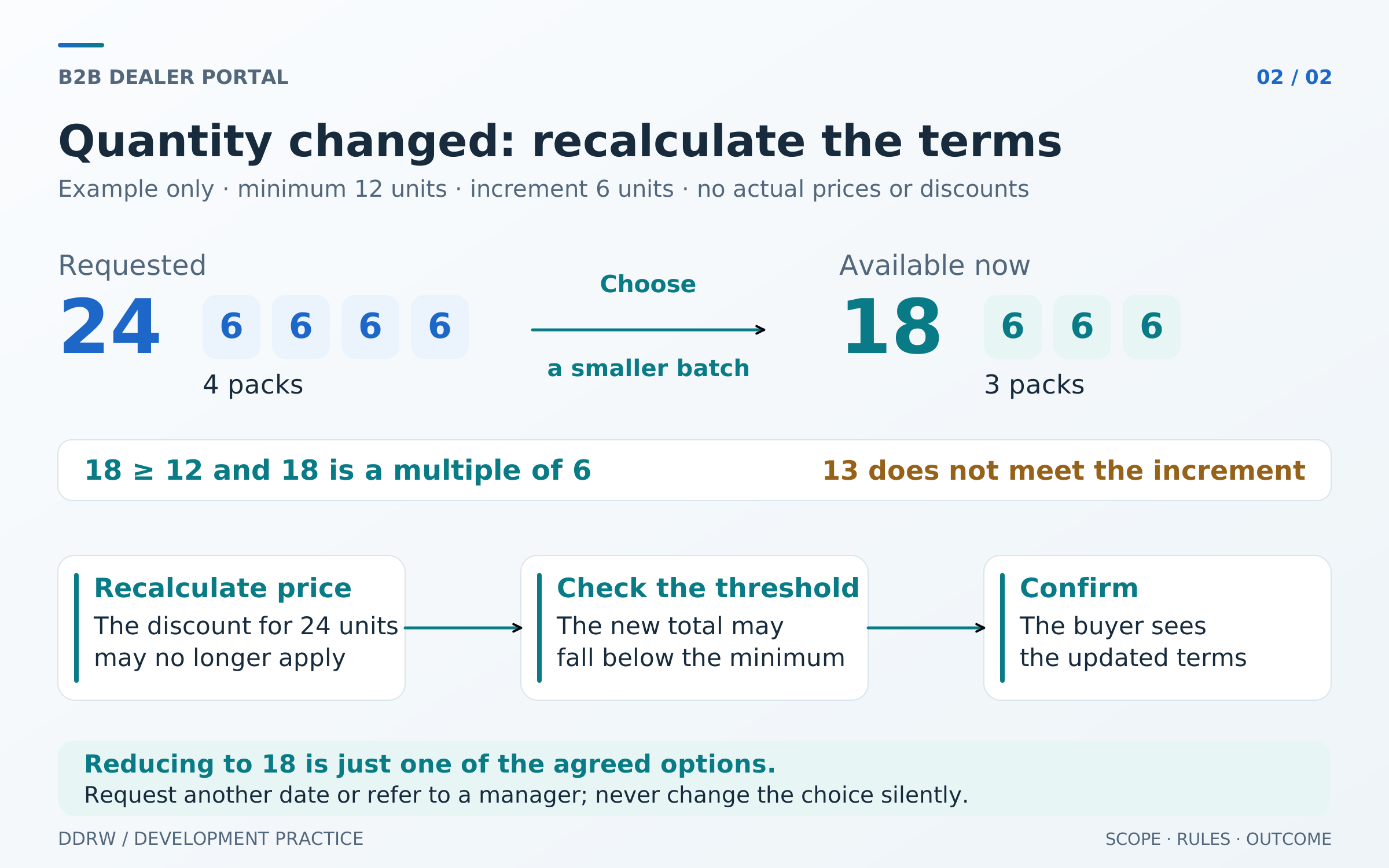
With increments of 6, a quantity of 13 is invalid. Instead of silently rounding, the portal can explain the rule and suggest 18; the buyer confirms the change. Showing both pack count and total units is useful when it fits the sales model.
Clarify the level of each restriction: SKU, variant, product group or whole cart. Two colors of one product, for example, may count as separate items for minimum quantities. Their quantities may be combined only if the supplier’s rule permits it.
Shopify B2B documentation describes minimum, maximum and increment quantities separately; restrictions apply to product variants. This illustrates why a platform evaluation needs to establish the level at which each rule applies. Quantity rules and volume pricing.
Show available quantity and explain reservations
Physical warehouse stock and the quantity that can be promised to a new buyer may differ. Some stock is already allocated to other orders, unavailable for sale or assigned to a different dispatch location. Dealers need to know how much they can order under their selected terms.
Agree on what the portal shows: an exact available quantity, a range or a status requiring later confirmation. Each option needs a clear meaning. “In stock” must not imply immediate dispatch when availability still requires a manager’s check.
A reservation also has a specific meaning. Define when it is created, which warehouse and order it belongs to, how long it lasts and when it is released. Adding a product to a cart may only preserve the buyer’s selection; availability becomes a promise at a different stage if that is how the supplier’s process works.
Microsoft’s documentation illustrates the difference between stock and availability: with soft reservations, the physical quantity may remain unchanged while availability for the next reservation decreases. Reservation example in Inventory Visibility.
If reliable availability is temporarily unknown, the interface must reflect that state. It may still allow a request without a confirmed reservation, but distinguish the result from delivery confirmation.
Follow one wholesale order from start to finish
Consider a hypothetical scenario. A dealer selects an organization and contract, then orders 24 units of one SKU. The product is sold in packs of 6, with a minimum quantity of 12. The quantity is valid, and the portal calculates the price using the buyer’s current price list.
By checkout, only 18 units remain available. The portal needs to offer the options supported by the process: reduce the quantity to 18, request 24 with a later delivery date, or send the order to a manager for approval. Every option requires a clear result and the buyer’s decision.
Reducing the quantity requires recalculating the price and total and rechecking the overall order threshold. A quantity of 18 satisfies the minimum of 12 and increment of 6, but a discount available for 24 units may no longer apply. The buyer must see the final terms before confirming.
Partial shipment may be another option if permitted. Define the quantity and terms of each part separately. Having 18 units now does not itself mean that the remaining 6 are secured by a future supply.
This small example shows the connection between four decisions: the selected price list, valid quantity, available quantity and confirmation method. Test them together. Correct behavior of each individual field does not prove that a wholesale order can be completed.
Distinguish a received request from a confirmed order
After submission, a dealer must understand exactly what happened. A receipt message may mean a request was sent for approval. Confirming stock and reservations, agreeing terms and preparing dispatch are different events when included in the selected process.
Link stage names to the company’s real actions. For example, supplement “Needs approval” with what is being checked: price, timing, quantity or receiving terms. Dealers can then understand the next step without interpreting technical acceptance of a request as a supply promise.
Changes after approval must be visible. If a supplier proposes another variant, quantity or date, the buyer must see the proposed terms and how to confirm them. Order history helps reconstruct what was requested and what was agreed.
We cover technical order and update exchange in our article on online store integrations. For a dealer portal, first agree on the meaning of every result the buyer will see.
Repeat orders only after checking current terms
Quick SKU entry and repeating a previous selection are useful for regular wholesale purchasing. In both cases, recheck the selected organization, current price list, packaging and availability before creating a new order. A previously purchased item may have changed or no longer be sold under its former terms.
Treat a repeat order as a new cart based on old contents. Show changes as a list: a new price, increased minimum quantity, an unavailable variant or a different date. The original order retains its own terms in history.
Do not silently remove unavailable items from the repeated selection. Buyers need to understand exactly what was not copied, so they can adjust the order, choose replacements or ask the supplier a specific question.
Limit the first launch to a complete dealer journey
The first version can focus on a defined dealer group, one set of contract terms and an agreed range. The chosen journey must be complete: entering under the right organization, viewing its price list, selecting a valid quantity and receiving a clear confirmation.
If a manager still makes some decisions, make that explicit in the process. The portal might accept a request while a reservation appears only after review. This can be a useful starting point when the team can perform that work and the dealer understands the response time.
Dealer incentive programs, complex allocation across multiple warehouses and additional approval options can be reserved for later stages. Price, quantity and checkout-result rules must nevertheless be defined for the first launch. Otherwise, the main wholesale journey remains ambiguous.
What to check before launching a B2B portal
Testing should reproduce the supplier’s commercial terms. Prepare several test dealers and orders with known expected outcomes.
| Check | Expected result |
|---|---|
Two organizations buy one SKU | Each sees its permitted range and correct pricing terms |
The organization changes in a populated cart | Terms and availability are rechecked, and changes are visible to the buyer |
A quantity violates the pack multiple | The rule is clearly explained, and no adjustment happens silently |
Stock decreases before checkout | The current restriction and permitted next actions are shown |
A request is not yet confirmed | The dealer sees the approval state and receives no promise of a nonexistent reservation |
An old order is repeated | A new selection uses current terms and shows changes |
After launch, examine which wholesale requests need manual correction and why: invalid quantities, unclear pricing, unavailable products or ambiguous confirmation. These reasons help prioritize improvements. Assess team time savings using actual handling of comparable orders.
For DDRW web platforms and customer portals, we begin by agreeing on the workflow, data and actions. For dealer portals, we separately clarify price lists, batch restrictions and interaction with business systems. Through contacts, send a catalog sample, anonymized terms for two dealers and one representative order — the starting point for a concrete system discussion.
