
A customer places an order, the website displays confirmation, but no email appears. The developer says, “Sending succeeded.” The customer checks spam. A manager clicks the button again. There may now be several emails, while the reason for the original delay remains unknown.
Email delivery consists of separate steps. Asking where a specific message stopped is therefore more useful than immediately changing hosting or rewriting a template.
Consider a hypothetical equipment store. It sends order confirmations, delivery updates and a separate new-arrivals campaign. Addresses at example.com are illustrative. This is not a report of DDRW's results, an instruction to copy DNS records or a promise that every email will reach the inbox.
1. Separate message creation, handoff and reading
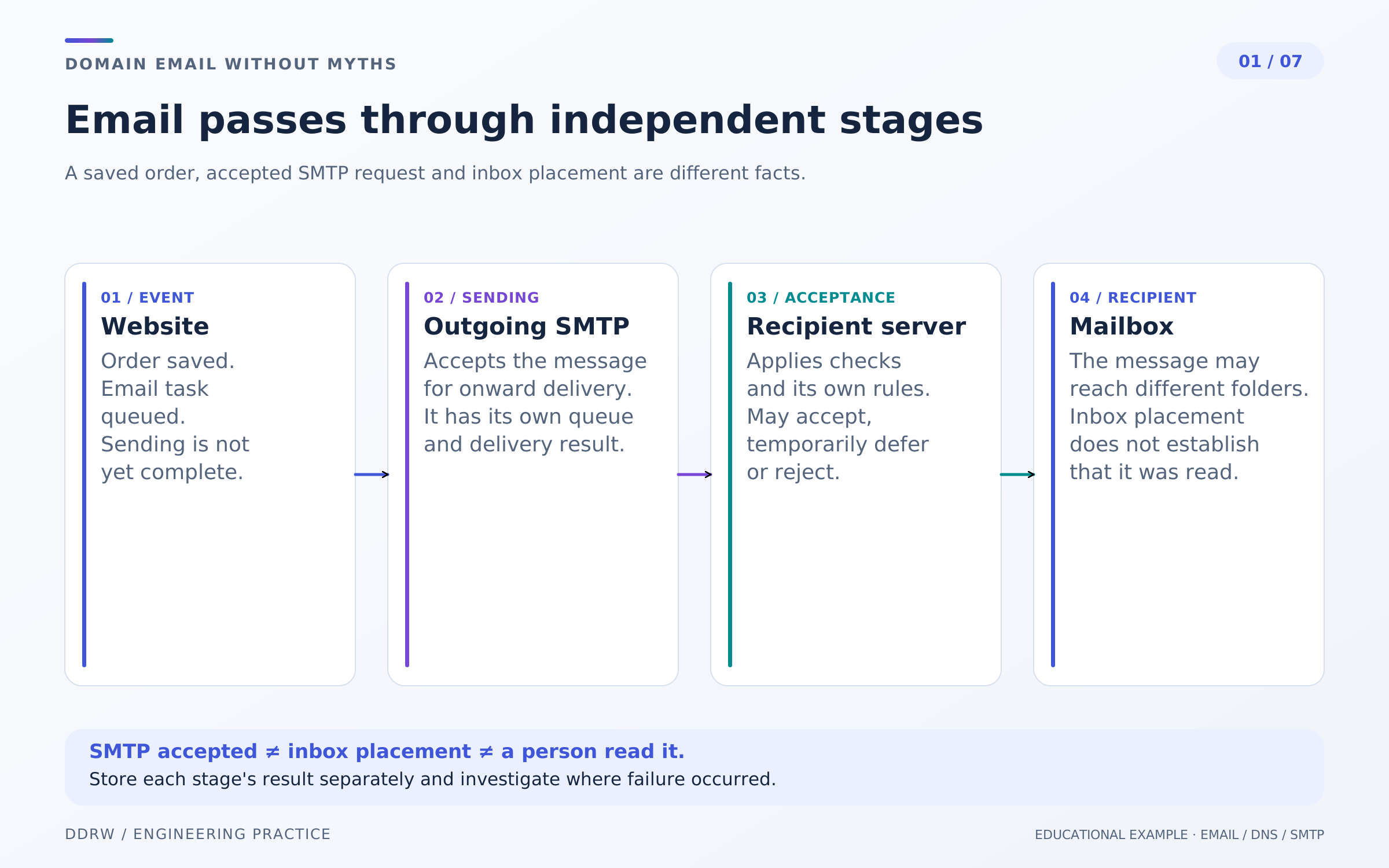
The store has order WEB-1042. Saving it is a business event. The notification task is a separate record: who should receive an email, using which template and for what reason. Distinguishing even these two steps is useful: a notification failure must not make an existing order disappear.
SMTP is a protocol for transferring email between systems. A successful server response after accepting a message means taking responsibility for further processing. It does not confirm inbox placement. A later rejection and nondelivery notification are also possible. Transfer rules are described in RFC 5321.
The store's administration interface should distinguish “awaiting sending,” “handed to the mail server,” “rejection received” and “needs investigation.” Labels should match the information the system actually has.
If a mail service reports delivered, clarify its definition: it usually means acceptance by the recipient's server, not placement in the Inbox. An open-tracking pixel does not prove a person read the message either: images may load automatically or be blocked. Support needs an understandable delivery status, not an attractive percentage without an explanation of its method.
2. Identify the three addresses involved in sending
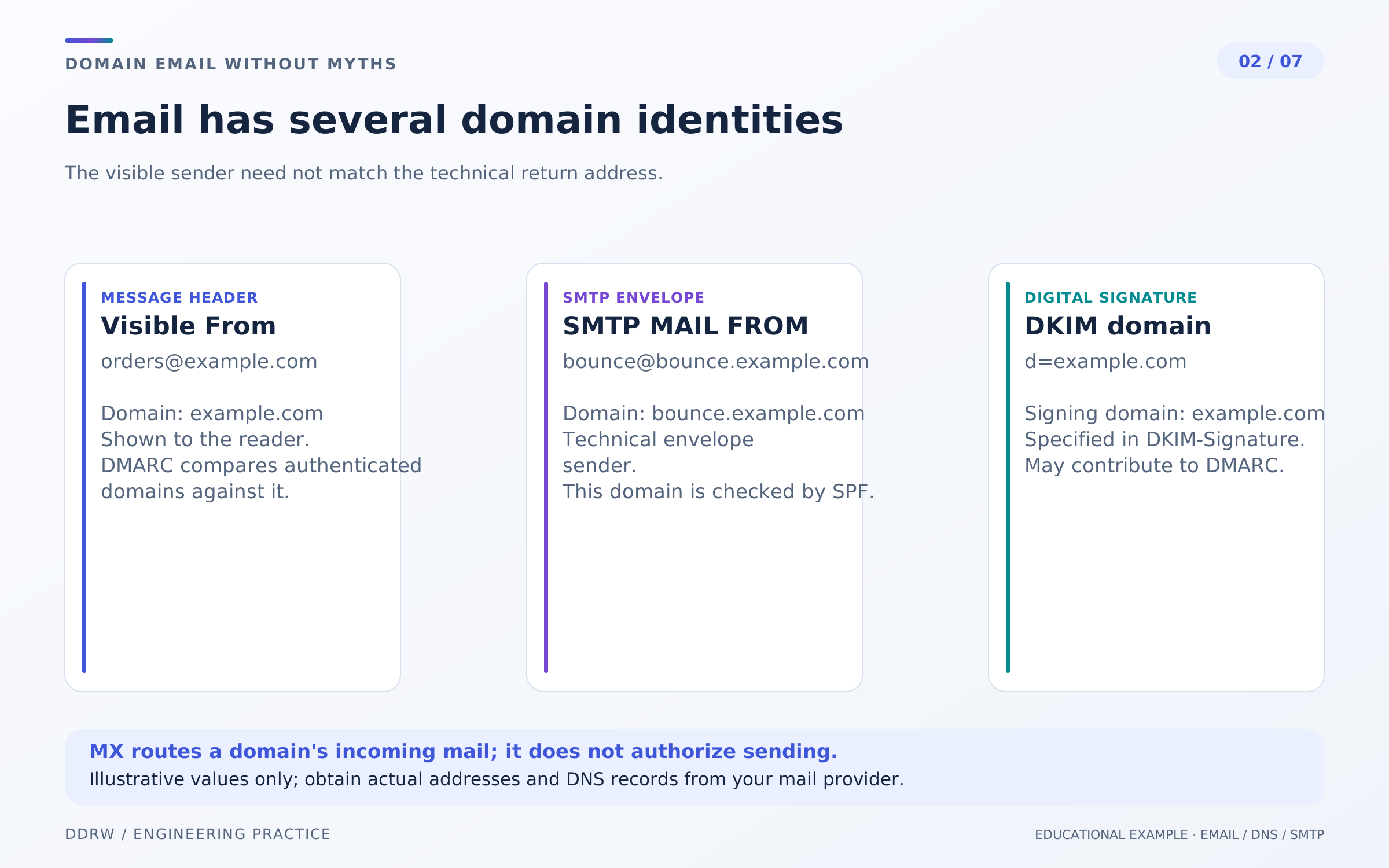
One message has several domain identities. They are easy to confuse because customers usually see only one.
- Visible From:
orders@example.com—the sender address shown in the email interface. - SMTP MAIL FROM:
bounce@bounce.example.com—the return-path address in the mail envelope, used among other things to handle bounces. - DKIM d=:
example.com—the domain that signs the message.
For our store, these are three separate entries in the sending configuration. Record them before diagnosis: a brand name in the template does not reveal which domain the mail servers checked.
An MX record tells systems where to send a domain's incoming email. Its presence does not authorize a server to send email from that domain. Purchasing a mailbox and connecting the website's outgoing mail may also be separate tasks.
A practical inventory result is a short record for each source: website, CRM, support system and campaign service. Specify the responsible employee, domains used and where settings are stored. Do not include passwords or private keys. When contractors change, this record helps reconstruct the setup without accessing every account immediately.
3. SPF states which servers may send
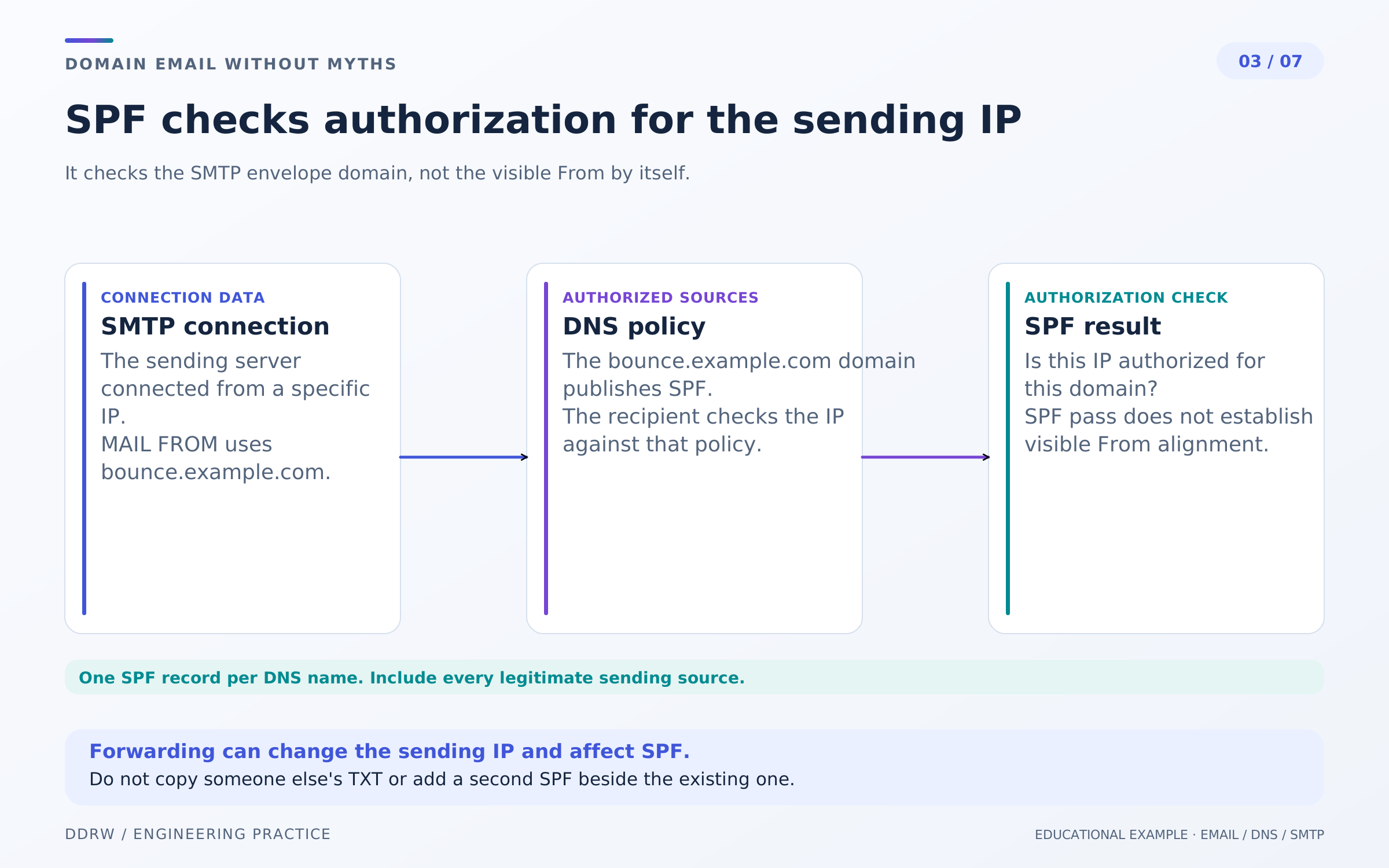
SPF lets a domain declare permitted sources of outgoing email. In an ordinary delivery, the connecting server's IP is checked against the SMTP MAIL FROM domain. SPF alone does not authenticate the visible From. Do not publish multiple separate SPF records for the same DNS name. Forwarding can change the server involved in the check and cause a failure. See RFC 7208.
In our store, the developer connects the website to a new service, but the old CRM still sends documents. Both sources must be considered before changing DNS. Adding a second “ready-made SPF string” alongside the first does not replace a coordinated configuration.
Do not copy a universal TXT record from an article. The contractor should explain which name needs the record and which actual systems it authorizes. Preserve the previous configuration and record the reason for the change: six months later, that will be more useful than a screenshot with a green checkmark.
Check a real message from each source, not only an online DNS test. An external check shows published rules; received-message headers help identify which rule applied to a particular send. If problems occur only after forwarding, investigate that route separately rather than broadening permissions at random.
4. DKIM connects a message to the signing domain
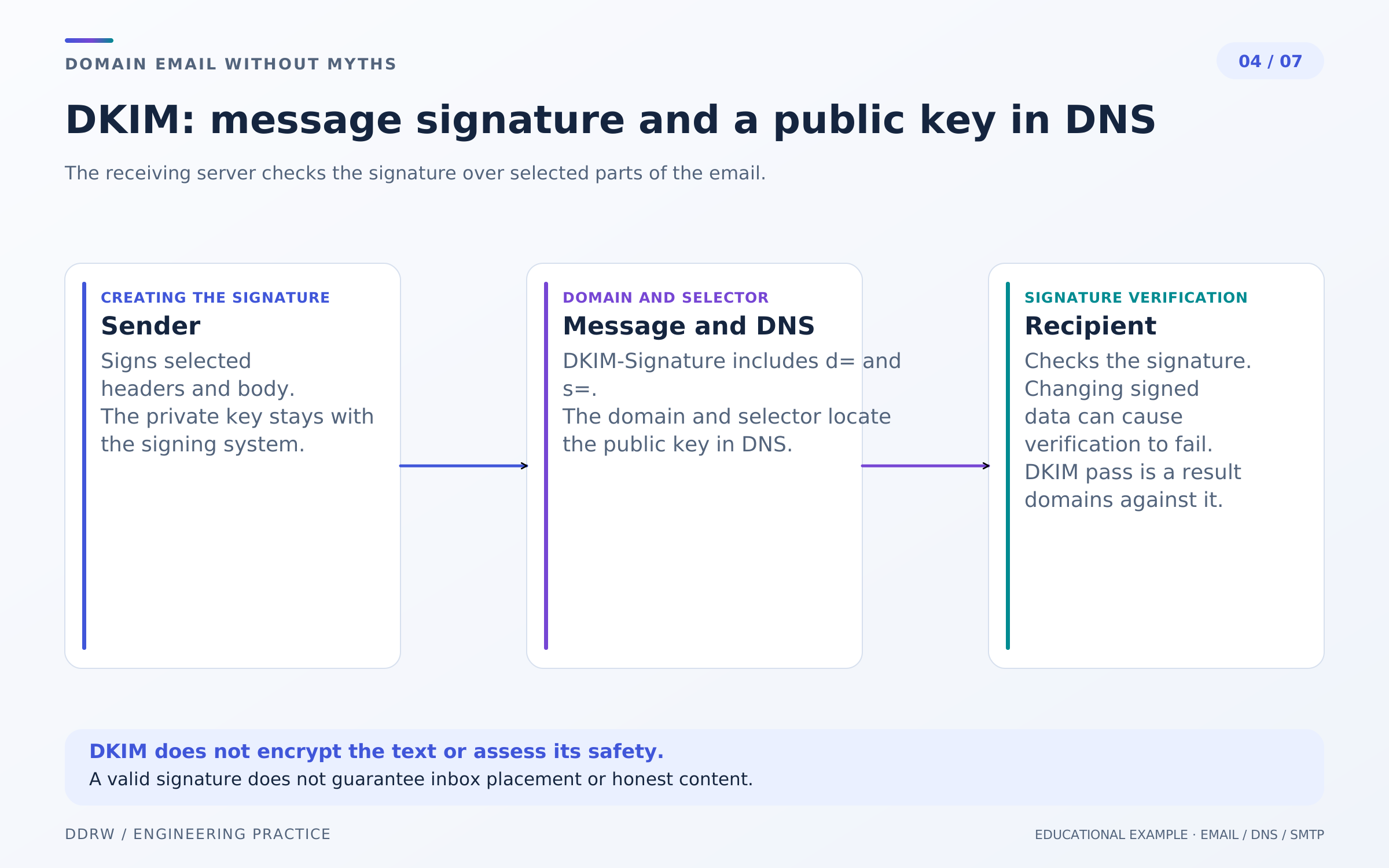
DKIM adds a digital signature covering selected headers and the email body. The recipient finds the public key in DNS using the signing domain and selector—the name of a specific key. The private key stays with the sending system. A successful check does not mean the message is encrypted or its contents are safe. Changes during forwarding can break the signature. The mechanism is defined in RFC 6376.
Suppose the store sends a confirmation through the website and an invoice through its CRM. These systems may use different selectors. That helps with key management, but both sending paths must be tested independently: a valid order-confirmation signature tells you nothing about the invoice email.
At handover, request a list of active selectors, the key owner and the rotation procedure. There is no need to disclose a private key to a manager or place it in a content editor's instructions.
If signatures stop passing after a new gateway is connected, compare the route and message transformations. An additional service may have started changing content, for example. Do not disable verification merely to remove the error: first establish where signing happens and what follows it. That map will also help with the next infrastructure migration.
5. DMARC aligns verified domains with the visible sender
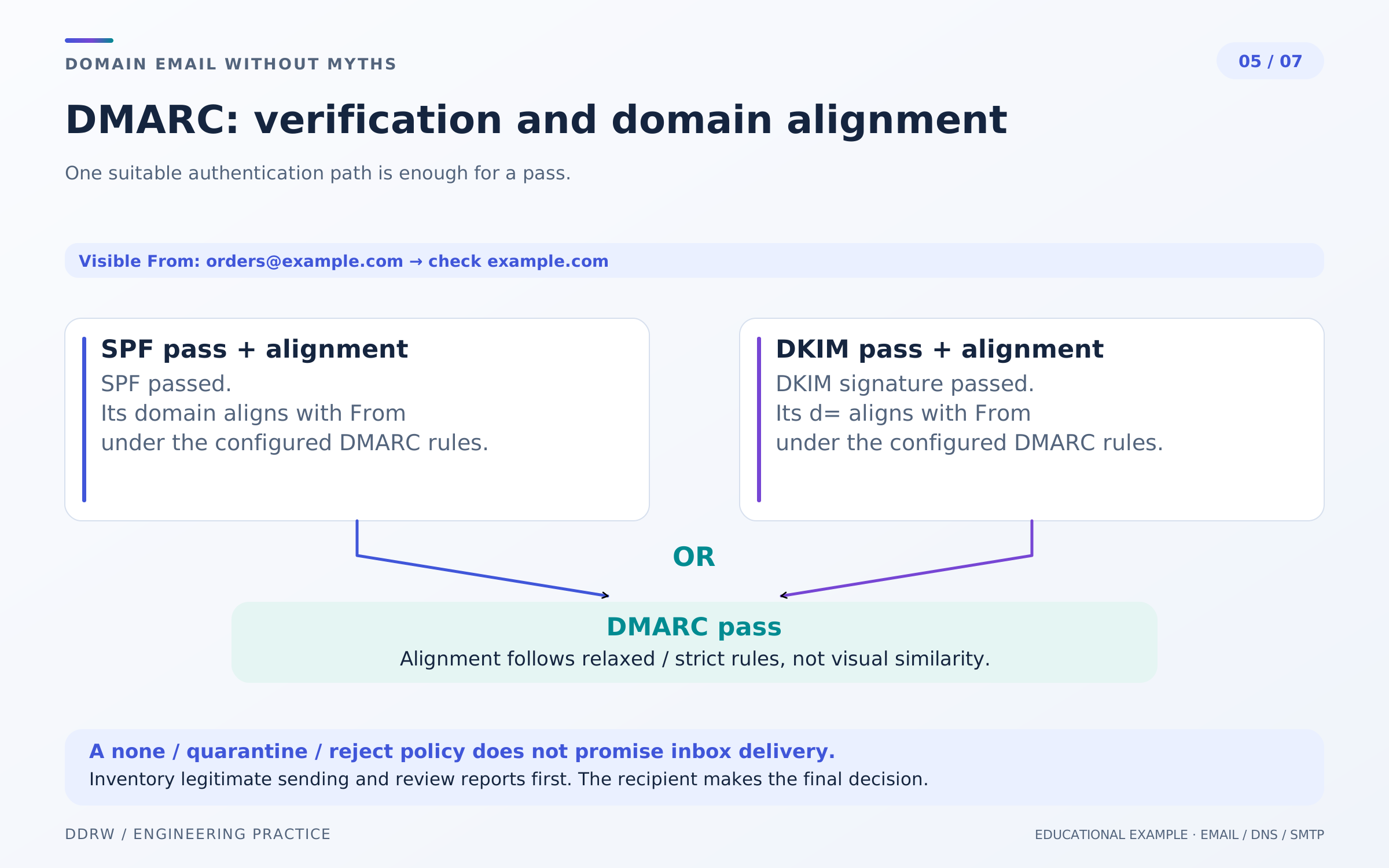
DMARC requires the visible From domain to align with a successfully checked SPF domain or DKIM d= domain. One aligned mechanism is sufficient; both need not pass. Strict and relaxed rules determine how closely domains must match. The p=none policy requests no special treatment for messages failing DMARC; quarantine and reject request quarantine and rejection respectively. Reporting is configured separately. The recipient makes the final decision; this does not guarantee bypassing spam filters. The current specification is RFC 9989, published in May 2026 to replace RFC 7489.
Start with an inventory of legitimate senders and report analysis. For the store, a forgotten receipt-delivery system matters more than a conspicuously strict setting. Check infrequent messages: access recovery, refunds and documents sent after manual order processing.
Plan stricter policy after reviewing sources and unaligned streams. At each stage, assign someone to test working scenarios and correct the configuration. Reports help only when someone reads them; creating a reporting address is not enough.
6. Transactional messages and campaigns need different treatment
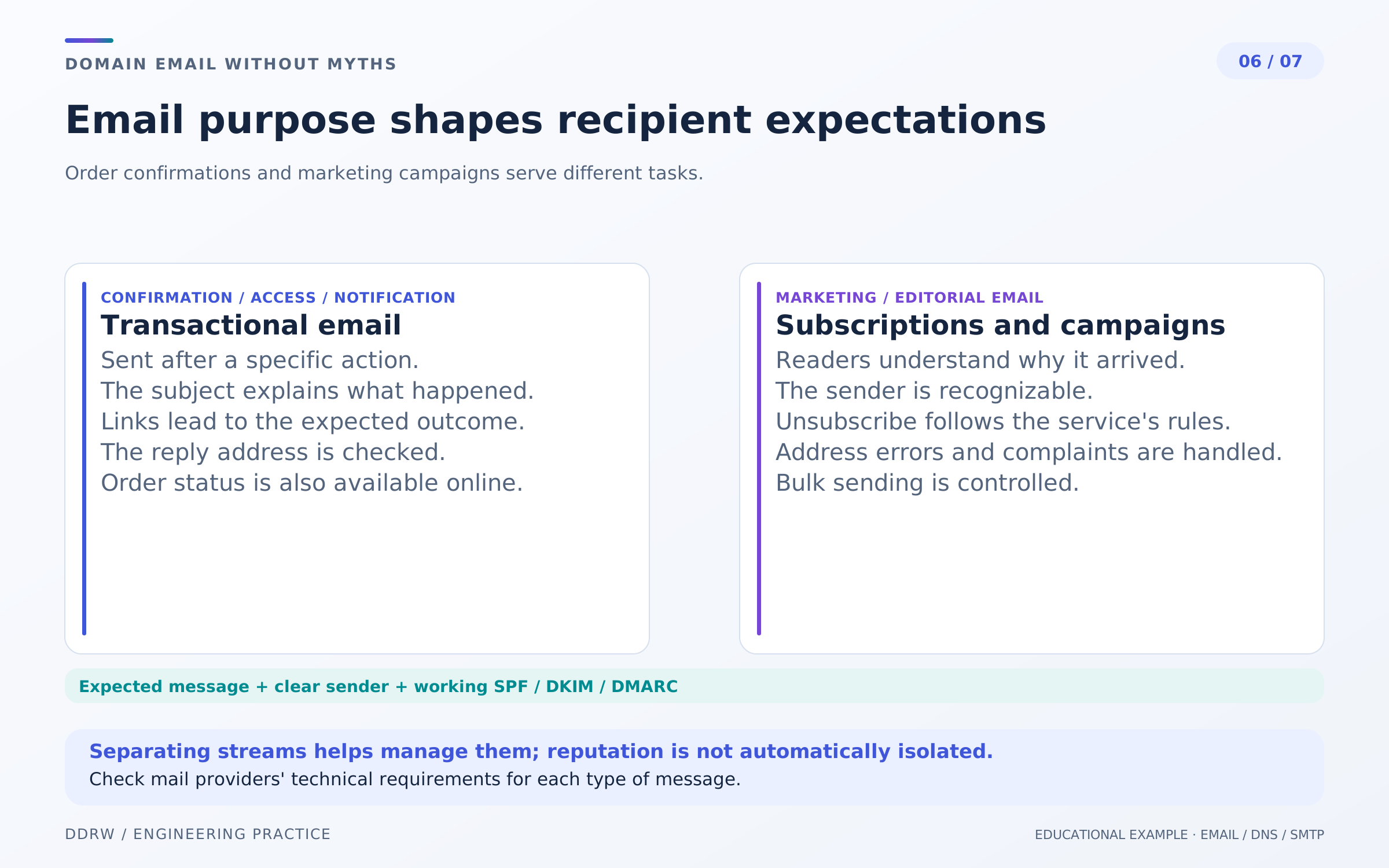
The customer expects confirmation of WEB-1042 immediately after ordering. A new-arrivals collection creates a different expectation and serves another purpose. Separate templates, audiences, sending rules and responsibilities for these streams. Different subdomains can help organize management but do not, by themselves, guarantee reputation isolation.
Customers should understand who is writing, which order the message concerns and where they can reply. Check Reply-To: responses must not reach an abandoned mailbox. Do not turn a transactional confirmation into a long advertising catalog that hides the order number and next step.
Campaigns need a working unsubscribe mechanism. RFC 8058 describes the technical contract for one-click unsubscribe: specific headers and HTTPS POST handling. An ordinary footer link is not equivalent to this mechanism. This is a technical explanation, not legal advice.
Email providers also publish their own requirements. For example, Gmail's sender guidelines cover authentication and unsubscribe handling; check which requirements apply to your sending type. These are Gmail's rules, not a universal description of every mail service.
Within the store, agree who handles permanent bounces and removes unsuitable addresses from future campaigns. Purchased lists and repeated sending to known-invalid addresses cannot be fixed with an attractive DKIM signature.
7. Diagnose a particular email through its traces
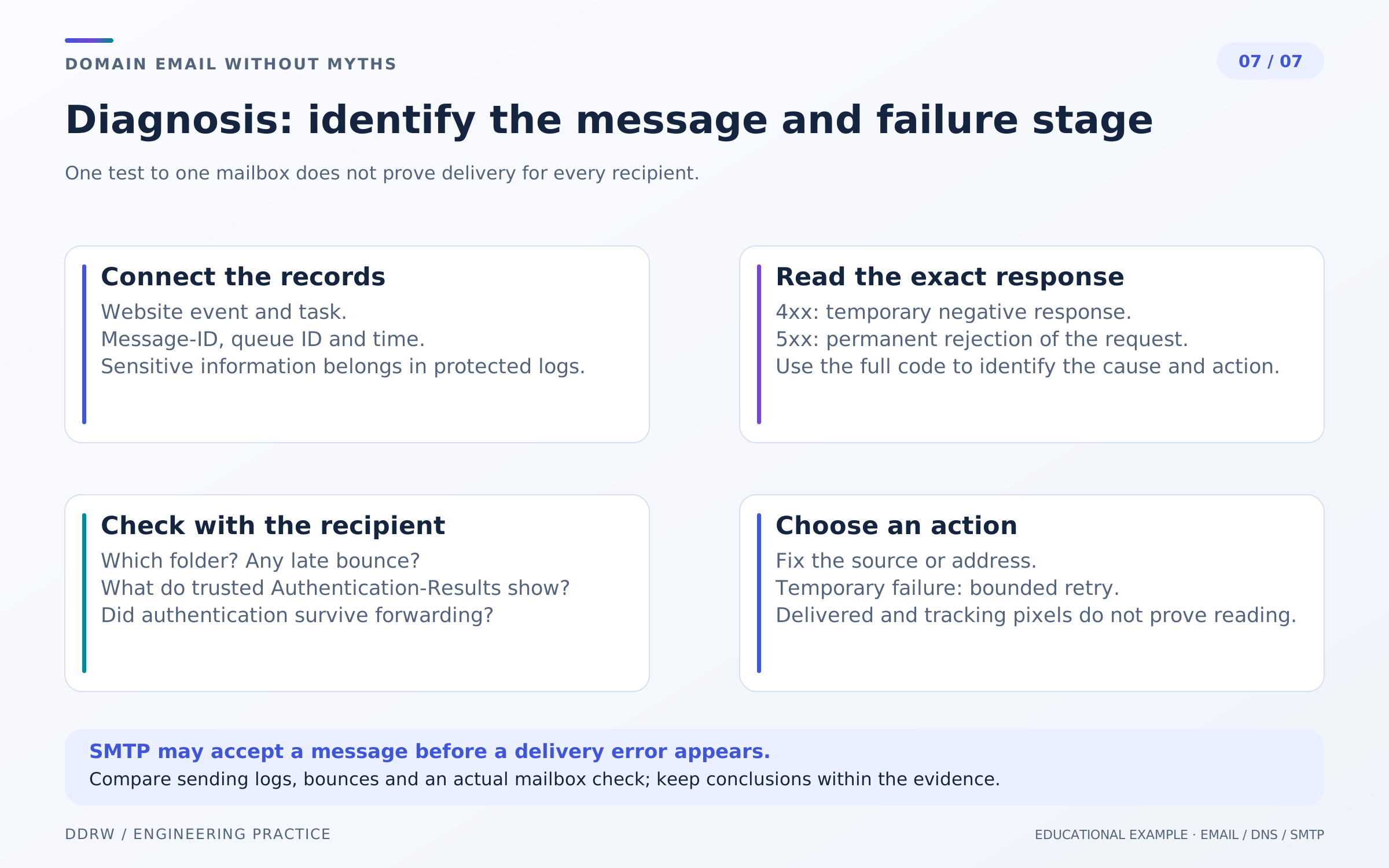
For “the confirmation never arrived,” you need the linked order number, Message-ID, SMTP queue identifier, time and recipient. Store that information in protected logs with restricted access. Do not log passwords, recovery links or private correspondence.
SMTP 4xx responses indicate a temporary failure. A 5xx response is a permanent negative reply to the request: do not automatically repeat the same request without resolving the cause. Diagnosis needs the full code and diagnostic text, not just a red status. Account for a late bounce—a nondelivery notification after initial message acceptance. Repeated sending without understanding the cause is unhelpful.
Request the raw headers of a test message. Use Authentication-Results from a trusted receiving system, rather than any arbitrary header with that name: another point on the route can add one too. Trust boundaries for these results are described in RFC 8601.
For acceptance testing, use several agreed test addresses across different mail providers and corporate email. For each, preserve the route, authentication result and actual folder placement. Then test replying, an invalid address, a temporary failure and a repeated task separately. Test messages are part of acceptance, not a reason to email random people.
Acceptance checklist
- The order is saved independently of the notification result; failures are visible to the responsible employee.
- From, MAIL FROM and DKIM domains are recorded for the website, CRM and campaigns.
- SPF covers every sending source without a second SPF record for the same name.
- DKIM signatures are checked on received messages; key and selector owners are known.
- DMARC is checked for domain alignment, and policy changes follow an inventory and reports.
- Order confirmations are clear on phones; Reply-To and unsubscribe work for the appropriate stream.
- Temporary errors, permanent rejections and late bounces can be investigated without exposing secrets.
- Test recipients and scenarios are documented; an owner is assigned for future failures.
FAQ
All checks pass. Why is the email still in spam?
Authentication confirms specific technical properties of sending. It does not replace the recipient system's other decisions. Investigate the actual route, audience expectations and exact server responses; do not promise inbox placement based on one green indicator.
Is changing the SMTP password enough?
Only if the problem concerns access to the sending server. If the server has already accepted the message, a new password will not explain what happened afterward. Identify the last confirmed step first.
Where should a small website owner start?
Ask the contractor to demonstrate one order's journey to a test mailbox, the check results and where bounces are visible. Then record the owner and the process for handling a complaint. This is a useful first outcome without rebuilding the whole mail infrastructure.
Related articles
- Website inquiry form: what to check before launch—the inquiry journey and error handling.
- Reliable business integrations: connecting CRM and inventory systems—tasks, retries and data reconciliation.
- Website security: what a business owner should check—access, secrets and operations.
