
If a website will not open or has stopped accepting orders, the first useful outcome is a clear description of the failure and an assigned owner. This helps pass the problem to the responsible specialist and coordinate actions. Changing DNS, disabling protection and restoring the database at the same time can create new problems and make the cause harder to find.
Below is a proposed procedure for website owners and their teams: an initial-check decision tree, an incident report and recovery criteria. It does not establish a cause from one browser message or promise to resolve every failure within a fixed time. The examples are instructional.
First establish exactly what stopped working
“The site is down” is not enough. The whole domain, one page or a particular action may fail: submitting an inquiry, signing in or placing an order. The homepage may still work.
Record the exact page address, the action before the error, its text and the time with time zone. Take a screenshot with personal data hidden. For an order, use the internal number; do not include payment details, passwords or verification codes in the request.
Next, try opening the page normally from another network, such as mobile data instead of office Wi-Fi. If several people see the problem, record their observation conditions. This helps assess the scope but does not prove availability or unavailability for every visitor.
If sales are affected, assign one coordinator. They collect information, pass it to the specialist and tell the team the next step. While the technical specialist investigates, managers can accept inquiries through an agreed backup channel.
Information gathering runs alongside agreed action to reduce the consequences. A specialist does not need to wait for a complete root-cause investigation before safely restoring service.
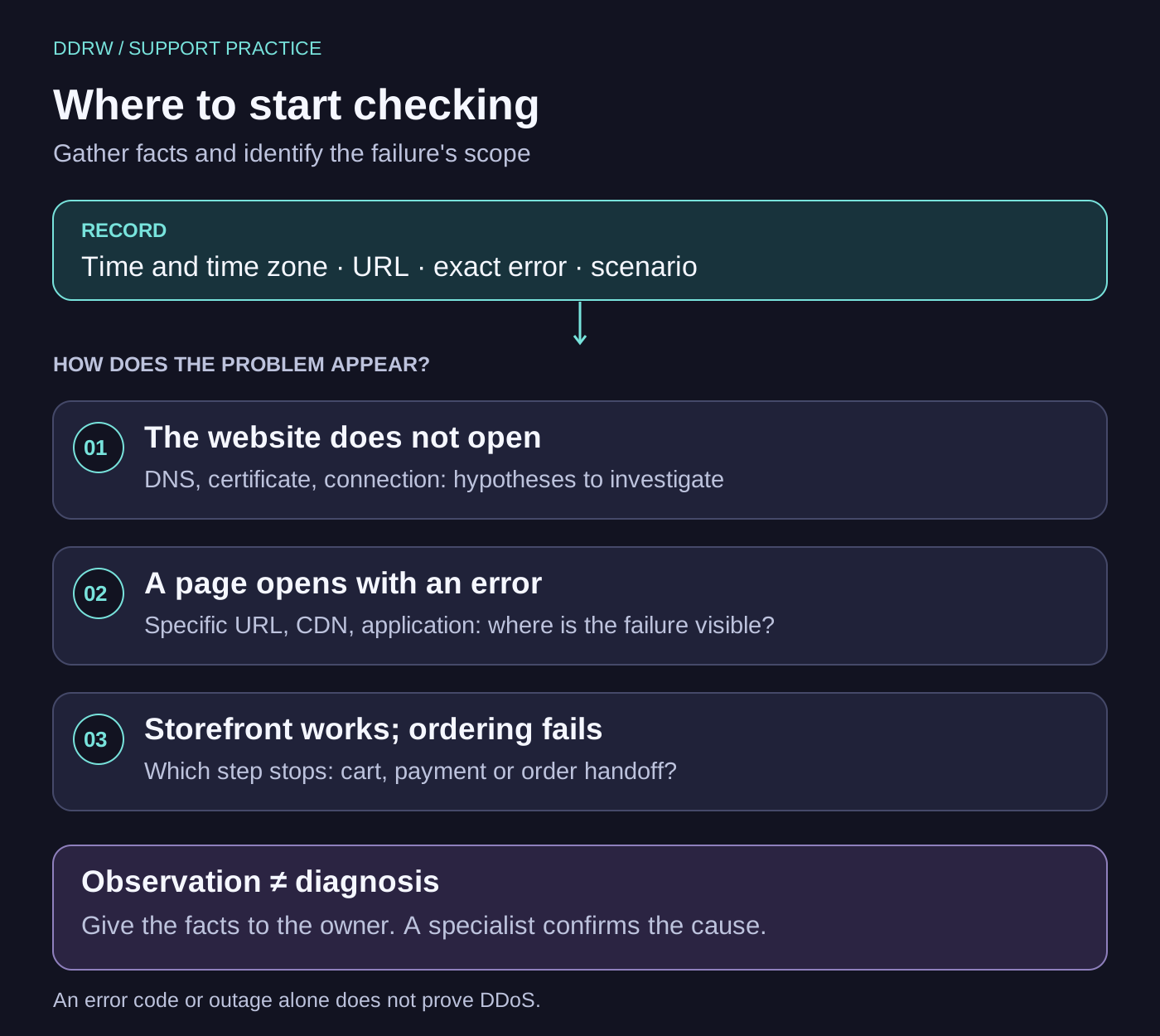
Separate observations from assumptions about the cause
DNS connects a domain name to a server address. TLS provides a secure connection. A CDN or reverse proxy may receive a request before the application. An error at any of these points can look like an unavailable website to a visitor, but requires different checks.
Business owners do not have to diagnose the entire chain themselves. Their task is to preserve the exact message and the conditions in which it appears. A specialist then compares this information with configuration, logs and system changes.
| What is observed | What to record | Who to involve first |
|---|---|---|
The browser cannot find the domain | Domain, time, error text and networks where it repeats | The person responsible for the domain and DNS |
The browser displays a certificate warning | Address and exact warning text; stop entering data | The person responsible for TLS, hosting or the proxy |
A page returns 502 or 504 | Code, URL, time and request identifier if shown | Technical support with visibility into the proxy and application |
The homepage works but a section will not open | Specific route, navigation method and whether the user was signed in | The application developer |
The catalog opens but an order or inquiry cannot be completed | Step, message and internal operation number if created | The person responsible for that scenario and its integrations |
Code 502 means a gateway or proxy received an invalid response from an upstream server; 504 means it did not receive a timely response. These are MDN’s definitions of HTTP 502 and HTTP 504. The codes narrow the area to investigate but do not themselves prove DDoS, a hack or failure of a particular component.
Send support an incident report
The report lets a specialist reproduce the problem and compare it with system events. Fill in what is known and mark unknown fields accordingly. An unsupported guess such as “probably an attack” is less useful than the exact time and error address.
Copy this template into your working support request:
What is not working: page or user action.
Where: domain and path without secret URL parameters.
When noticed: date, time and time zone.
Last known working time: time or “unknown”.
Expected: the result the user should have received.
Actual: exact error message or response code.
Scope: pages, users and networks checked.
Recent changes: what is known and when it changed.
Actions already taken: action, person, time and result.
Coordinator: name and work contact channel.
Next contact: agreed time for a status update.
Attachments: screenshot without personal data, operation number.
Recent changes include a release, domain configuration, a certificate, a payment module or an external service. If the team changed nothing, record that too. Timing alone does not establish a cause.
Send the report through the agreed support channel. Transfer credentials separately using the established secure method. Do not attach a full request log, a customer-database export or a raw network-session file to an ordinary email: these may contain user data and tokens.
Agree on actions that change the system
The coordinator handles communication and chronology; the technical specialist tests hypotheses and proposes changes; the process owner defines business constraints. In a small company, one person may hold several roles. Everyone should understand who makes the decision.
For each change, record what will be done, who will do it, the expected result and how it will be checked. If rollback is needed, establish beforehand which data or operations may have appeared after the chosen recovery point. This is explained further in the article on backups and restoration.
Do not change several independent settings at once without agreement. Do not disable protection or certificate checks just to make a page “open somehow.” Do not blindly repeat paid orders after a timeout: first establish the operation’s state. We explain this situation separately in the article on reliable integrations.
A coordinator, clear roles and a shared record of events are consistent with the incident-management approach in the Google SRE Workbook. Our template is a practical editorial adaptation for a website team, not a copy of Google’s internal procedure.
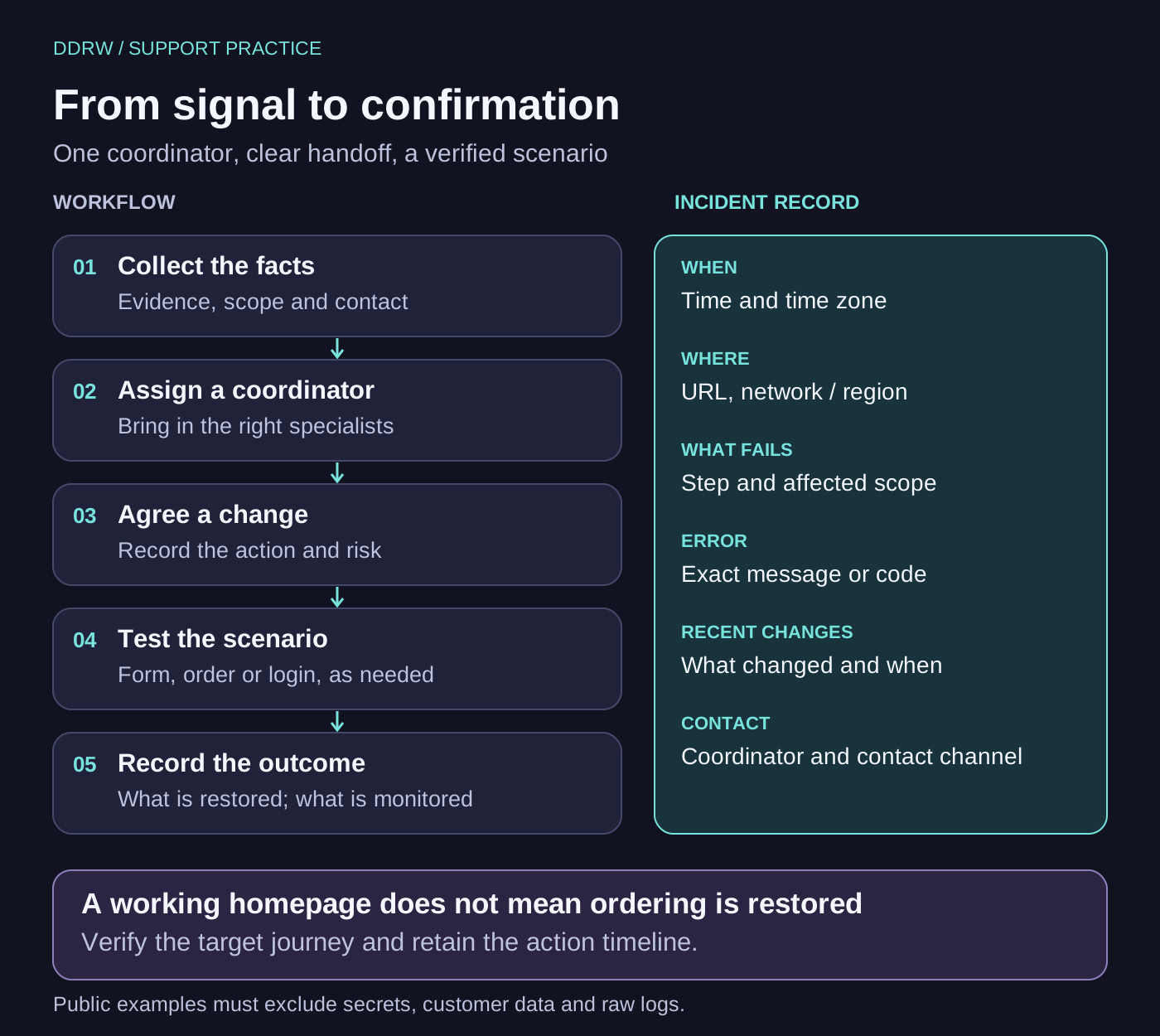
Three training examples: different investigation paths
These cases are invented to explain the procedure. They do not describe real DDRW client outages or results of testing we performed.
Case 1. After a release, the catalog returns an error while the homepage works. Record the catalog route, time, code and known release time. The developer checks logs and release changes. Coinciding with the release is a working hypothesis; decide on rollback after assessing compatibility and data. Recovery means the catalog and product page open and the required user journey works.
Case 2. After placing an order, the visitor sees a pending state and then an error. The team preserves the operation number and time. The integration owner checks order status in connected systems. Do not ask the user to pay again until the result of the first attempt is known. Recovery criteria include consistent states and no duplicate operation.
Case 3. The website does not open from the office network but does over mobile data. Record the network difference and exact browser messages. A specialist checks availability, domain resolution and restriction settings. The observation proves neither a global outage nor an attack. Verify the result from the network where the problem occurred as well.
How to establish that service has recovered
An accessible homepage is only one checkpoint. Before closing the incident, repeat the affected scenario under the same conditions as far as possible: network, device, user role and sequence of actions.
For a store, this may mean going from the catalog to a product page and placing an agreed test order. For a form, submit an inquiry and verify that the responsible employee receives it. For an account, sign in and perform the relevant operation with suitable permissions. Check payments in an agreed test mode where available; a real charge solely for verification requires separate agreement.
| Check result | What to keep in the incident record |
|---|---|
The affected scenario works again | The journey checked, by whom and when |
Connected systems received the required data | Identifiers and agreed states without secrets |
Observed errors have stopped | Observation interval and data source, chosen by the technical team |
Existing restrictions remain effective | Login, permissions and protection affected by the change have been checked |
The team knows the outcome | What has recovered, what is still being investigated and who owns follow-up actions |
Fixing a symptom and establishing its cause may finish at different times. If service has returned while the cause is still under investigation, record that explicitly. It is more accurate than closing a request as “everything fixed” without evidence.
What to prepare before the next failure
Keep the report template somewhere the team can access and enter contacts for the domain, hosting, application and key integration owners in advance. Agree on a backup communication channel, access procedures and who may authorize a change. Clarify which user journeys the team considers critical.
Regular work is covered in the article on website support after launch. If there are signs of unauthorized access, a separate process is needed to preserve evidence and limit consequences; it is described in the website security guide.
The Cloudflare DDoS report for Q3 2026 prompted us to revisit this subject. It describes observations from that provider’s network and does not establish the cause of a specific website failure. For a business, a prepared incident handover is more useful than hastily inferring an attack from a single sign.
If you need to organize maintenance, DDRW can discuss critical scenarios, responsibility boundaries and recovery checks as part of website support.
Text and illustrations prepared with AI assistance. This article contains a proposed procedure and explicitly identified training examples; it does not report measurements on client websites.
