
Start with the decision the presentation should support
A presentation for an initial meeting, a partner proposal and internal approval may describe the same project but needs different emphasis. First, write down what the listener should understand and what next step you propose. “Introduce the company” is too vague; “explain the scope of a pilot project and agree who will participate” already provides direction.
Clarify who will see the material, what they know about the product and which questions they usually ask. A short list of concerns is useful: why change the current process, how will the work be organized, and what will their team need to provide? Answers to these questions form the basis of the content rather than an appendix to a finished design.

AI-generated illustration. The order of questions and conclusions can be agreed on using cards before the final presentation design.
Choose how it will be viewed before creating slides
A presentation delivered by a speaker and a file intended for independent reading need different amounts of explanation. At a meeting, the speaker conveys part of the meaning. In a document sent afterwards, the connections must be understandable without their commentary. Agree on the main viewing scenario and decide whether a separate version for sharing is needed.
Check the conditions: a large screen, laptop or phone; continuous internet access or a downloaded PDF. If an important explanation exists only in a video behind an external link, someone without a connection will miss it. The main message needs a self-contained slide, while additional demonstrations can go in an appendix. This helps avoid a file that looks compelling at a meeting but loses its meaning when sent out.
Build the story around the audience’s questions
Consider a hypothetical example: a team proposes an event booking service to a partner. A logical sequence starts with the current difficulty, then shows whom the product serves, how booking works and what the pilot includes. After that, it can explain responsibilities, limitations and the decision required.
Projects do not all need the same number of slides. Check something else: each screen should answer a separate question, and the connection to the next should require no guesswork. First write headings as complete thoughts. Instead of “Functionality,” try “The participant chooses an event and receives confirmation.” This sequence alone will reveal where the story repeats itself or skips an important explanation.
Collect materials together with supporting evidence
Prepare text, photographs, logos, interface screenshots and the source data for charts. Record the owner, version and permitted use of each file. If a screenshot shows an outdated screen, label it before design begins; otherwise it could accidentally illustrate current capabilities.
Separate claims into verified facts, plans and hypothetical examples. In our example, a finished booking form can be shown as operational, while a future organizer account should be described as proposed development. Do not replace missing measurements with impressive numbers. Explain how you expect to verify the result and leave room for data the team will actually collect.
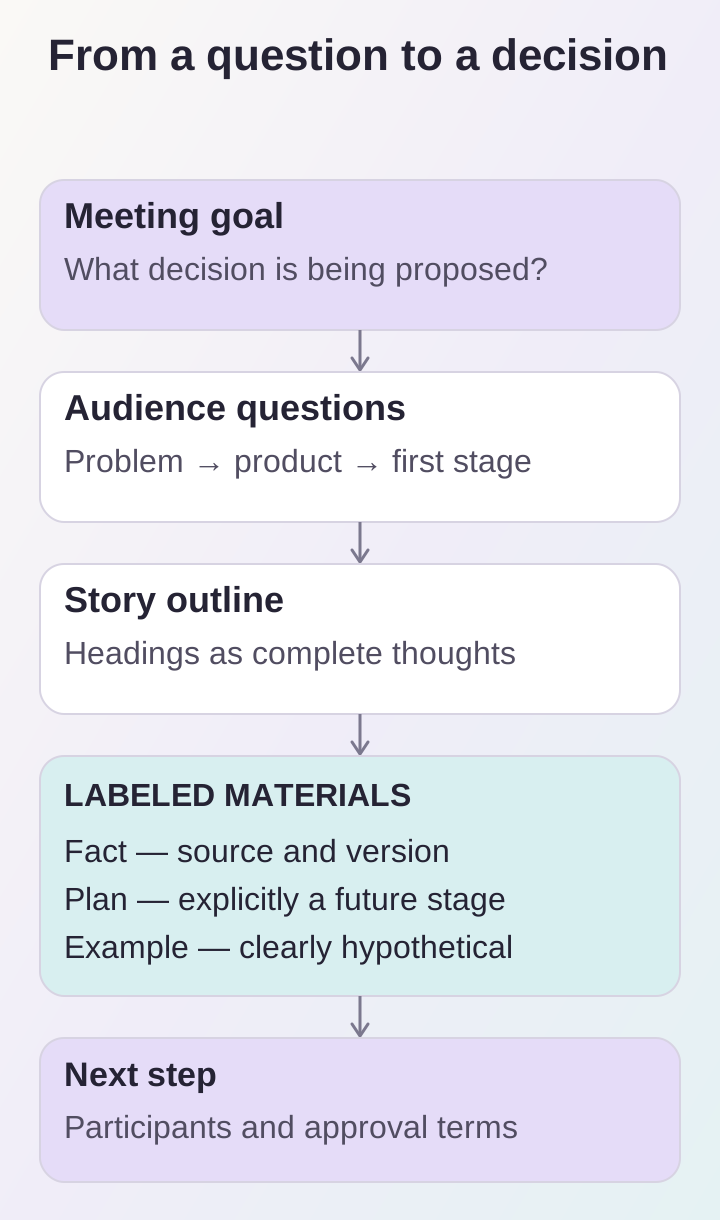
The story determines the number of slides; each visual should answer an audience question and have a clear status.
Give every visual element a purpose
A diagram should explain a process, a screenshot should show an interface, and a photograph should provide context. An image that does not help convey the message can overload a slide. Try stating in words what the audience will learn from each visual element. If there is no answer, reconsider its role.
Use consistent notation and a clear reading direction in diagrams. In interface screenshots, highlight the area being discussed rather than trying to fit the entire page. Illustrative images should be labeled. Keep explanations readable and meaningful colors distinguishable: the message should not depend solely on an attractive gradient or a fine line that disappears on another screen.
Approve the content separately from the final design
First review the outline, then draft slides containing the materials, and finally the designed version. Each stage needs one person responsible for consolidated feedback. Comments from several participants should be combined into an agreed set of changes; otherwise the same sections will keep changing direction.
Define acceptance criteria in advance: current names, supported claims, a clear next step, working links and readable charts. Check the exported file on the chosen devices, not just the source file in the editor. If the presentation concerns a digital product, the article on preparing a website project brief can help gather requirements: adapt its questions to the purpose of your particular meeting.
What to provide before work begins
Before preparing a professional presentation, collect:
- The purpose, audience and decision you propose.
- The viewing format and required file versions.
- A story outline, facts and separately identified plans.
- Images and data with clear sources.
- The person responsible for approval and the acceptance criteria.
Agree on source files, a PDF and the rules for subsequent editing when handing over the result. Include a date or version identifier so the team does not send outdated material. This will keep the presentation useful after the first meeting and make its content easier to update without rebuilding the entire story.
